
HP 14" HD Chromebook Laptop
4.4Editor score
Intel Quad-Core N4120 Processor
14 Inch HD Anti-Glare Display
Up to 14 Hours Battery Life
Finding a reliable laptop that fits your budget can be challenging. A cheap Chromebook offers a practical solution for everyday tasks like browsing, streaming, and working online without breaking the bank. These devices prioritize simplicity and speed through Google's cloud-based operating system.
We have carefully evaluated ten distinct models based on processor power, memory capacity, screen quality, and overall build durability. Our analysis focuses on real-world usability for students, remote workers, and casual users who need consistent performance during long daily sessions.
Each selection below highlights specific strengths and potential trade-offs to guide your decision making. Please note that availability and pricing fluctuate frequently across online retailers so verify current stock before making your final purchase decision.
4.4Editor score

4.3Editor score
4.4Editor score
As an Amazon Associate we earn from qualifying purchases.
The following table provides a side-by-side overview of each model specifications to help you quickly identify the device that matches your specific needs for screen size, memory, and connectivity options.



This HP model stands out as a top contender for budget-conscious shoppers seeking a reliable Chromebook for daily tasks. It holds a solid rating from users who appreciate its balance of performance and cost effectiveness across various usage scenarios.
We may earn a commission when you buy through this link, at no additional cost to you.
The Intel Quad-Core N4120 processor ensures that you can handle multiple browser tabs and applications without significant lag. The 4GB of high-bandwidth RAM supports smooth navigation while the 14-hour battery life keeps you productive throughout the day.
While the HD display is functional it lacks the sharpness of full high-definition panels which might be noticeable when viewing high-resolution media. Additionally the 64GB storage is adequate for cloud users but may fill up quickly if you store files locally.
Students and casual users looking for a straightforward laptop for web browsing homework and video calls will find this device meets their needs well. Its value proposition makes it an excellent starting point for anyone entering the Chromebook ecosystem.
The quad-core architecture divides workloads effectively allowing for reliable multitasking during online classes or work sessions.
With a lightweight form factor and robust battery you can easily carry this device between classrooms or coffee shops.
We may earn a commission when you buy through this link, at no additional cost to you.
This HP Chromebook offers a slim profile that appeals to users who prioritize portability without sacrificing essential performance features. It maintains a consistent rating among those who use it for homework streaming and general web browsing tasks.
We may earn a commission when you buy through this link, at no additional cost to you.
The device supports 4K content streaming smoothly thanks to its integrated Intel UHD Graphics 600. Combined with up to 14 hours of battery life and HP Fast Charge technology it ensures you stay connected and powered up even during long travel days.
The trade-off lies in the HD display which does not offer the pixel density found in higher-end models. Storage is also confined to 64GB which encourages reliance on cloud services rather than local file management for large libraries.
Ideal for students and travelers this laptop delivers a balanced experience for media consumption and productivity. Its ENERGY STAR certification further appeals to environmentally conscious buyers looking for efficient computing solutions.
Get from zero to fifty percent battery charge in approximately forty five minutes to minimize downtime during busy schedules.
The touchpad supports four-finger gestures allowing for intuitive scrolling and zooming across various applications.
We may earn a commission when you buy through this link, at no additional cost to you.
This Dell model distinguishes itself with a 2-in-1 design that allows the screen to rotate fully for tablet usage. It has earned strong marks from users who need a versatile tool for reading note-taking and interactive learning apps.
We may earn a commission when you buy through this link, at no additional cost to you.
The Intel Celeron N4020 processor provides adequate speed for web apps and Android applications. The touchscreen feature adds a layer of interactivity that is particularly useful for digital annotation and navigating complex interfaces with finger taps.
Storage is limited to 32GB which might require careful management or reliance on external drives and cloud storage. The dual-core processor is less powerful than quad-core alternatives found in newer models but remains sufficient for light productivity tasks.
Perfect for younger students or home users who value flexibility this device offers a unique form factor at a competitive price point. The renewed condition ensures cost savings while still delivering reliable functionality for everyday use.
Navigate apps and annotate documents directly with your finger making it ideal for interactive education and creative projects.
Selecting a renewed unit provides significant savings without compromising on core performance needs for basic computing.
We may earn a commission when you buy through this link, at no additional cost to you.
This Lenovo option brings higher visual fidelity to the budget segment with a Full HD touchscreen that improves media consumption clarity. It has received positive feedback for its modern connectivity features and responsive performance during multitasking.
We may earn a commission when you buy through this link, at no additional cost to you.
The MediaTek Kompanio 520 processor is designed to deliver strong efficiency and graphics performance suitable for streaming and light creative work. Support for Wi-Fi 6 ensures faster and more stable internet connections in environments with multiple connected devices.
The 1080p resolution significantly outperforms standard HD panels offering sharper text and richer colors. However the storage remains at 64GB and the port selection is modest which may require dongles for specific external peripherals.
Professionals and students needing sharper visuals and faster wireless speeds will appreciate this machine. Its privacy shutter adds an essential layer of security for video conferencing making it a practical choice for remote work.
The IPS technology ensures wide viewing angles and accurate colors making it great for watching videos or reading documents.
A built-in shutter on the webcam allows you to physically block the camera when not in use for added peace of mind.
We may earn a commission when you buy through this link, at no additional cost to you.
This Acer model provides a larger 15.6-inch screen which offers more visible workspace for multitasking and document editing. It holds a strong rating from users who value the included accessory bundle and the spacious view for daily computing.
We may earn a commission when you buy through this link, at no additional cost to you.
The Intel Celeron N4020 processor delivers sufficient power for standard web tasks. The anti-glare coating on the display reduces eye strain during extended use in bright environments. The value pack adds wireless earbuds and a mouse to enhance usability.
A potential downside is the weight increase compared to smaller laptops which reduces portability slightly. The HD resolution spread across 15.6 inches can appear less sharp than on smaller screens where pixels are more densely packed.
Home users and students who primarily use their device at a desk will benefit from the extra screen real estate. The comprehensive bundle makes it a convenient all-in-one solution for those setting up a new study or office station.
The 15.6-inch display provides ample room for split-screen windows and complex spreadsheets without feeling cramped.
Included wireless earbuds and a mouse allow for immediate enhanced usability without purchasing extra peripherals separately.
We may earn a commission when you buy through this link, at no additional cost to you.
This ASUS device stands out by offering 128GB of storage which doubles the capacity of many competitors in this price range. Users appreciate the larger space for local files and the vibrant quality of the Full HD IPS display.
We may earn a commission when you buy through this link, at no additional cost to you.
The Intel processor boosts speeds up to 2.80GHz ensuring responsive performance during complex web interactions. The IPS panel offers better color consistency and viewing angles compared to TN panels found in older or cheaper models.
Buying a renewed unit comes with some uncertainty regarding cosmetic condition and component wear though testing is usually performed. Ensure you understand the warranty terms before purchase to mitigate potential risks associated with refurbished electronics.
Power users needing more local storage for documents or media will find this option appealing. The combination of higher storage and a quality screen makes it a versatile choice for both work and entertainment.
With 128GB you can store more offline files and applications without immediately relying on cloud synchronization.
IPS technology ensures that colors remain consistent even when viewed from the side improving the media experience.
We may earn a commission when you buy through this link, at no additional cost to you.
This HP model is a reliable standard option that has earned high praise from users for its consistent performance and build quality. It offers a balanced mix of features suitable for students and families seeking a no-fuss computing device.
We may earn a commission when you buy through this link, at no additional cost to you.
The dual-core Intel Celeron N4000 provides adequate speed for basic web tasks. Audio quality is enhanced by B&O tuned speakers which deliver clearer sound for videos and music compared to standard laptop speakers.
Storage is limited to 32GB which might be tight for those who download many applications or media files locally. The older processor may struggle with heavy multitasking compared to newer quad-core alternatives available today.
Users looking for a proven device with excellent battery life and audio performance will find this laptop compelling. Its lightweight design makes it easy to carry around for daily commuting or travel.
Tuned by B&O the stereo speakers deliver rich sound quality that enhances entertainment and video calls.
Weighing just 3.24 pounds this device is easy to carry in a backpack for school or work without fatigue.
We may earn a commission when you buy through this link, at no additional cost to you.
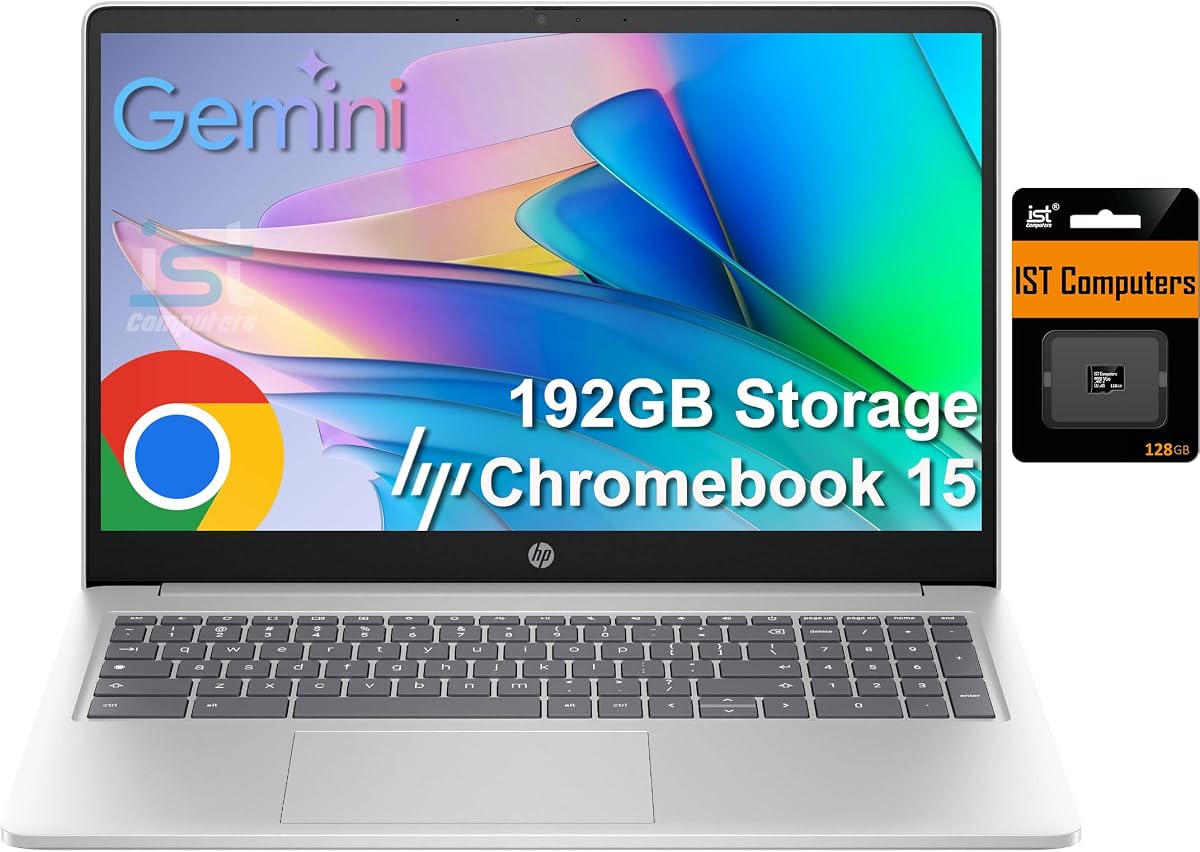
This premium HP model distinguishes itself with advanced specs like 8GB DDR5 RAM and 192GB total storage which are rare in affordable Chromebooks. Users value the future-proofing provided by these enhancements for smoother multitasking and file management.
We may earn a commission when you buy through this link, at no additional cost to you.
The Intel N200 processor supports four cores for efficient task management. The DDR5 memory significantly improves data transfer speeds allowing for rapid application launches and seamless switching between windows.
While the display remains HD the hardware specifications offer a level of performance closer to premium notebooks. The larger storage capacity allows for more local data retention without constant reliance on internet connections for file access.
Power users and professionals needing a robust Chromebook for complex web apps will appreciate this configuration. The inclusion of USB-C power delivery ensures you can charge with universal chargers which adds convenience on the go.
With 8GB of DDR5 RAM you can run multiple heavy applications simultaneously without slowdown or lag.
Connect up to one external monitor via USB-C at 4K resolution for an expanded desktop workspace.
We may earn a commission when you buy through this link, at no additional cost to you.
This Acer device brings modern connectivity standards to the market with DDR5 RAM and Wi-Fi 6 support in a refreshed chassis. Users interested in the latest wireless speeds and memory performance find this model attractive for daily browsing.
We may earn a commission when you buy through this link, at no additional cost to you.
The Full HD IPS display offers a visual upgrade over standard HD panels with better color and viewing angles. The processor speed reaches up to 2.78GHz providing a responsive experience for web-based applications and streaming services.
Some user feedback indicates mixed experiences which might stem from varied production batches in the renewed category. Storage remains at 64GB which is standard but not exceptional for those needing to store large media libraries offline.
Tech-savvy buyers who want the latest connectivity without paying premium prices will likely be satisfied. It serves well for students who need fast and reliable internet access in crowded networks or dense housing areas.
Wi-Fi 6 ensures faster data transfer and lower latency when connected to modern routers.
The IPS screen delivers a more vibrant and stable image compared to basic panel technologies.
We may earn a commission when you buy through this link, at no additional cost to you.
This Lenovo model is designed with durability in mind making it a popular choice for educational environments where robustness is key. It offers an entry-level price point that makes basic computing accessible for almost any household.
We may earn a commission when you buy through this link, at no additional cost to you.
The MediaTek processor provides adequate speed for simple web tasks and the 11.6-inch screen makes the device highly portable. The 16GB storage is quite limited so it relies heavily on cloud storage and streaming services for content.
The device is best suited for basic use cases where advanced performance is not a priority. While it may lack modern features it provides a reliable foundation for learning tools and simple productivity applications.
For those on a strict budget or needing a durable device for kids this option stands out. Its compact size and strong build quality ensure it can withstand frequent transport and daily use.
Built to withstand drops and rough handling this model is ideal for student use in active classrooms.
The low price tag lowers the barrier to entry for families looking to provide a laptop for homework.
We may earn a commission when you buy through this link, at no additional cost to you.
Selecting the right Chromebook requires understanding key hardware factors that influence performance and longevity. This section breaks down the essential features you should evaluate before making a purchase.
The processor is the brain of your device and directly affects how smoothly it handles tasks. For basic browsing and video calls a dual-core or quad-core Celeron processor is usually sufficient. If you plan to run multiple apps simultaneously consider a model with a Kompanio or newer Intel N-series chip.
Always look for processors with higher base clock speeds to ensure snappy performance over time.
RAM determines how many tabs you can keep open without slowdown. Four gigabytes is the minimum standard for comfortable multitasking while eight gigabytes offers future-proofing for heavier loads. Storage should ideally be at least 64GB to manage system updates and local files comfortably.
If you have large media files check if the device supports expandable storage via microSD cards.
Screen resolution impacts readability and visual clarity. HD displays are common in budget models but Full HD offers sharper text and better video quality. IPS panels provide wider viewing angles and more accurate colors compared to standard TN panels.
Consider screen size carefully as larger screens offer more workspace but reduce portability.
Since Chromebooks are often used on the go battery endurance is critical. Look for devices rated for at least 10 hours of mixed usage to last through a full school or work day. Fast charging capabilities can also minimize downtime when you are in a hurry.
Battery efficiency often correlates with the processor architecture so newer chips usually deliver better run times.
Ensure the laptop has enough USB ports to support your peripherals like mice or external drives. USB-C is becoming the standard for charging and data transfer so verify its presence. Wi-Fi 6 support ensures faster and more stable wireless connections in crowded networks.
Check for an HDMI port if you need to connect to external monitors or projectors regularly.
A sturdy build ensures the laptop can survive daily travel. Look for models that weigh less than 3.5 pounds if you plan to carry it in a backpack frequently. Materials matter too as metal alloys often feel more premium and durable than plastic.
A comfortable keyboard and responsive trackpad are essential for long typing sessions.
Buying renewed devices can save money but requires checking warranty terms and seller ratings. Refurbished models often pass quality checks but may have minor cosmetic imperfections. New units offer peace of mind with full manufacturer warranties and pristine condition.
Choose renewed only if you are comfortable verifying the return policy before buying.
Chromebooks receive automatic updates and have a defined Auto Update Expiration date. Check that the model will receive updates for several years to ensure security and app compatibility. Newer models generally support longer update cycles than older ones.
Longer support ensures your device stays secure and functional for a longer period.
Begin by setting up your Google account and syncing your data to the cloud for seamless access. Install essential extensions from the Chrome Web Store to enhance productivity and block unwanted ads on your browsing sessions.
Protect your device by keeping it on a hard flat surface to allow proper ventilation. Avoid using it on soft fabrics like beds or sofas which can trap heat and reduce battery efficiency over time.
Regularly clean the screen with a microfiber cloth and avoid harsh chemicals to preserve the anti-glare coating. Keep the keyboard free of debris by using a can of compressed air periodically to maintain smooth key presses.
Yes, cheap Chromebooks are excellent for students because they are affordable and lightweight. They handle homework research and video conferencing with ease. The simple interface helps kids focus on learning without complex distractions.
You can play many casual games through Android apps or the web browser. However, heavy PC gaming is not supported. Titles like Minecraft and Roblox run well on most modern models with good specs.
Chrome OS includes built-in security features that protect against most common threats. You generally do not need third-party antivirus. Keeping your system updated ensures you stay protected from emerging vulnerabilities.
Most Chromebooks have microSD card slots where you can add storage cheaply. Alternatively you can use cloud services like Google Drive to store files online. External USB drives also work for transporting large amounts of data.
This date indicates when Google stops providing software updates for your specific Chromebook model. Check this before buying to ensure you get security updates for at least a few years. It is crucial for long-term reliability.
Chromebooks often feel faster for web tasks due to a lightweight operating system. They boot up instantly and handle browsing efficiently. However Windows laptops offer more versatility for complex software tasks.
We have explored ten distinct models ranging from ultra-affordable options to feature-rich performers. The top picks offer a balance of screen quality memory and reliability to suit various user needs.
Prioritize battery life and display resolution if you spend long hours working away from home. For basic tasks focus on processor speed and available storage to avoid frequent slowdowns.
Remember that availability changes frequently so check current stock and return policies before finalizing your purchase. Verify the current price to ensure it fits your budget expectations for this season.