
Redragon K617 HE
4.3Editor score
Hall Effect magnetic switches
8000Hz polling rate
60% compact layout
Discover the top keyboards for Counter-Strike 2 in October 2026. We compare rapid trigger Hall Effect switches, polling rates, and form factors for competitive
Finding the right keyboard for Counter-Strike 2 can significantly impact your performance in competitive matches. Players need precise input, rapid response times, and reliable durability to execute complex movements and flick shots effectively during intense gameplay sessions.
This guide compares ten top-rated gaming keyboards specifically suited for high-level FPS titles. We evaluated magnetic switch technology, polling rates, adjustable actuation, and build quality to identify models that offer the best balance of speed and reliability for CS2 players.
Each pick highlights unique features like rapid trigger capabilities and compact layouts designed to maximize mouse space. Prices and availability may change frequently, so always verify current offers before making your final purchase decision for your gaming setup.
4.3Editor score
4.4Editor score
4.5Editor score
The following table provides a side-by-side comparison of the top ten keyboards selected for CS2 performance. Review key specifications like switch type, polling rate, and layout to find the model that fits your specific playstyle and budget requirements.



The Redragon K617 HE stands out as an accessible entry point for players seeking rapid trigger technology. With a rating of 4.3 stars, it offers Hall Effect magnetic switches that eliminate physical contact for faster response times. This makes it ideal for executing quick movements in Counter-Strike 2 without breaking the bank.
We may earn a commission when you buy through this link, at no additional cost to you.
Its core strength lies in the software-adjustable actuation ranging from 0.1mm to 3.4mm. This allows players to fine-tune sensitivity specifically for movement keys versus aiming keys. The 8000Hz hyper-polling ensures inputs are registered nearly instantly, giving you a competitive edge during intense gunfights and clutches.
However, the compact 60% design means losing dedicated arrow keys and function layers which might take getting used to. The build quality is functional but lacks the premium feel of higher-end models. These trade-offs are acceptable given the low price point, providing high-end features to budget-conscious gamers.
Buyers looking for a cost-effective rapid trigger keyboard should consider this model highly. It delivers the essential mechanical advantages needed for CS2 performance without the premium price tag. If you prioritize input speed and customization over build luxury, this is a strong starter choice for competitive FPS.
The Hall Effect technology detects keypresses without physical contact, enabling a speed that exceeds standard mechanical switches significantly.
Software allows you to set different trigger points for specific keys to optimize for either speed or accuracy in gameplay.
We may earn a commission when you buy through this link, at no additional cost to you.
The Redragon K686 HE builds on the rapid trigger foundation with improved acoustic dampening and a media knob. Rated 4.4 stars, it uses next-gen UltraMag POM magnetic switches for even better longevity. This model appeals to players who want silent operation without sacrificing speed in competitive shooters.
We may earn a commission when you buy through this link, at no additional cost to you.
Its dual-module floating structure paired with dampening layers creates a softer feel compared to rigid mechanical boards. The single control knob manages lighting and volume, streamlining the setup process. Combined with the 8000Hz polling rate, this keyboard ensures reliable input registration during high-speed movement sequences.
The added weight from the sound dampening materials might be a drawback for portability. Also, the software interface can be slightly complex for newcomers to Hall Effect technology. These issues are minor considering the performance gains and ergonomic benefits provided by the floating switch design.
Players who value a quieter keyboard with smooth keypresses will appreciate this unit. It balances premium features with reasonable pricing for a magnetic switch board. Consider this if you play in shared spaces or prefer a more refined typing feel alongside gaming performance.
Independent switch-plate design reduces noise and vibration for a cleaner user experience during long gaming sessions.
Physical knob allows quick adjustments to volume and backlight without interrupting your game or leaving the desk.
We may earn a commission when you buy through this link, at no additional cost to you.
The Redragon K673 HE delivers solid magnetic switch performance for FPS enthusiasts seeking reliability. Its 4.1-star rating reflects a balanced approach to rapid trigger functionality and build stability. The keyboard focuses on minimizing input lag and maximizing consistency for critical gameplay moments.
We may earn a commission when you buy through this link, at no additional cost to you.
Key features include software-powered precision tuning that allows saving multiple profiles between 0.1mm and 3.4mm. This ensures consistent behavior across different game scenarios. The PRCS feature cuts redundant keystrokes during quick direction changes, enhancing movement fluidity in competitive environments like CS2.
Lighting effects are functional but not as extensive as premium competitors. Reliance on software drivers is necessary for full feature utilization which might bother minimalists. However, these limitations do not hinder the core gaming performance which remains sharp and responsive for tactical shooters.
Ideal for players prioritizing input accuracy over aesthetic flourishes. This model provides a clean and effective platform for competitive play. If you want a dependable Hall Effect keyboard without unnecessary distractions, this is a practical choice to consider.
Dynamic key activation reduces redundant inputs ensuring your movements translate directly to in-game actions without error.
Save different actuation settings to instantly adapt your keyboard for different game modes or personal preferences.
We may earn a commission when you buy through this link, at no additional cost to you.
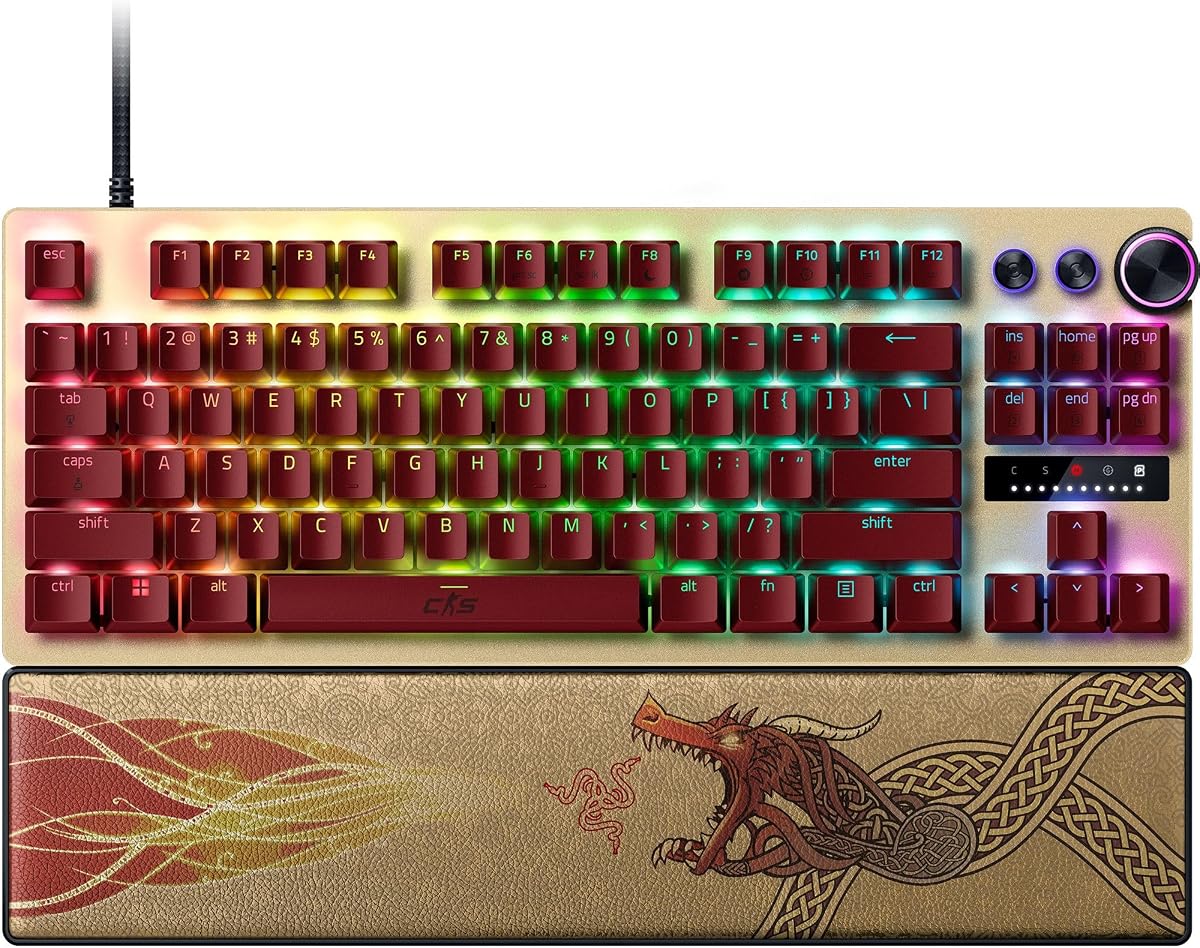
The Razer Huntsman V3 Pro TKL CS2 Edition is engineered specifically for elite competitive play. With a 4.4-star rating, it offers advanced optical switches and unique features like Snap Tap for prioritizing inputs without releasing keys. This design gives gamers an unbeatable edge in FPS titles.
We may earn a commission when you buy through this link, at no additional cost to you.
Its analog optical switches enable a 0.1 to 4.0mm adjustable actuation range for maximum precision. The onboard LED array helps visualize settings without needing software constantly. These features cater directly to high-level players who demand control over every movement input during tournaments or ranked matches.
The premium price reflects the high-end build and exclusive features like textured PBT keycaps and a leatherette wrist rest. While firmware updates may be required for full functionality, the hardware quality justifies the investment. This model is built to withstand intense training and competitive usage over years.
Pros players seeking the ultimate competitive advantage this keyboard is highly recommended. It combines Razer's reputation with specialized CS2 optimizations. If budget allows and you want top-tier performance with professional features, this is the definitive choice for serious gamers.
Snap Tap mode lets you switch between W and S keys instantly to counter-strafe quickly without releasing the previous key.
Use onboard LEDs to adjust settings on the fly without cluttering your screen or interrupting game sessions.
We may earn a commission when you buy through this link, at no additional cost to you.
The Corsair Clipper PRO MINI combines compact design with advanced Hall Effect control tailored for FPS. Rated 4.4 stars, it features Rapid Trigger for instant resets and FlashTap SOCD for sharper counter-strafing. Its IP57 rating adds durability against spills during intense gaming sessions.
We may earn a commission when you buy through this link, at no additional cost to you.
MGX Hyperdrive core Hall Effect switches offer zero drift and adjustable actuation for consistent performance. The dual-layer sound dampening keeps noise low, preventing distractions. This makes it ideal for players who want a distraction-free setup with maximum mouse space available.
The 60% layout sacrifices dedicated arrow keys which may require adjustment for some users. It is primarily designed for gamers who rely on WASD and mouse movements. These trade-offs are standard for compact layouts but should be considered if you need frequent navigation keys.
Competitive players needing maximum mouse space and input precision will love this keyboard. Its robust build and advanced features make it a strong contender. If you prefer a minimalist desk setup without sacrificing performance, this model is an excellent investment.
FlashTap SOCD enables cleaner directional inputs reducing conflicting signals during complex movement sequences in game.
IP57 resistance protects against dust and water ensuring the keyboard survives spills and harsh environments.
We may earn a commission when you buy through this link, at no additional cost to you.
The Redragon K745 HE brings rapid trigger technology to a vibrant and accessible gaming keyboard. With a 3.9-star rating, it offers strong features like UltraMag POM switches and 8000Hz polling. It appeals to players who want fast input speeds combined with colorful lighting effects.
We may earn a commission when you buy through this link, at no additional cost to you.
Its 5-layer noise dampening provides a soft and silky keypress feel. The software allows precision tuning between 0.1mm and 3.4mm to match your playstyle. These technical features ensure that gameplay remains responsive and enjoyable even during long competitive sessions.
Some users may find the software less polished than premium brands. Adjusting settings might require extra steps compared to higher-end models. However, the core performance remains solid for the price, making it a reliable option for casual and semi-pro gamers.
Gamers wanting rapid trigger features without breaking the budget will find this unit compelling. It balances performance with aesthetic customization effectively. If you like customizable lighting and fast switches this keyboard delivers excellent value for money.
Adjustable RGB modes create a dynamic desk atmosphere that enhances your gaming environment day or night.
Multiple dampening layers ensure a uniform keystroke experience reducing noise and unwanted vibration during typing.
We may earn a commission when you buy through this link, at no additional cost to you.
The Keychron C0 HE is a specialized one-handed keypad designed for creators and power users. Its 4.2-star rating highlights a competitive-grade performance with an 8K polling rate and Rapid Trigger switches. It allows precise movement control by handling secondary actions or macros separately.
We may earn a commission when you buy through this link, at no additional cost to you.
Users can customize key mapping and RGB lighting via a web-based configurator without installing software. This cross-platform support makes it ideal for macOS and Windows setups. The compact layout keeps essential commands within reach, optimizing desk space for large mouse movements in FPS games.
Since it is not a full keyboard you will need a separate primary input device. This setup can be complex for some but offers unique ergonomic benefits. The cost is additional compared to standard keyboards but offers distinct advantages for multitasking and control.
Streamers and competitive players needing extra macro access will benefit from this tool. It simplifies complex inputs and reduces hand movement fatigue. If you want to offload secondary controls to a dedicated device this keypad is a strong option.
Trigger OBS scenes and shortcuts with one hand while maintaining full control of your main game inputs.
Fully compatible with Windows and macOS allowing flexibility for users with multiple system configurations.
We may earn a commission when you buy through this link, at no additional cost to you.
The renewed version of the Razer Huntsman V3 Pro TKL offers high-end features at a reduced price. With a 3.5-star rating, it still includes advanced optical switches and Rapid Trigger technology. This option appeals to gamers seeking elite performance without the full retail cost.
We may earn a commission when you buy through this link, at no additional cost to you.
Its analog optical switches enable precise inputs and adjustable actuation for competitive play. The Snap Tap feature prioritizes the latest input for near-instant directional changes. These capabilities remain intact in the renewed model providing significant value for budget-conscious pros.
Renewed products may have cosmetic imperfections or shorter warranty terms. Buyers should inspect the item upon arrival to ensure functionality. These considerations are reasonable given the savings compared to a new unit of the same high-performance tier.
Gamers willing to accept minor wear for major savings should consider this renewed unit. It delivers the same core tech as the new version for a fraction of the cost. If you need premium features but have a tighter budget this is a smart compromise.
Get access to premium optical switches and rapid trigger tech at a much lower entry price.
Key functions like Snap Tap and onboard adjustments work as expected for high-level competitive play.
We may earn a commission when you buy through this link, at no additional cost to you.
The Corsair K55 RGB PRO is a practical membrane keyboard offering solid features for casual players. Rated 4.4 stars, it provides dynamic RGB backlighting and six dedicated macro keys for automation. It serves as a reliable entry point for those not ready for expensive mechanical switches.
We may earn a commission when you buy through this link, at no additional cost to you.
Features like IP42 spill resistance and a detachable palm rest add convenience and comfort. You can program macros easily via iCUE software or use streaming commands directly. These usability features make it versatile for both gaming and daily productivity tasks.
It lacks rapid trigger technology and magnetic switches which limit peak performance. The membrane switches have longer actuation distances compared to mechanical boards. These limitations are acceptable for casual use but not ideal for serious competitive play.
Users needing an affordable and spill-resistant option will find this keyboard effective. It balances comfort and basic customization well. If you are starting out or need a backup board this model offers good value.
Six dedicated macro keys let you activate complex commands or shortcuts with a single press.
Detachable rubber palm rest reduces hand stress allowing for longer play sessions without fatigue.
We may earn a commission when you buy through this link, at no additional cost to you.
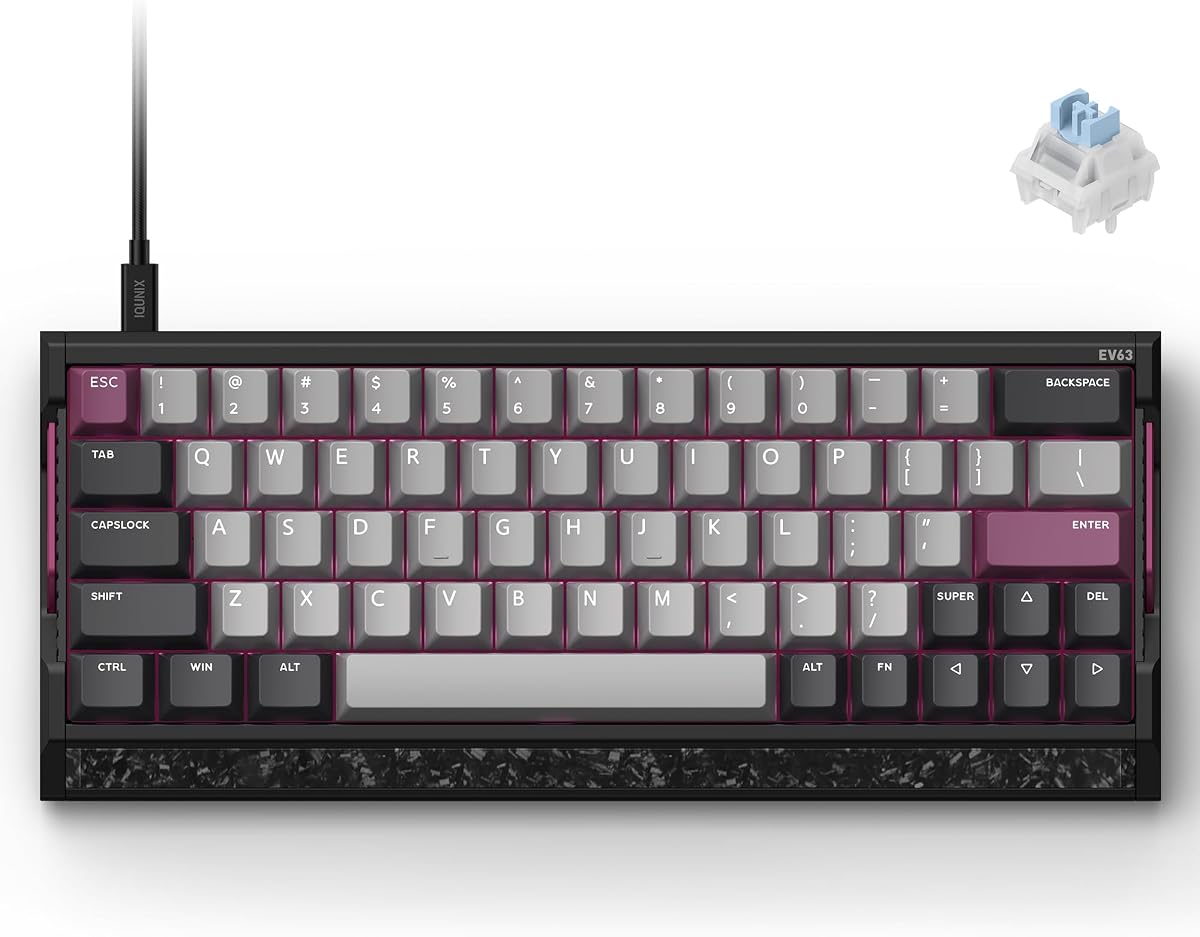
The IQUNIX EV63 is a premium Hall Effect keyboard engineered for elite FPS players. Rated 4.5 stars, it features Magnetic X Ultra switches and an M.A.T. 2.0 algorithm to reduce missed inputs. Its forged carbon front plate and aluminum case provide a solid custom feel for intense gaming.
We may earn a commission when you buy through this link, at no additional cost to you.
Advanced players can fine-tune actuation and SOCD settings via the Driver 3.0 app. The rapid trigger control ensures cleaner stops and strafes during high-speed gameplay. This level of technical customization rivals high-end mechanical boards for competitive scenarios.
The compact 64-key layout saves desk space but requires adjustment for full-size users. The price is higher than standard keyboards reflecting the premium materials used. These trade-offs are acceptable for those valuing build quality and input precision above all else.
Serious gamers needing a premium custom-like feel should strongly consider this model. It offers top-tier stability and advanced tuning capabilities. If you want a keyboard that feels unique and performs at the highest level this is a standout choice.
M.A.T. 2.0 checks each key in real time to ensure consistent input and reduce voltage fluctuations during play.
CNC aluminum and real forged carbon create a heavy stable chassis that reduces case vibration during play.
We may earn a commission when you buy through this link, at no additional cost to you.
Selecting the right keyboard involves weighing several technical factors that directly impact gameplay performance.
Hall Effect magnetic switches are ideal for CS2 due to their rapid trigger capabilities which allow faster resets than mechanical switches. These switches detect key presses based on magnet position rather than physical contact. This reduces latency and allows you to adjust actuation points to your preference. Look for models offering adjustable actuation between 0.1mm and 3.4mm for flexibility. This ensures you can set lighter triggers for movement and heavier ones for accuracy. Choosing the right switch type is the most critical step in optimizing for FPS play. Prioritize keyboards with proven rapid trigger technology over standard mechanical boards for speed.
Polling rate determines how often the keyboard sends data to your PC. High-end boards offer up to 8000Hz which ensures near-instant input registration. This reduces latency during fast-paced movements and ensures your actions are recorded immediately. Standard keyboards often offer 1000Hz which may cause minor delays. For competitive play every millisecond counts so higher polling rates are preferred. Check product specs to ensure the device supports high polling frequencies consistently. This feature directly impacts reaction times in critical gameplay moments.
Layout affects how much space you have for mouse movement which is vital for low-sensitivity aiming. Compact 60% or TKL designs remove the numpad to free up desk area. This allows wider mouse swipes essential for flick shots and precise tracking. However, ensure the layout retains necessary keys like WASD and modifiers. Full layouts offer more convenience but restrict mouse space. Consider your wrist height and desk size when choosing a form factor. A layout that supports your physical setup will improve comfort over long sessions.
Durability is essential because CS2 sessions can be intense and frequent. Aluminum or carbon plates provide a solid feel that reduces vibration during rapid tapping. Look for high durability ratings like 100 million keystroke lifespans to ensure longevity. Water and dust resistance ratings add protection against accidental spills or debris. Premium build materials also enhance typing comfort and overall aesthetics. Investing in a robust chassis ensures the keyboard withstands competitive wear and tear. A solid build also improves stability when playing aggressively.
Advanced keyboards require software to configure actuation profiles and macros efficiently. Look for intuitive interfaces that allow saving multiple profiles for different games or tasks. Web-based configurators are convenient as they do not require local installation. Customization options should include RGB lighting control and key remapping features. Ensure the software is stable and compatible with your operating system. Proper configuration tools make it easier to tailor the keyboard to your playstyle. Good software support enhances the value of advanced hardware features.
Price ranges vary significantly between basic membrane boards and premium magnetic switches. While budget models offer great value, investing in rapid trigger technology often pays off in performance. Determine your priority: pure competitive speed or overall comfort and aesthetics. High-end boards offer better build quality but cost more. Mid-range options like Redragon provide a balance of performance and affordability. Decide how much you are willing to spend based on your competitive goals. Your budget should align with the features that truly impact your gameplay.
Ergonomic support prevents strain during marathon sessions. Wrist rests and keycap materials influence comfort levels significantly. PBT keycaps resist shine and provide a better texture for fingers. Adjustable feet allow you to set a comfortable typing angle. Good ergonomics help prevent fatigue which can slow down your reactions over time. Ensure the keyboard feels comfortable before committing to long periods of play. Comfort is just as important as speed for sustained competitive performance.
Wired connections remain the gold standard for competitive FPS gaming due to zero latency. Wireless options are improving but can introduce input lag in critical moments. Ensure the cable is detachable for easy transport and maintenance. USB Type-C connectors are modern standards offering durability and speed. Always verify that the connection method matches your rig setup. Wired reliability is crucial for consistent performance in ranked matches. Avoid wireless keyboards unless you are sure the latency is negligible.
Start by installing the necessary driver software to unlock full customization features. Adjust the actuation points to your preference using the onboard controls or web app. Test different profiles in-game to find the optimal setting for your playstyle. This ensures every key responds exactly how you expect during critical moments.
Keep your keyboard clean by regularly using compressed air to remove dust from switches. Avoid eating near the keyboard to prevent food particles from interfering with performance. Periodically check your connections to ensure cables are secure and undamaged. Proper maintenance extends the lifespan of your magnetic switches and overall device.
Adjust your wrist rest and desk height to reduce strain during long sessions. Rotate your profiles based on different game modes to maintain consistent performance. If you notice any lag or sticky keys reset your profile settings to default. Regular checks ensure your setup remains optimal for competitive play over time.
Rapid trigger allows keys to reset the moment you lift your finger rather than waiting for a physical reset point. This enables faster repetitive movements and quicker direction changes which are vital for CS2. It significantly reduces latency compared to standard mechanical switches.
Yes, rapid trigger improves counter-strafing and movement precision. It allows you to stop moving and shoot almost instantly without waiting for keys to reset. This is essential for competitive play where reaction times determine the outcome of fights.
A polling rate of 8000Hz is ideal for CS2 as it ensures inputs are registered nearly instantly. Standard 1000Hz can introduce slight delays. Higher rates reduce latency and improve responsiveness during rapid sequences.
Yes magnetic switches typically offer lifespans of 100 million keystrokes. They do not rely on physical contact so they wear out slower than standard switches. High durability makes them a long-term investment for gamers.
Most keyboards require software to activate and customize rapid trigger settings. Some models allow basic settings via onboard controls. Always install drivers to ensure all features function correctly.
TKL keyboards offer a balance of space and function keys whereas 60% are more compact. Both save desk space for mouse movement. Choose based on whether you need arrow keys and function layers regularly.
Yes magnetic keyboards provide smooth tactile feedback suitable for typing. Adjustable actuation lets you set heavier keys for typing to avoid accidental presses. They are versatile for both gaming and work.
Wireless options can work but wired connections are generally preferred for zero latency. Ensure the wireless model uses low latency technology like 2.4GHz dongles. Wired is still safer for competitive ranked matches.
The top picks in this guide highlight the best keyboards for Counter-Strike 2 ranging from budget-friendly magnetic switches to premium custom boards. Models like the Redragon K617 HE and Razer Huntsman V3 Pro TKL offer significant performance gains through rapid trigger technology.
Prioritize features like adjustable actuation and high polling rates if you aim for competitive play. A compact layout can also maximize mouse space improving your aiming precision. Always consider build quality and ergonomics to ensure long-term comfort.
Prices and availability for these keyboards may fluctuate so check current listings before purchasing. Investing in the right tool can significantly enhance your in-game performance. Verify specs and current pricing to make an informed decision for your setup.