
Redragon K512 RGB Membrane Gaming Keyboard
4.5Editor score
Six onboard macro keys no software
Dedicated media wheel and controls
True RGB lighting with thirteen modes
This guide compares the top keyboards with macro keys for gaming and productivity, evaluating features, build quality, and performance to help you choose.
Finding the right input device can transform your workflow and gaming sessions. Keyboards with macro keys offer powerful automation tools that let you execute complex commands with a single press. Whether you are a competitive gamer or a productivity enthusiast, having dedicated macro capabilities streamlines tasks significantly.
We have analyzed ten standout models to bring you this comprehensive list. Our evaluation focuses on macro functionality, build quality, switch types, and overall user experience. Each product was selected based on its ability to deliver reliable performance and versatile customization options for diverse user needs.
Each pick below highlights specific strengths and ideal use cases to guide your decision. You will find detailed breakdowns of features, pros, cons, and practical advice. Keep in mind that product availability and pricing can change, so verify current details before purchasing to ensure you get the best value.
4.5Editor score

4.1Editor score
4.3Editor score
Below you will find a side-by-side comparison of all ten keyboards. This table highlights key specifications and features to help you quickly identify the model that fits your specific requirements and budget constraints best.


The VSD K1 Pro stands out as a top contender for users seeking advanced macro functionality combined with modern streaming capabilities. With a rating of 4.1, it delivers a robust experience for both gamers and content creators. Its integrated streaming deck features LCD keys that allow for deep personalization and quick access to complex workflows.
We may earn a commission when you buy through this link, at no additional cost to you.
This keyboard shines due to its full-key programmable macros and the ability to record multi-step operations directly via its software interface. The hot-swappable PCB means you can customize the tactile feel without soldering, while the gasket mount ensures a premium typing experience. The LCD screen adds a unique layer of utility for managing settings on the fly.
While the software dependency might be a slight hurdle for some, the customization options outweigh this minor inconvenience. The device requires a wired connection for full display functionality, which limits portability but ensures stability. For desktop setups, this is an acceptable trade-off given the sheer volume of features packed into this chassis.
Anyone looking to streamline their gaming combos or streaming workflows will find immense value here. The combination of mechanical reliability and digital control makes it a versatile tool. We recommend this for power users who need granular control over their inputs and visual feedback on every macro execution.
The LCD keys can display images and animations for instant visual recognition of complex commands during gameplay.
Hot-swappable switches let you tailor the actuation force to your preference without specialized tools.
We may earn a commission when you buy through this link, at no additional cost to you.
The Redragon K512 offers exceptional value for budget-conscious users who still demand robust macro functionality. With a high rating of 4.5, it proves that you do not need to spend a fortune to get reliable performance. The six onboard macro keys can be recorded and assigned without any driver installation, making setup incredibly simple.
We may earn a commission when you buy through this link, at no additional cost to you.
Its strength lies in its ease of use and solid construction. The media wheel allows for quick volume adjustments, and the RGB lighting provides ample visual customization. The double-shot injection molded keycaps ensure that legends remain clear even after years of daily use, which is a significant plus for longevity.
The membrane technology might not appeal to enthusiasts seeking a clicky mechanical feel, but it offers a quiet and consistent typing experience. While the optional software adds depth, the keyboard functions perfectly on its own. This makes it ideal for students or casual gamers who prioritize function over flashy aesthetics.
If you need a plug-and-play solution that gets the job done without breaking the bank, this is a strong choice. It balances cost and features better than almost any competitor in this price range. We highly recommend it as an entry-level option for macro programming.
Record complex combos directly on the hardware for immediate access during gameplay without PC dependency.
Dedicated volume and media controls keep your focus on the screen while managing audio instantly.
We may earn a commission when you buy through this link, at no additional cost to you.
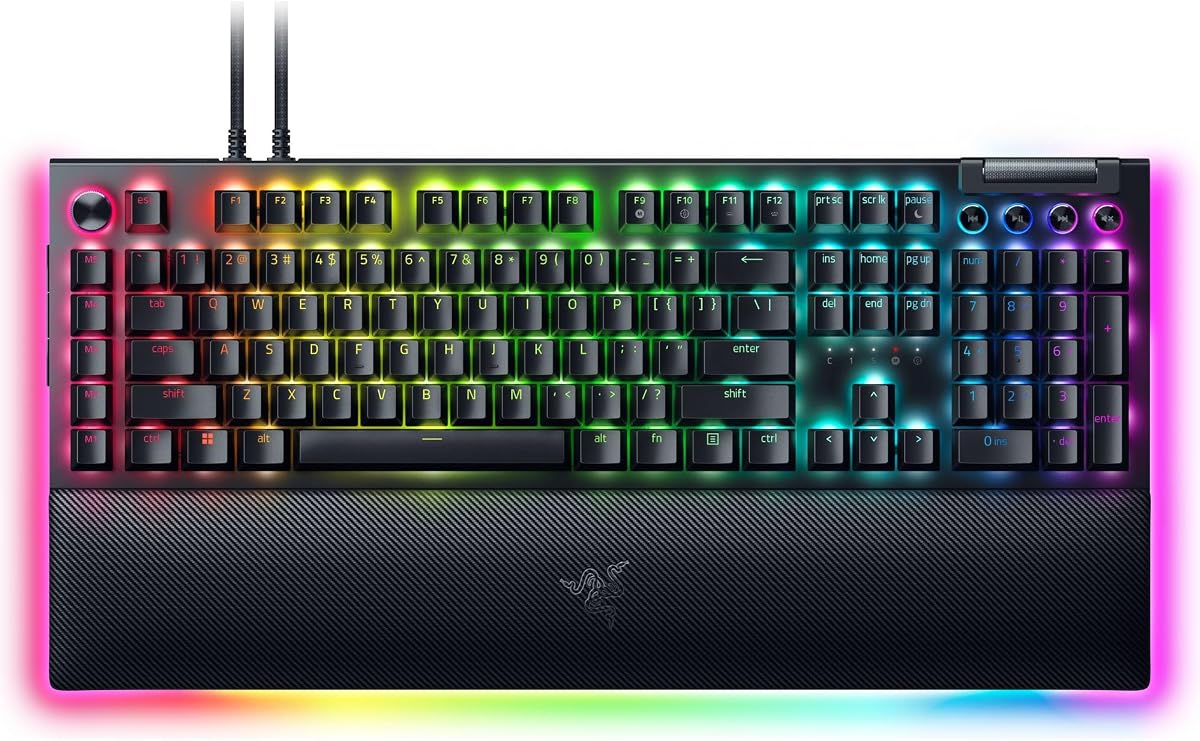
The Razer BlackWidow V4 Pro represents the pinnacle of macro-enabled keyboards for those seeking a high-end experience. Its rating of 4.3 reflects a well-rounded device that combines tactile switches with advanced customization. Eight dedicated macro keys ensure you have ample room for complex command assignments across different applications and games.
We may earn a commission when you buy through this link, at no additional cost to you.
This keyboard excels in its ability to integrate into a sophisticated desktop setup. The command dial offers a unique way to control functions, while the underglow lighting creates an immersive environment. The plush leatherette wrist rest is magnetically attached, providing superior comfort during long sessions without compromising on stability.
While the premium price tag is a consideration, the feature set justifies the investment for serious enthusiasts. The build quality is exceptional, and the doubleshot ABS keycaps ensure durability. However, to unlock the full potential of the command dial and macro mapping, users will need to rely on the companion software.
Gamers and professionals who demand the best tactile feedback and extensive macro capacity should consider this model. It offers a luxurious typing experience that few rivals can match. If budget is less of a concern than performance and aesthetics, this keyboard is a top-tier recommendation.
Assign custom functions to the dial for fluid control of volume, zoom, or other system settings.
Green switches provide distinct feedback for accurate keystrokes during intense competitive gaming scenarios.
We may earn a commission when you buy through this link, at no additional cost to you.
The Corsair K55 RGB PRO is a solid choice for users who want reliable macro features in a durable package. With a rating of 4.4, it offers a good balance of functionality and build quality. Six dedicated macro keys are available for activation via the iCUE software, allowing for flexible command setup.
We may earn a commission when you buy through this link, at no additional cost to you.
Durability is a key selling point here, thanks to the IP42-rated design that protects against spills and dust. This makes it suitable for environments where accidents are more likely. The detachable palm rest ensures comfort during extended use, and the RGB backlighting adds a vibrant touch to your workspace.
While it uses membrane switches, the typing experience is responsive enough for most users. The media controls allow for convenient audio management without interrupting your game. However, to fully utilize the macro capabilities, you will need to install the iCUE software, which might be a slight hurdle for some.
If you are looking for a keyboard that can withstand daily wear and tear while providing essential macro capabilities, this is a great option. It is particularly well-suited for casual gamers or office workers who need a robust input device. We recommend it for its resilience and practical design.
IP42 rating guards against minor accidents ensuring your keyboard survives common office or gaming spills.
Dedicated volume keys allow for instant adjustments without navigating through menus during gameplay.
We may earn a commission when you buy through this link, at no additional cost to you.
The Redragon K580 delivers a compelling mechanical experience with dedicated macro functionality at an affordable price. With a rating of 4.5, it is highly regarded for its versatility and build. Five dedicated macro keys allow you to save complex combos directly on the keyboard, eliminating the need for software in basic use.
We may earn a commission when you buy through this link, at no additional cost to you.
One of its standout features is the hot-swappable socket, which allows you to change switches without soldering. This future-proofs your keyboard and lets you tweak the tactile feel as you prefer. The media wheel provides convenient volume control, making it easy to adjust audio levels without leaving your game.
While the design is straightforward, the functionality is robust. The double-shot keycaps ensure longevity, and the anti-ghosting support ensures accurate inputs during intense gaming. For those who want mechanical feedback without breaking the bank, this keyboard is an excellent choice that stands the test of time.
We recommend this model for anyone looking to enter the mechanical keyboard world with macro support. It offers a great balance of price and performance. If you want to customize your switches later, this keyboard provides the flexibility to do so easily and effectively.
Hot-swappable sockets let you replace switches easily to change the typing feel without soldering skills.
Dedicated scroll wheel for precise volume control keeps media adjustments smooth and accessible.
We may earn a commission when you buy through this link, at no additional cost to you.
The Redragon K550 stands out for its extensive macro capabilities, offering 12 onboard macro keys for complex setups. With a rating of 4.1, it appeals to users who need a high volume of programmable inputs for productivity or gaming. The aluminum top plate gives it a premium feel and ensures stability during use.
We may earn a commission when you buy through this link, at no additional cost to you.
This keyboard includes custom purple switches that deliver a strong tactile feel with a satisfying sound. The USB pass-through port is a practical addition that helps reduce cable clutter by allowing you to connect your mouse or other peripherals directly to the keyboard. Dedicated media controls keep audio management quick and easy.
While the switches are not hot-swappable, the custom design offers a unique typing experience that many find enjoyable. For users requiring a large number of macros, this model is hard to beat in its price range. The software support allows for further customization if you need advanced features.
If you need a keyboard with a significant number of macro keys and a sturdy build, this is a great option. It provides the tools necessary for extensive workflow automation. We recommend it for power users who prioritize macro capacity and tactile feedback.
Twelve onboard macro keys provide ample space for complex command sets without needing software.
Solid aluminum top plate ensures the keyboard remains stable and durable during intense typing.
We may earn a commission when you buy through this link, at no additional cost to you.
The Razer BlackWidow V4 X offers a reliable option for users seeking macro functionality within the Razer ecosystem. With a high rating of 4.5, it delivers excellent performance through its six dedicated macro keys. These keys can be programmed to suit your playstyle, providing quick access to essential commands.
We may earn a commission when you buy through this link, at no additional cost to you.
The yellow mechanical switches provide a linear and quiet experience, ideal for shared spaces or late-night gaming. The multi-function roller allows for quick adjustments to volume or brightness. The Chroma RGB per-key lighting adds a touch of personalization, allowing you to match your setup aesthetic perfectly.
While it lacks some of the premium features of higher-end models, it delivers robust performance at a competitive price. The doubleshot ABS keycaps ensure durability. However, you will need to use the Razer software to unlock the full potential of the macro keys and lighting.
This keyboard is recommended for fans of the Razer brand who want a dependable device with macro support. It balances simplicity with powerful features effectively. We suggest it for gamers who need quick macro access without overly complex configurations.
Yellow switches offer rapid-fire inputs with minimal noise for quiet and fast gameplay.
Integrated roller allows quick changes to volume or brightness without leaving your game.
We may earn a commission when you buy through this link, at no additional cost to you.
The Redragon K618 PRO brings wireless freedom to macro enthusiasts with its impressive 20 on-the-fly macro keys. With a rating of 4.1, it offers a versatile solution for users who want to declutter their desk. The tri-mode connectivity ensures you can switch between devices seamlessly without re-pairing.
We may earn a commission when you buy through this link, at no additional cost to you.
This keyboard features a low-profile design that reduces actuation distance for faster inputs. The dedicated media scroll lets you manage audio instantly. For those who need to move between a PC and laptop or tablet, this keyboard provides the flexibility to do so without sacrificing speed or functionality.
While it relies on batteries, the convenience of wireless often outweighs this minor maintenance task. The software allows for deeper customization, but basic macro functions work directly on the hardware. It is a great option for modern setups that demand mobility and macro support.
We recommend this model for users who prioritize wireless flexibility and quick macro access. It bridges the gap between portability and performance. If you want to eliminate cables without losing productivity, this keyboard is an excellent choice.
Tri-mode connectivity allows easy switching between devices without needing to re-pair constantly.
Reduced travel distance ensures quick actuation for faster typing and gaming response.
We may earn a commission when you buy through this link, at no additional cost to you.
The Logitech G213 Prodigy is a trusted option for users looking for a reliable keyboard with macro capabilities. With a rating of 4.2, it offers solid performance for everyday gaming and productivity. The Logitech G Hub software enables you to customize lighting and program macros for enhanced workflow efficiency.
We may earn a commission when you buy through this link, at no additional cost to you.
This keyboard is built to last, featuring a spill-resistant design that protects against accidents. The integrated palm rest provides comfort during long sessions, and the anti-ghosting matrix ensures accurate inputs during intense gaming. The media controls are dedicated and easy to access without disrupting your current task.
While the membrane switches may not provide the tactile feedback of mechanical options, they are quiet and smooth. The customization software offers depth, but may take some time to master. For a reliable all-rounder, this keyboard delivers consistent performance and durability.
We recommend this model for general users who value brand reliability and practical features. It is a great choice for those who want a comfortable and long-lasting input device. If you prioritize comfort and durability over mechanical feel, this is a strong contender.
Robust design ensures the keyboard survives spills making it durable for daily use.
Integrated palm rest offers ergonomic support reducing strain during extended typing sessions.
We may earn a commission when you buy through this link, at no additional cost to you.
The Razer BlackWidow V4 offers a premium experience with dedicated macro keys and excellent build quality. With a rating of 4.2, it is designed for users who want a high-end device. The six dedicated macro keys allow for essential keybinds to be accessed quickly, enhancing your workflow significantly.
We may earn a commission when you buy through this link, at no additional cost to you.
This keyboard features a magnetic plush leatherette wrist rest that provides significant comfort. The multi-function roller allows for quick adjustments, and the underglow lighting adds to the immersive experience. The yellow linear switches ensure smooth and rapid input which is crucial for competitive gaming.
While it requires software for full macro customization, the quality of the hardware justifies the dependency. The RGB lighting and ergonomic design make it a pleasure to use. For those seeking a balance of performance and comfort, this keyboard is a strong choice.
We recommend this model for gamers who value comfort and precision. It offers a luxurious feel that elevates your setup. If you want a reliable device with macro support that looks great and feels great, this is an excellent option.
Striking underglow lighting enhances your gaming setup aesthetics and provides better ambiance.
Plush leatherette wrist rest provides secure support for your hands during extended gaming.
We may earn a commission when you buy through this link, at no additional cost to you.
Selecting the right keyboard with macro keys involves understanding your specific needs and preferences. This guide breaks down the essential factors to consider before making your purchase.
Determine how many macro keys you need and whether they are hardware-based or software-dependent. Hardware-based macros allow you to record commands directly on the keyboard without relying on a PC, which is useful for LAN parties or if you prefer a clean desktop setup. Software-based macros offer deeper customization but require the companion app to be running.
Look for keyboards that allow easy recording and assigning of macros. The ability to switch profiles quickly is also crucial if you use the keyboard for different games or applications throughout the day.
Mechanical switches offer tactile feedback and durability, while membrane switches provide a softer and quieter experience. Consider whether you prefer linear, tactile, or clicky switches. Linear switches are great for rapid-fire inputs in gaming, while tactile switches provide a bump that confirms key presses effectively.
If you are on a budget, membrane keyboards often come with macro features at a lower price point. However, mechanical keyboards generally offer better longevity and a more satisfying typing experience for long hours of use.
Check the materials used in the construction. A keyboard with a metal plate or sturdy ABS casing will be more durable than one made entirely of plastic. Spill-resistant designs are also a valuable feature if you often drink near your keyboard.
Ensure the keycaps are high quality, such as double-shot molded, to prevent fading over time. A sturdy build ensures your investment lasts through years of heavy use.
Decide if you need a wired or wireless keyboard. Wired keyboards generally offer lower latency which is preferable for competitive gaming. Wireless keyboards provide a clean setup but may require charging or battery changes.
Check for additional features like USB pass-through ports which allow you to connect a mouse or headset directly to the keyboard. This can help reduce cable clutter on your desk.
Evaluate the companion software provided by the manufacturer. Robust software allows you to create complex macros and customize RGB lighting. Ensure the software is user-friendly and supports the level of customization you require.
Some software may be cloud-based which allows you to save profiles across devices. This is beneficial if you switch between computers often.
Look for features like detachable wrist rests or adjustable feet to reduce strain during long sessions. Comfort is crucial if you use the keyboard for productivity work or extended gaming marathons.
A keyboard with a good typing angle helps maintain a natural hand position. This reduces fatigue and improves overall comfort over time.
Set a budget that aligns with your needs. Macro keyboards range from affordable membrane options to premium mechanical models. Determine which features are non-negotiable for you.
Often, mid-range keyboards offer the best value by combining solid build quality with necessary macro features without the premium price tag.
Consider extras like dedicated media controls, RGB lighting, or LCD screens. These features can enhance the user experience and add convenience to your setup.
Media controls allow you to adjust volume without leaving your application which is a practical addition for any user.
To get started with macro keys, first identify the commands you use frequently. Most keyboards allow you to record these directly by pressing a specific combination of keys. Consult your user manual to find the exact macro recording mode for your model.
Proper cleaning is essential to maintain performance. Use a soft brush or compressed air to remove dust and debris from under the keycaps. Avoid using harsh chemicals that could damage the switches or the casing of the keyboard.
Regularly update your software to ensure you have the latest features and security patches. This also helps in optimizing the performance of your macros and ensuring compatibility with new applications you might use.
Not all keyboards require software. Some models offer onboard memory allowing you to store macros directly on the keyboard. This is useful if you do not want to rely on background software to run your macros.
Yes, macro keys are excellent for productivity. You can automate repetitive tasks like copying and pasting text or launching specific applications. This helps save time and reduces manual effort during work hours.
Mechanical keyboards generally offer better tactile feedback and durability. However, membrane keyboards can be more budget-friendly and quieter. The best choice depends on your preference for feel and your budget constraints.
Most keyboards allow you to reset macros through a specific key combination or via the software interface. Check your user manual for the reset procedure to restore factory default settings easily.
Macros are often system-dependent. Some software supports multiple operating systems while others may be limited to Windows. Ensure the keyboard software you choose is compatible with your specific OS.
Modern wireless keyboards have improved latency and reliability. Many gaming wireless models now offer response times comparable to wired options. However, wired connections still offer the lowest possible latency for competitive play.
We have reviewed ten excellent keyboards that offer powerful macro capabilities to suit different needs. Whether you prefer the advanced features of the VSD K1 Pro or the budget-friendly efficiency of the Redragon K512, there is a model for everyone.
When choosing, prioritize the features that matter most to you such as switch type, build quality, and macro storage options. Consider how you will use the keyboard daily and select a device that complements your workflow seamlessly.
Prices and availability can change quickly so always verify the latest details before purchasing. Investing in a quality macro keyboard can significantly enhance your gaming and productivity experience in the long run.