Treedix Cable Tester Board
4.6Editor score
Affordable price point
Compact portable design
LED indicator feedback
This guide compares the top ten HDMI signal testers for 2026, evaluating their features, performance, and reliability to help you choose the right tool for
Finding the right HDMI signal tester is crucial for technicians and hobbyists alike. These devices ensure your cables and displays function correctly, preventing costly downtime and frustrating troubleshooting sessions in complex setups.
We have carefully selected and analyzed ten distinct models available on the market. Our comparison covers everything from basic continuity checks to advanced signal generation capabilities, ensuring you find the perfect match for your specific technical requirements.
Each pick highlights unique strengths and ideal use cases for different users. Please note that prices and availability can change rapidly, so we recommend verifying current details before making your final purchase decision online.
4.6Editor score

4.8Editor score

4.5Editor score
This section provides a side-by-side overview of the ten selected models, highlighting their core specifications and primary use cases to help you quickly identify the right tool for your workflow.


This professional-grade unit stands out for its ability to test cutting-edge HDMI 2.1 standards including 8K resolution. It offers a vast array of test patterns and resolution options that are essential for high-end home theater installers and AV professionals working with the latest display technologies.
We may earn a commission when you buy through this link, at no additional cost to you.
The device includes advanced features like EDID read/write and CEC control which allow for deep system integration checks. You can verify HDCP 2.3 compliance and analyze timing formats to ensure your signal chain is fully compliant with modern industry requirements.
While the functionality is robust, it requires a learning curve to utilize all the settings effectively. The interface is dense with options which might overwhelm someone who just needs a simple continuity check, but for experts it provides necessary depth.
This tool is ideal for technicians who need to guarantee signal integrity on high-bandwidth connections. If your work involves installing premium AV systems, the investment in this level of verification capability will pay off quickly.
Accessing 64 different resolutions and 33 unique patterns allows you to stress-test cables under various bandwidth conditions.
The ability to test specific encryption standards like HDCP 2.3 ensures your content protection systems are functioning correctly.
We may earn a commission when you buy through this link, at no additional cost to you.
This model serves a dual purpose as both a signal generator and a display emulator which is rare at this price point. It uses a simple DIP switch mechanism to select resolutions and HDCP settings making it straightforward to configure without menus.
We may earn a commission when you buy through this link, at no additional cost to you.
It supports essential 4K output formats including 4:4:4 and 4:2:0 chroma subsampling which are vital for color accuracy testing. The ability to toggle HDCP versions helps verify compatibility between source devices and display inputs effectively.
The reliance on physical switches means it lacks the flexibility of digital menus found in more expensive units. However this simplicity reduces the chance of configuration errors during quick troubleshooting tasks on site.
Installers looking for a cost-effective way to generate specific test signals will find this unit highly practical. It bridges the gap between basic continuity testers and full-blown professional analyzers nicely.
Select different resolutions and chroma formats quickly using the onboard DIP switches for precise signal matching.
Toggle between HDCP off and specific versions to test content protection compatibility across your AV chain.
We may earn a commission when you buy through this link, at no additional cost to you.
Rated highly by users this tester offers a perfect balance of speed and accuracy for everyday cable verification tasks. It quickly scans all 19 wires to detect shorts or open circuits which saves significant time during installations or repairs.
We may earn a commission when you buy through this link, at no additional cost to you.
The double-mode test function allows you to choose between a fast scan and a full display mode depending on your preference. The intelligent power consumption feature ensures battery life is managed well with automatic shut off after periods of inactivity.
While it is efficient you will need to replace the battery occasionally as indicated by the voltage warning light. The unit handles a wide temperature range making it suitable for use in various environmental conditions without performance degradation.
For general technicians and AV enthusiasts this device provides reliable performance without unnecessary complexity. It is our top pick for those who need a robust tool for regular continuity checks and cable maintenance.
Identify open circuits or shorted wires instantly with the rapid scan mode to speed up your workflow.
Get alerts when battery voltage drops and rely on auto shut off to preserve power between uses.
We may earn a commission when you buy through this link, at no additional cost to you.
This handheld unit stands out because it includes an HD LCD screen so you can see the video and audio output directly. This means you do not need a separate monitor or television to verify that a set-top box or source is working correctly.
We may earn a commission when you buy through this link, at no additional cost to you.
The device is built to withstand rough handling with a shock proof and water resistant housing. Its three HDMI ports allow for flexible testing configurations including continuity checks between different cable segments simultaneously.
The integrated screen adds bulk and cost compared to simpler LED testers but provides valuable visual confirmation. The battery life is substantial allowing for hours of continuous use without needing to recharge the device.
Technicians who need visual confirmation on site will appreciate the all-in-one nature of this tool. It removes the guesswork of signal integrity by showing you exactly what the display receives.
Use the integrated HD screen to check audio and video signals without needing an external display device.
The tempered glass and rubber housing protect against dust and water making it ideal for tough environments.
We may earn a commission when you buy through this link, at no additional cost to you.
This compact device is designed for quick and simple testing of HDMI cable integrity. It excels at identifying issues like color shifts or missing picture elements which are common complaints in home theater setups.
We may earn a commission when you buy through this link, at no additional cost to you.
You can place the tester at either the source or display end of your system to isolate where the fault lies. The display clearly shows the status of each signal component helping you pinpoint specific wire failures quickly.
While it lacks advanced features like resolution testing it is highly effective for its intended purpose of basic cable diagnostics. Its small size makes it easy to carry in a toolkit without adding much weight or bulk.
For users needing a straightforward way to check cable health without complex menus this is a solid choice. It helps reduce troubleshooting time by providing immediate visual feedback on signal status.
Detect common visual artifacts like color shifting that indicate cable degradation or connection issues.
View the status of individual signal components to identify which wires are functioning correctly.
We may earn a commission when you buy through this link, at no additional cost to you.
This unit offers deeper insight into cable compliance and bandwidth capabilities up to 18Gbps. It allows you to test whether your cables can handle 4K signals properly which is essential for modern high definition systems.
We may earn a commission when you buy through this link, at no additional cost to you.
The built-in EDID management lets you control how displays communicate with source devices providing more control over the signal chain. It also supports 4K to 1080p scaling which can be useful for verifying compatibility with older monitors.
Operation is more involved than simple continuity testers and might require some technical knowledge to interpret results accurately. However for installers verifying high speed cable performance these features are necessary for reliable installations.
Choose this model if your work frequently involves verifying that cables meet high-speed HDMI standards. It bridges the gap between basic testers and full analysis suites effectively.
Verify that your HDMI cables can reliably transmit high bandwidth 4K signals without errors.
Control how displays identify themselves to sources for smoother integration and fewer handshake issues.
We may earn a commission when you buy through this link, at no additional cost to you.
This versatile tester can handle both HDMI and standard network cables making it useful for IT environments where both are present. It scans wires quickly and offers different modes to suit your testing speed requirements.
We may earn a commission when you buy through this link, at no additional cost to you.
The auto shut-down feature helps preserve battery life by turning the unit off after ten minutes of inactivity. It supports a wide range of HDMI versions ensuring compatibility with most consumer devices found in homes and offices.
While it is a budget-friendly option the user rating is slightly lower than others suggesting potential consistency issues. It works well for basic checks but might lack the refinement of dedicated high-end HDMI tools.
If you need a single tool that covers both data and video cables for light duties this is a practical solution. It keeps your toolkit lean without sacrificing basic functionality.
Check both HDMI video cables and RJ45 network cables with one portable device.
Automatic shut off after ten minutes of inactivity helps extend the life of your batteries significantly.
We may earn a commission when you buy through this link, at no additional cost to you.
The Jonard unit focuses on precision by evaluating each wire pair individually for shorts or open circuits. Its detachable remote allows for testing long cables where the two ends are far apart without needing assistance.
We may earn a commission when you buy through this link, at no additional cost to you.
You can choose between scan mode to see individual connections or full display mode to view all statuses at once. This flexibility helps tailor the testing process to different troubleshooting scenarios efficiently.
While it relies on a standard 9V battery the unit is robust and well designed for professional use. The ability to test up to 500 meters makes it ideal for large installations where cables run long distances.
Technicians needing detailed wire information will find the scan mode particularly valuable for diagnosing complex faults. It provides clear data on wire pairing which can be critical for custom cabling jobs.
Test long cables easily by connecting the remote to one end and the main unit to the other.
See individual connection results one by one to pinpoint specific wire failures accurately.
We may earn a commission when you buy through this link, at no additional cost to you.
This compact tester combines HDMI and LAN testing in a small package that fits easily in your pocket. The main unit can be powered by a standard battery or a USB charger providing flexibility for field work.
We may earn a commission when you buy through this link, at no additional cost to you.
The remote unit stores conveniently on the side of the main unit which keeps everything organized and ready for use. It supports various HDMI versions and scans wires to determine short circuits or order issues effectively.
The LED lights flash in rotation for network cables and indicate HDMI continuity clearly. While it lacks a screen this simplicity ensures that you get immediate visual feedback on cable integrity.
For general purpose cabling checks this unit offers great value and versatility. It handles both data and video cables which reduces the number of tools you need to carry for general maintenance.
Verify network cable connections alongside your video cables to ensure full system connectivity.
Choose between battery power or USB charging to keep your tester running in any situation.
We may earn a commission when you buy through this link, at no additional cost to you.
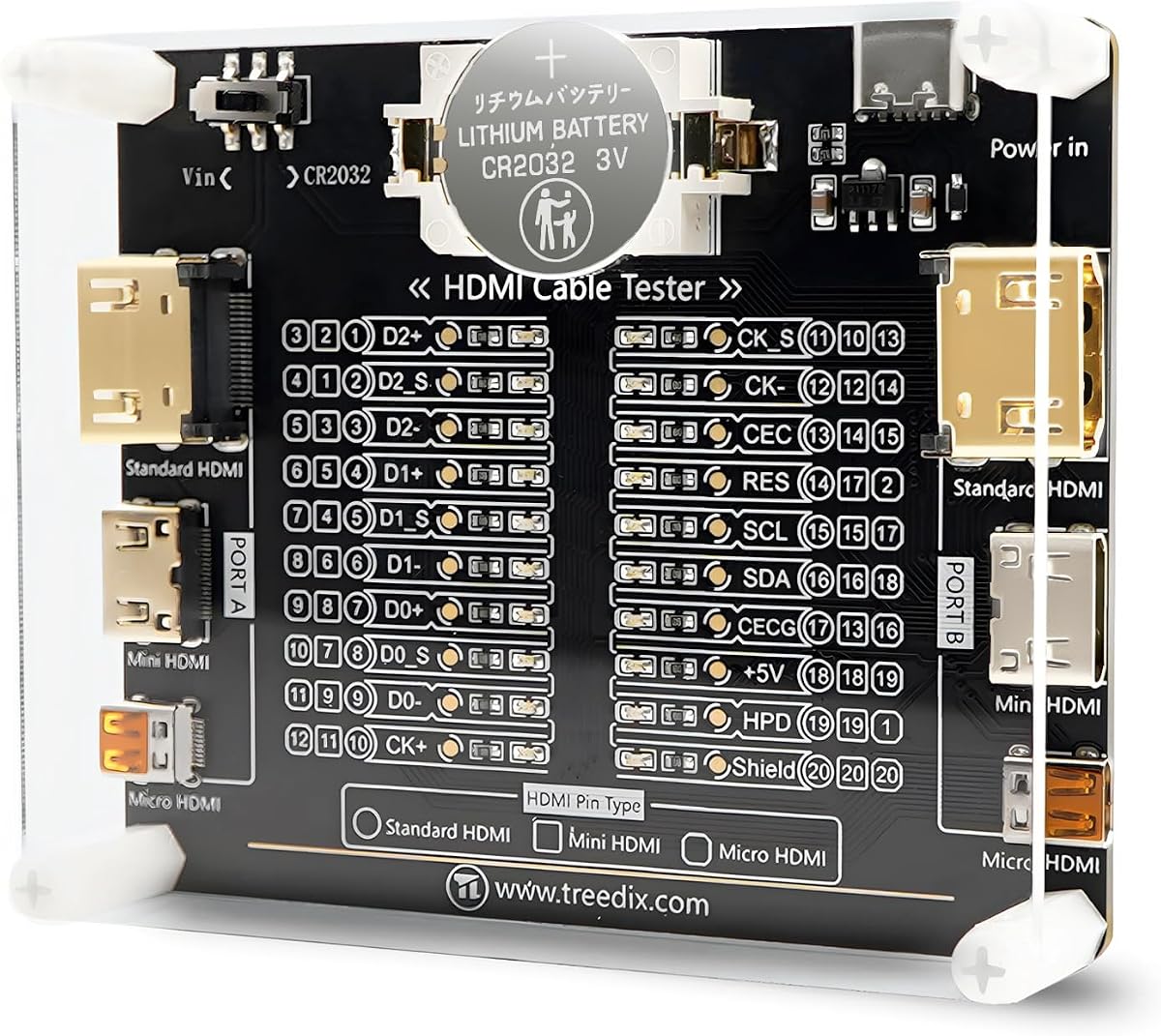
This small board is an excellent low cost option for checking basic continuity and cable conditions. Each of the 20 LEDs corresponds to a pin on the HDMI connector giving you clear visual feedback on wire status.
We may earn a commission when you buy through this link, at no additional cost to you.
The unit includes an acrylic housing to protect the internal components from damage during transport. You can power it using a battery or external supply giving you flexibility depending on where you are working.
It supports a wide range of HDMI interfaces from standard Type A to Micro Type D making it versatile for different devices. While it lacks advanced features the simplicity makes it very easy to use for quick checks.
For hobbyists or those needing a budget tool for occasional checks this board is a smart buy. It keeps costs low while still providing reliable continuity information for standard cables.
See exactly which pins are connected with 20 LED indicators corresponding to the connector layout.
Keep your tester safe in the included acrylic housing while you move between work sites.
We may earn a commission when you buy through this link, at no additional cost to you.
Choosing the right tester depends on your specific needs from simple cable checks to advanced signal analysis. Consider the following factors to find the model that fits your workflow.
Determine whether you need a simple continuity checker or a full signal generator. Basic testers check for shorts and open circuits which is enough for home use. Professionals might need generation capabilities to simulate video signals for display testing.
Match the device features to your daily tasks to avoid overspending on unneeded capabilities.
Ensure the tester supports the resolutions you work with such as 4K or 8K. Newer HDMI versions like 2.1 require higher bandwidths which not all testers can verify. Check specs for compatibility with 18Gbps or 40Gbps standards.
Select a device that matches the highest resolution and bandwidth you intend to test.
Consider how often you carry the device. Handheld units with rugged housing are better for field work. Desktop models might offer more features but lack mobility. Look for battery life if you work away from power outlets.
Prioritize compact and durable designs for frequent on-site usage.
Some testers use LED lights for feedback while others include LCD screens for detailed data. Screens provide better visualization but add to the cost. Decide if you need detailed signal data or just pass or fail indicators.
Choose a display method that fits your comfort level with technical readouts.
Verify that the tester supports the cable types you use most often. This includes standard, mini, and micro HDMI connectors. Some units also test network cables which adds versatility for IT work.
Ensure the ports match the connectors on your existing cables.
Check how the device is powered. Batteries like 9V or AAA are common but might need frequent replacement. USB powered units offer convenience if you carry a power bank. Long battery life is essential for all day field work.
Select a power method that ensures the device is ready when you need it.
Prices range from affordable boards to high-end analyzers. Define your budget based on your professional needs. A basic tester might suffice for hobbyists but technicians should invest in reliability and precision features.
Balance cost with the features you will actually use regularly.
Look for reputable brands that offer warranties and customer support. Quality control matters for electronics used frequently. Check reviews for durability and long term reliability before purchasing.
Choose a brand with good support to handle any technical issues.
Begin by connecting the tester to the HDMI cable you wish to inspect. Ensure both ends are securely inserted into the correct ports on the device. Turn on the tester to activate the LEDs or display screen.
Observe the indicators to see if all wires are connected correctly. If a light does not match the expected pattern check the cable for damage. Use the scan mode on advanced models to trace specific signal faults.
Store your tester in a protective case to prevent damage to ports and electronics. Keep the device dry and away from extreme temperatures to maintain performance. Clean the ports with compressed air to remove dust buildup over time.
An HDMI signal tester verifies the integrity of HDMI cables and connections. It detects faults like shorts or open circuits ensuring signals travel properly. This helps technicians troubleshoot display issues quickly.
If you have a TV you might not need a generator for basic checks. However a generator allows you to test without a display which saves time in installations. It provides controlled signals for accurate verification.
Not all testers check 4K resolution specifically. Basic continuity testers only check wires not video quality. Look for units explicitly listing 4K or 8K support for resolution verification.
Most testers support older HDMI versions like 1.4 or 2.0. They are designed to work with standard Type A connectors. Always check the specs to ensure compatibility with your cable types.
Test cables when you notice display issues or after installation. Regular checks prevent sudden failures in professional setups. A quick continuity test takes only seconds to perform.
Check if the device has power or a fresh battery. Ensure the cable is fully inserted into the tester ports. If the issue persists the wire might be damaged internally.
Our top picks cover a range of needs from budget friendly continuity boards to advanced 8K generators. Each option provides distinct advantages depending on your professional or personal requirements for video testing.
Prioritize resolution support and portability when making your selection. Ensure the features you need are present so you do not waste money on extras or miss critical capabilities.
Remember to verify current availability and specifications before purchasing. Prices and models change frequently so always check the latest details from the seller.