
Silverstone Technology ML03B Milo Series
4.2Editor score
Supports up to four 80mm fans
Drive cages with multi-purpose mounts
Easy to install and cable route
Discover the top Htpc Media Cases for home theater setups. We compare design cooling and compatibility to help you find the perfect enclosure for your build.
Building a home theater PC requires a case that blends seamlessly into your living space while delivering excellent performance. An ideal Htpc Media Case offers a compact footprint, quiet operation, and robust cooling to handle media tasks without disruption.
We evaluated ten top-rated models based on airflow design, build quality, and expansion capabilities. Each product was assessed for its ability to fit standard components while maintaining a sleek aesthetic suitable for modern entertainment centers.
Every pick highlights unique strengths like retro styling, modular drive bays, or advanced USB connectivity. Prices fluctuate often so verify current availability before purchasing to ensure you get the best value for your specific setup needs.
4.2Editor score

4.5Editor score

4.7Editor score
This side-by-side comparison highlights key specifications across all ten selected cases. Use this table to quickly identify which model fits your motherboard size, cooling needs, and aesthetic preferences for your home theater setup.


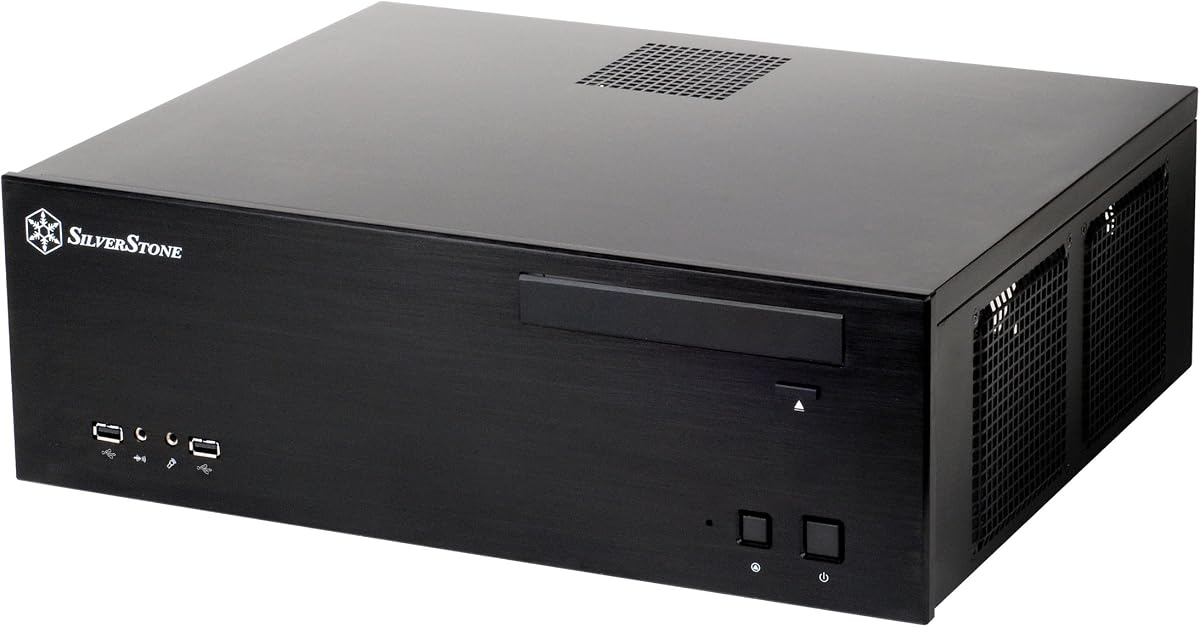

This Grandia 11 case from Silverstone Technology stands out as a top choice for home theater enthusiasts seeking a balance of performance and style. With a 4.5-star rating it delivers reliable airflow and supports standard ATX motherboards making it versatile for various builds.
We may earn a commission when you buy through this link, at no additional cost to you.
The positive air pressure design ensures superior cooling while minimizing dust accumulation inside the chassis. The fully meshed front panel allows for large surface area air intake which keeps components running cool even during intensive media playback or light gaming sessions.
While the stereo-shaped design looks great it can require thoughtful cable routing to maintain the clean aesthetic. Additionally the GPU length compatibility might be tighter compared to full tower cases so verify your graphics card dimensions before purchase.
Ideal for users who want an ATX-compatible HTPC without sacrificing cooling efficiency this case remains a strong recommendation. Its blend of form and function makes it a dependable foundation for a silent media PC setup.
The meshed front panel and positive pressure design work together to optimize airflow and keep internal temperatures low.
Compatible with SSI-CEB ATX and Micro-ATX boards giving you flexibility in component selection for your build.
We may earn a commission when you buy through this link, at no additional cost to you.
The GD09 model is engineered specifically to slide into typical AV cabinets without issues. Its 358mm depth is a crucial detail for integration into furniture while maintaining airflow efficiency. This makes it a practical choice for living room setups where space is limited.
We may earn a commission when you buy through this link, at no additional cost to you.
Positive air pressure design helps maintain a quiet environment which is essential for media consumption. The faux aluminum finish adds a premium look that matches well with home entertainment gear. It supports multiple motherboard sizes ensuring flexibility.
On the downside the weight might make it harder to reposition frequently. Expansion options are also constrained compared to larger cases which could limit future upgrades. However for standard media playback this is rarely an issue.
If your priority is fitting a PC into existing furniture while keeping noise low this case is a top contender. It balances aesthetics with functionality to meet the needs of home theater builders effectively.
Designed with a 358mm depth to comfortably fit inside standard home theater cabinets without protruding awkwardly.
Positive air pressure design reduces noise levels ensuring your media experience remains uninterrupted by fan sounds.
We may earn a commission when you buy through this link, at no additional cost to you.
For builders on a budget the ML03B Milo offers a reliable entry point into HTPC building. It supports Micro-ATX motherboards and includes drive cages that eliminate the need for extra adapters. This simplicity saves time and money during assembly.
We may earn a commission when you buy through this link, at no additional cost to you.
The case supports up to four 80mm fans allowing users to customize their cooling setup based on needs. Cable routing is straightforward which helps maintain a clean look. It is compatible with standard PS2 power supplies ensuring you do not need a proprietary unit.
The trade-off is the use of steel alongside aluminum which may feel less premium. It also lacks advanced features like USB-C or hot-swap bays. For basic media needs however these limitations are acceptable for the price.
This case is ideal for cost-conscious users who still want a dedicated media PC. It provides the essential structure and cooling without the extra cost of high-end styling or features.
Offers essential features at a lower price point making it accessible for entry-level home theater PC projects.
Supports up to four 80mm fans to help you tailor cooling performance to your specific component needs.
We may earn a commission when you buy through this link, at no additional cost to you.
This variant of the GD09 includes a modern USB Type-C port on the front panel. This addition future-proofs your build for devices that rely on faster connectivity. The rest of the design remains consistent with the popular GD09 model.
We may earn a commission when you buy through this link, at no additional cost to you.
It supports ATX and Micro-ATX boards ensuring broad compatibility. The positive air pressure design ensures quiet operation and effective dust prevention. Rackmount ears are supported if you need to install it in a rack setup.
The main limitation is that older USB devices might still need adapters. Also the price is slightly higher than the standard GD09. However the convenience of USB-C often justifies the extra cost for new builds.
If you plan to connect external drives or peripherals regularly this case offers the best balance of modern features and classic design. It is a smart upgrade for users who need faster data transfer speeds.
The front USB Type-C port allows for faster data transfer and convenient connection for modern external devices.
Builds on the trusted GD09 form factor ensuring reliable cooling and compatibility for your media center components.
We may earn a commission when you buy through this link, at no additional cost to you.
The FLP01 stands out with its unique retro-inspired design reminiscent of classic computer aesthetics. It features a floppy disk-style optical drive bay cover that adds character to your setup. This case is a top pick for users who value style.
We may earn a commission when you buy through this link, at no additional cost to you.
Internally it supports a universal drive cage compatible with 5.25 3.5 and 2.5 drives. This flexibility ensures you can use various storage types without needing adapters. The positive air pressure design also ensures effective cooling performance.
While the retro look might not suit every living room it is unmatched in uniqueness. The price is higher than average but the build quality and distinctive design justify it for enthusiasts. It is a true conversation piece.
Ideal for those who want their media PC to be a visual centerpiece this case delivers. It combines modern performance with nostalgic charm to create a memorable home theater component.
The retro floppy disk-style optical bay cover creates a unique visual look that stands out from standard cases.
A universal drive cage supports multiple drive sizes providing flexibility for your storage configuration needs.
We may earn a commission when you buy through this link, at no additional cost to you.
This model supports Extended ATX motherboards which is rare for compact HTPC cases. The aluminum front panel adds a premium touch to the build. It is ideal for users needing higher expansion capabilities in a media center.
We may earn a commission when you buy through this link, at no additional cost to you.
It supports up to twelve drive bays allowing for extensive storage options. Expansion cards up to 13.6 inches are supported which gives flexibility for powerful GPUs. The positive air pressure design maintains quiet operation.
The case is larger than others so measure your space carefully. It also costs more than typical Micro-ATX cases. However for users who need E-ATX support it offers a critical solution without sacrificing style.
If you require maximum storage and support for larger boards this is a top choice. It bridges the gap between media center aesthetics and high-performance workstation needs.
Rarely found in HTPCs this case supports Extended ATX motherboards allowing for more advanced system builds.
With up to twelve drive bays it offers excellent capacity for media libraries and data archiving needs.
We may earn a commission when you buy through this link, at no additional cost to you.
The ML04 Type-C features an aluminum front door that adds a premium look to the compact chassis. It supports Micro-ATX and Mini-ITX boards making it suitable for smaller builds. The USB Type-C port ensures modern connectivity for peripherals.
We may earn a commission when you buy through this link, at no additional cost to you.
With support for up to four 80mm fans cooling is customizable for your needs. Drive cages include multi-purpose mounts to simplify installation. This model offers a good balance of style and function for standard media use.
The steel body is heavier than all-aluminum options but provides structural rigidity. The feature set is somewhat basic compared to higher-end cases. However it remains a reliable choice for quiet and efficient media playback.
For users who want a compact case with a nice front panel and modern ports this is a solid option. It meets the essentials for a living room PC without unnecessary bulk.
The aluminum front door provides a sleek look while keeping the overall size compact for space-saving setups.
Supports up to four 80mm fans to ensure proper ventilation and temperature control for your components.
We may earn a commission when you buy through this link, at no additional cost to you.
This Grandia series case is a classic choice known for its durable aluminum construction. It supports ATX motherboards and fits nicely in home theater cabinets due to its depth. The positive air pressure system ensures reliable cooling.
We may earn a commission when you buy through this link, at no additional cost to you.
Quick access filters make maintenance easy to prevent dust buildup over time. It supports expansion cards up to 12.2 inches which is generous for a media case. The black finish blends well with most AV equipment.
The lack of USB-C is a drawback for new builds. It also carries a weight premium due to aluminum use. However the build quality and reliability remain high for users prioritizing stability.
Ideal for those who appreciate the original Grandia look and functionality this model delivers. It is a steady option for building a quiet and robust home theater computer.
Positive air pressure design keeps dust out and maintains consistent cooling for continuous media operation.
Aluminum construction ensures durability and a sleek appearance that fits well in living room environments.
We may earn a commission when you buy through this link, at no additional cost to you.
This model features two USB 3.0 ports on the front panel which was a major upgrade at launch. The thick aluminum front panel adds a premium feel to the case. Three silent fans are included to keep noise levels low.
We may earn a commission when you buy through this link, at no additional cost to you.
The depth of 323mm ensures it fits comfortably in standard home theater cabinets. Cable routing is designed to make installation easier for first-time builders. It supports Micro-ATX motherboards for compact builds.
USB 3.0 is older but still functional for most media needs. It lacks the latest USB-C connectivity. However if you do not need fast storage transfer this model offers good value and reliability.
For users who prioritize silent operation and durable aluminum construction this is a strong pick. It provides the basics for a quiet living room PC with solid build materials.
Three silent 120mm fans are included to ensure immediate cooling without additional purchases.
A thick 8.0mm aluminum front panel provides a premium look and added protection.
We may earn a commission when you buy through this link, at no additional cost to you.
This case is distinguished by two front hot-swap drive bays which make drive replacement easy. It includes three silent fans to manage airflow efficiently. The aluminum front panel provides a sturdy and stylish exterior.
We may earn a commission when you buy through this link, at no additional cost to you.
It supports up to four 3.5-inch hard drives which is useful for large media libraries. The 340mm depth fits comfortably in home theater cabinets. Cable routing is designed to keep the interior clean.
The focus on drive access might limit GPU clearance. The case is also heavier due to metal construction. For users needing frequent drive access this feature is highly valuable despite other limitations.
Ideal for media servers needing frequent drive swaps this model is a great choice. It balances robust storage options with the sleek look needed for a living room setup.
Front hot-swap bays allow easy drive replacement without opening the case for maintenance or upgrades.
Supports multiple 3.5-inch drives to accommodate large media libraries or data storage needs.
We may earn a commission when you buy through this link, at no additional cost to you.
Selecting the right Htpc Media Case involves balancing size features and compatibility. This guide breaks down key factors to help you make an informed decision for your home theater PC.
Ensure the case fits within your furniture or entertainment center. Many HTPCs have specific depth requirements to allow doors to close properly.
Check dimensions carefully against your available space to avoid installation issues later.
Most cases support Micro-ATX or Mini-ITX boards but some allow ATX or E-ATX. Verify the supported form factors before purchasing to ensure your components fit.
Select a case that matches your motherboard size to avoid clearance problems.
Look for mesh panels or positive pressure designs to maintain low noise and temperatures. Effective cooling is critical for media PCs running continuously.
Prioritize designs that support multiple fans or radiators for better thermal performance.
Modern cases often include USB Type-C ports while older models may only have USB 3.0. Decide what connectivity you need for your peripherals and external drives.
Ensure the front ports match your device requirements to avoid extra dongles.
Assess how many hard drives or SSDs you need. Some cases support hot-swap bays while others have fixed cages. Consider your storage requirements when choosing.
Pick a drive layout that matches your data storage needs for media files.
Aluminum fronts provide a premium look and better rigidity while steel bodies are often more affordable. Match the finish to your existing living room furniture.
Choose materials that balance durability with your preferred visual style.
Dust filters help keep your system clean but they must be easy to remove for cleaning. Quick access filters save time on maintenance.
Look for cases with removable filters to ensure long-term reliability.
If you plan to use a dedicated graphics card or capture card check the available expansion slots. Media PCs may need these components for transcoding or gaming.
Verify expansion limits to ensure your planned upgrades are physically possible.
Start by planning your layout to ensure the case fits in your intended location. Verify clearance for cables and ventilation to avoid overheating during long playback sessions.
Regularly clean dust filters using a soft brush or vacuum to maintain airflow efficiency. This prevents dust buildup that can restrict cooling and increase noise levels over time.
If your case has hot-swap bays handle drives carefully when swapping them to avoid damage. Always follow proper ejection procedures to ensure data integrity during drive replacement.
A good Htpc Media Case fits in standard furniture has quiet operation and supports your motherboard size. Look for designs with mesh panels for airflow and filters for dust prevention to keep performance optimal.
Yes ensure the case depth allows cabinet doors to close properly. Most HTPCs measure around 350mm deep but always check your furniture dimensions before purchasing a new unit.
Many models support ATX or Micro-ATX boards but confirm compatibility in specs. Some compact cases only fit Mini-ITX or Micro-ATX so verify dimensions before buying.
Airflow prevents overheating during long media playback which protects hardware and reduces noise. Positive pressure designs and mesh front panels help maintain low temperatures while keeping fans quiet.
Aluminum cases provide a premium look better structural rigidity and often better dust resistance. While slightly more expensive they offer long-term durability and a sleek finish that matches home entertainment gear.
Clean dust filters every three to six months depending on your environment. If pets or smokers are present clean them more often to prevent airflow restriction and dust buildup.
These top picks offer a range of options from budget-friendly builds to premium aluminum designs. Whether you need hot-swap bays or a retro look there is a model here to suit your living room setup.
Prioritize size and cooling when making your choice to ensure the case meets your specific needs. Matching the features to your build goals will help you enjoy a silent and efficient media experience.
Remember to check current prices and stock levels before finalizing your purchase. Prices fluctuate regularly so staying alert ensures you get the best value for your Htpc Media Case build.