
TRENDnet TEG-S50284
4.8Editor score
28 Ports Multi-Gig
Lifetime Protection
NDAA Compliant
Discover the top 25GbE switches with SFP28 ports for data centers. This guide compares features, performance, and pricing to help you choose.
Choosing the right network switch is critical for modern infrastructure. 25GbE switches with SFP28 ports deliver high throughput for servers and storage. They ensure low latency and robust connectivity for demanding workloads efficiently.
We compared ten top models based on port density, management features, and reliability. Our analysis covers enterprise-grade options suitable for data centers and growing businesses. Each switch offers unique benefits for specific networking environments and needs.
Each pick highlights key specs and real-world performance capabilities. Ratings reflect user feedback and technical benchmarks where available. Prices fluctuate often, so verify current listings before making your final purchase decision today.
4.8Editor score


4.6Editor score
This table provides a side-by-side comparison of all ten switches. Review the port configurations and key specifications to find the best fit for your network infrastructure needs efficiently.





The QNAP QSW-M7230-2X4F24T-US is a top-tier network switch designed for high-performance environments. It delivers non-blocking throughput essential for modern enterprise needs. Users appreciate its flexible port configuration and reliability.
We may earn a commission when you buy through this link, at no additional cost to you.
It features 2 x 100GbE QSFP28 ports alongside 4 x 25GbE SFP28 ports. This setup supports AI clustering and large-scale NAS deployments efficiently. The Layer 3 Lite features enable static routing and bandwidth control without overhead.
Trade-offs include a higher cost compared to simpler models. The advanced features require some technical knowledge to configure fully. However, the lossless network performance justifies the investment for critical workloads.
This switch is ideal for data centers and high-res media production workflows. It bridges 100G fiber backbones with existing 10G copper setups effectively. We recommend it for businesses needing scalable upgrades and robust data routing.
Built-in technologies like Priority Flow Control minimize packet loss for RoCEv2 traffic.
Seamlessly connects modern optical backbones with legacy copper setups for cost-effective migration.
We may earn a commission when you buy through this link, at no additional cost to you.
The TRENDnet TEG-S50284 offers excellent value for multi-gigabit needs. It includes 24 high-speed 2.5G RJ-45 ports for Cat5e cabling. Users praise its reliability and lifetime manufacturer protection policy.
We may earn a commission when you buy through this link, at no additional cost to you.
It supports 4 ultra-fast 10G SFP+ ports for high-speed connections. The smart fans adjust speed based on cooling needs for energy efficiency. VLAN passthrough and LED indicators simplify network management tasks.
Trade-offs include limited Layer 3 routing capabilities. It lacks dedicated 25G SFP28 ports but offers 10G alternatives. For most SMBs, the performance is sufficient without extra complexity.
This switch fits government customers needing NDAA compliance. Tech support is available during normal business hours for assistance. We recommend it for cost-effective 10G link capability in office environments.
TRENDnet stands by their products with lifetime protection against manufacturing defects.
Smart fans auto-adjust speed to save energy based on real-time cooling needs.
We may earn a commission when you buy through this link, at no additional cost to you.
This Cisco Nexus switch offers 48 ports of 25GbE SFP28 connectivity. It is a renewed product professionally inspected by qualified vendors. The high density suits large data centers needing extensive server connections.
We may earn a commission when you buy through this link, at no additional cost to you.
It features 6 ports of QSFP+/QSFP28 for uplinks. Dual AC power supplies ensure high availability and redundancy. The package includes generic accessories but remains fully functional for operations.
Trade-offs involve the lack of original accessories. Renewed products may not have the same warranty as new ones. However, the cost savings are significant for budget-conscious data centers.
Ideal for those needing 25GbE speeds without full new pricing. Verify compatibility with existing systems before purchasing. We recommend checking vendor ratings for renewed items carefully.
48 fixed 25GbE SFP28 ports provide massive connectivity for server racks.
Dual AC power supplies ensure continuous operation even if one supply fails.
We may earn a commission when you buy through this link, at no additional cost to you.
The Mikrotik CRS520-4XS-16XQ-RM is a powerful enterprise switch. It combines 28 SFP28 ports with 100G QSFP28 uplinks. The quad-core ARM CPU running at 2GHz provides extra processing power.
We may earn a commission when you buy through this link, at no additional cost to you.
It offers extensive routing and firewall capabilities via RouterOS. Users value the flexibility and advanced traffic management options. The 4GB DDR4 RAM ensures smooth operation under heavy loads.
Trade-offs include a steeper learning curve for setup. It is pricier than basic switches. However, the feature set justifies the cost for advanced network admins.
Best for networks requiring complex routing and high throughput. The hardware is robust for demanding environments. We recommend it for power users needing premium features.
Quad-core CPU at 2GHz handles complex routing tasks efficiently without bottlenecks.
Advanced software features allow deep customization of traffic and security policies.
We may earn a commission when you buy through this link, at no additional cost to you.
This switch enhances network switching capacity with 28 10G SFP+ ports. It features 4 25G SFP28 ports for aggregation links. Users love the intuitive UniFi Network web app.
We may earn a commission when you buy through this link, at no additional cost to you.
It includes a 1.3-inch LCM color touchscreen for system insights. Layer 3 switching capabilities optimize traffic flow. The 760Gbps switching capacity ensures non-blocking performance.
Trade-offs include SFP28 port limitations in mixed modes. The redundant power system is sold separately. These are acceptable for most UniFi users needing high throughput.
Ideal for UniFi setups needing high-bandwidth aggregation. It connects easily to other network devices. We recommend it for businesses already invested in the ecosystem.
25G SFP28 ports create robust aggregation links for top-tier performance.
Touchscreen displays key system data concisely for quick management checks.
We may earn a commission when you buy through this link, at no additional cost to you.
The Dell EMC PowerSwitch N3224P-ON offers 25GbE SFP28 ports with PoE. It includes 2 x 100 Gigabit QSFP28 ports for uplinks. Users appreciate the Layer 3 routing capabilities.
We may earn a commission when you buy through this link, at no additional cost to you.
It supports PoE++ for powering devices directly. The modular design allows easy upgrades and maintenance. Rackmount ready housing fits standard server racks efficiently.
Trade-offs include high power consumption of 944 W. Management may require technical expertise. For data centers, the performance is worth the power cost.
Best for networks needing PoE++ and 25G uplinks. It fits modular infrastructures well. We recommend it for enterprise environments needing flexibility.
Powerful PoE++ ports support high-draw devices like access points and cameras.
Design allows easy upgrades and maintenance without full replacement of hardware.
We may earn a commission when you buy through this link, at no additional cost to you.
This TRENDnet switch offers web smart management features. It features 24 2.5G RJ-45 ports for flexibility. Users appreciate Hive enabled cloud service for remote diagnosis.
We may earn a commission when you buy through this link, at no additional cost to you.
Web smart management reduces configuration complexity. Advanced features include ACLs and SNMP trap monitoring. Lifetime protection ensures support for the product life.
Trade-offs include the lower user rating. Some cloud services may require additional fees. Despite this, the value remains high for SMBs.
Ideal for businesses needing remote management tools. It integrates well with existing networks. We recommend it for cost-effective web smart needs.
Remote management via cloud service allows easy configuration and diagnostics.
Advanced managed features include VLANs and QoS for flexible network setups.
We may earn a commission when you buy through this link, at no additional cost to you.
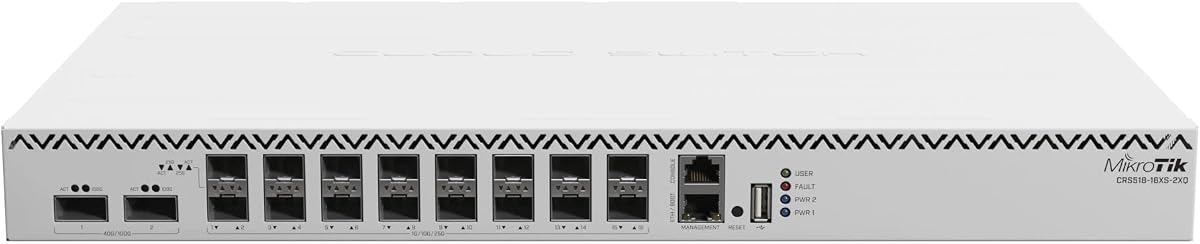
This MikroTik switch offers 16 ports of 25G SFP28 connectivity. It includes 2 x 100G QSFP28 uplinks for aggregation. Users value the advanced routing capabilities.
We may earn a commission when you buy through this link, at no additional cost to you.
Cloud Router Switch functionality simplifies management tasks. The compact design fits small server racks. It delivers high throughput for demanding networks.
Trade-offs include CPU limitations under heavy loads. Setup requires some networking knowledge. For most users, performance is adequate and cost-effective.
Best for small data centers needing 25G ports. It supports complex routing without full costs. We recommend it for reliable compact solutions.
Fits small server racks while delivering full 25G performance.
Cloud Router Switch functionality simplifies remote configuration and monitoring.
We may earn a commission when you buy through this link, at no additional cost to you.
This Cisco Nexus switch delivers 48 ports of 25GbE connectivity. It features 6 x 100-Gbps QSFP28 uplinks for bandwidth. Users appreciate NX-OS for consistent administration.
We may earn a commission when you buy through this link, at no additional cost to you.
Cut-through switching ensures low latency. Hot-swappable power supplies and fans enhance availability. VXLAN support enables scalable network virtualization.
Trade-offs include renewed condition uncertainty. Administration requires technical expertise. For high-performance needs, it is an excellent choice.
Ideal for large-scale data centers. It handles high-performance computing effectively. We recommend it for reliability-focused deployments.
Cut-through architecture minimizes latency for big data processing.
VXLAN support allows scalable network virtualization for modern needs.
We may earn a commission when you buy through this link, at no additional cost to you.
This D-Link switch offers 24 Gigabit ports and 4 SFP combos. It fits small networks needing Layer 2+ features. Users appreciate the lifetime warranty and silent operation.
We may earn a commission when you buy through this link, at no additional cost to you.
Web UI simplifies configuration and monitoring. It supports VLANs and static routing effectively. NDAA compliance makes it suitable for government projects.
Trade-offs include no 25G SFP28 ports. Features are basic for complex setups. For standard needs, it is cost-effective and reliable.
Best for SMBs needing managed switches. It is silent and efficient for offices. We recommend it for budget-conscious buyers.
Fanless design ensures silent running in noise-sensitive environments.
Lifetime warranty provides long-term confidence in product quality.
We may earn a commission when you buy through this link, at no additional cost to you.
Choosing the right switch requires evaluating port types and management features. This guide outlines key factors to ensure compatibility and performance.
Look for switches with 25GbE SFP28 ports alongside uplink ports like 100G QSFP28. Ensure total ports match your server count. High density reduces the need for multiple devices.
Check that ports match your transceiver needs. Verify compatibility with existing SFP28 cables.
Ensure the switch has enough throughput for your traffic. Non-blocking capacity prevents bottlenecks during peak times. Higher capacity supports future growth without upgrades.
Check specs for Gbps capacity. It should exceed total port speeds.
Layer 3 switches support routing and VLANs better than Layer 2. For complex networks, look for routing features. Layer 2 is enough for basic segmentation.
Choose Layer 3 for multi-subnet networks. It simplifies management.
Web GUI and cloud services simplify configuration. Managed switches offer QoS and SNMP. Unmanaged switches are cheaper but lack control.
Pick managed switches for enterprise needs. Web UIs are user-friendly.
Check power consumption for cooling needs. PoE support allows powering devices. Fanless designs reduce noise in offices.
Ensure power supply matches your room. Look for redundancy if needed.
NDAA and TAA compliance are vital for government projects. Check if your industry requires specific standards. Non-compliant switches may cause legal issues.
Verify compliance tags before buying. They protect investments.
Lifetime warranties indicate manufacturer confidence. Limited warranties may save cost initially but lack long-term value. Check service availability.
Choose longer warranties for peace of mind. They ensure reliability.
Ensure ports allow for future growth. Modular designs offer flexibility. Fixed switches may require full replacement later.
Plan for future expansion needs. Modular options save costs long-term.
Start by connecting devices via SFP28 cables. Verify port speeds in the GUI. Ensure firmware is up to date for stability.
Configure VLANs and QoS rules. Monitor traffic using built-in tools. Regularly check logs for errors or congestion.
Keep the switch in a cool, dry area. Avoid dust buildup. Restart the switch occasionally to clear memory issues.
Yes, most 25G SFP28 ports support 10G SFP+ optics. Ensure the switch firmware supports backward compatibility. Verify the optical modules are rated for 25G SFP28.
SFP28 cables vary by type. Copper Direct Attach cables typically reach 3 meters. Fiber optics can reach several kilometers. Check specific optics specs for exact distances.
Yes, switches like QNAP's are built for AI clustering. Low latency and lossless features optimize performance. Ensure you use RoCEv2 settings for best results.
Use transceivers rated for 25G speeds. Third-party optics may work if unlocked. Check switch compatibility lists to avoid issues.
Layer 3 Lite includes static routing and VLANs. It lacks full dynamic routing protocols. Suitable for simple network segmentation without complex routing needs.
Yes, SFP28 ports are often backward compatible. You can insert 10G SFP+ modules. Confirm supported speeds in the switch manual before purchasing.
The QNAP and Mikrotik models stand out for performance. Budget options like TRENDnet offer reliable multi-gig speeds. Each product suits different infrastructure needs.
Prioritize switching capacity and compliance for data centers. Look for Layer 3 features for complex routing. Ensure compatibility with existing transceivers.
Verify current pricing and stock before purchasing. Prices vary based on vendor availability. Review user feedback for latest reliability updates.