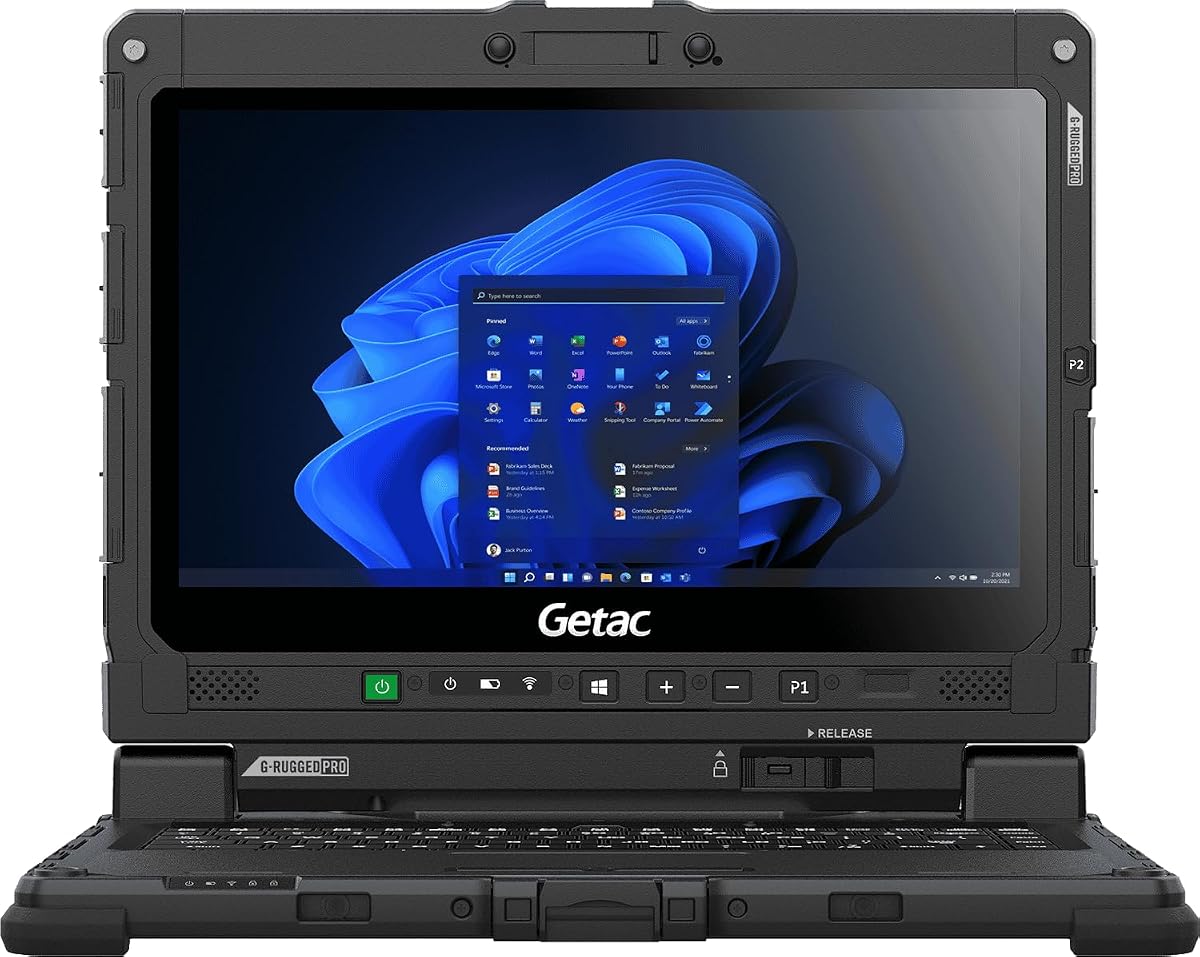
Getac Renewed K120 12.5" Rugged Laptop
5.0Editor score
1200 Nits LumiBond touchscreen
Military-grade durability certified
Affordable renewed pricing option
Finding a laptop for bright sunlight requires specialized displays that remain visible under direct sun. Professional field workers need high-nit screens to maintain productivity during outdoor tasks in challenging environments.
We evaluated ten top-rated models focusing on display brightness, durability ratings, and performance specs. This list includes rugged laptops and consumer devices optimized for visibility in extreme lighting conditions.
Each pick highlights key strengths and trade-offs to help you select the right tool. Note that prices and availability change frequently, so verify current details before making your final purchasing decision today.
5.0Editor score

4.1Editor score

As an Amazon Associate we earn from qualifying purchases.
This table provides a side-by-side comparison of all ten selected laptops. It highlights key specifications like brightness, processor, and durability to help you quickly identify the best model for your needs.


The MUNBYN IRX17 stands out as the top choice for professionals needing reliable performance in extreme environments. It holds a solid 4.1 rating from users who praise its industrial strength and screen clarity.
We may earn a commission when you buy through this link, at no additional cost to you.
Its standout feature is the 1000-nit sunlight-readable display which ensures visibility under direct sun. The Intel i7-1255U processor paired with 32GB DDR5 RAM handles heavy design tasks like AutoCAD smoothly.
While it is heavier than standard laptops the IP65 rating and MIL-STD-810H certification justify the bulk for field work. The dual battery option and physical camera switch add practical value for security and uptime.
This laptop is ideal for engineers and construction managers who need durability and screen brightness. If you prioritize ruggedness over portability this model delivers exceptional value for demanding outdoor operations.
The 1000-nit display ensures clear visibility even in harsh sunlight conditions where standard screens fail.
Running on an Intel i7 processor it handles complex simulations and data analysis without lag.
We may earn a commission when you buy through this link, at no additional cost to you.
The Getac K120 offers incredible value for those seeking a budget-friendly rugged laptop. It holds a perfect 5.0 rating for its reliability and high brightness screen that outshines many competitors.
We may earn a commission when you buy through this link, at no additional cost to you.
Its 1200-nit LumiBond touchscreen is the brightest in this lineup making it ideal for desert or outdoor shifts. The IP65 rating protects it from water and dust while the compact size aids portability.
Users note that while the processor is older it handles field apps efficiently. The Amazon Renewed status means you get a tested unit at a lower cost without sacrificing essential rugged features.
Choose this if you need maximum brightness on a tighter budget. It balances cost and performance effectively for professionals who prioritize screen visibility and durability above raw processing power.
With 1200 nits brightness this screen remains legible even in the harshest direct sunlight.
The Amazon Renewed option provides certified quality at a fraction of the cost of new units.
We may earn a commission when you buy through this link, at no additional cost to you.
The Getac S510 represents the pinnacle of rugged laptop engineering with the latest hardware. It features the new Intel Core Ultra 5 processor and 32GB DDR5 RAM for top-tier multitasking capabilities.
We may earn a commission when you buy through this link, at no additional cost to you.
Its 1000-nit display ensures clarity outdoors while the 15.6-inch screen offers ample workspace. The inclusion of Thunderbolt 4 allows for fast data transfer and modern connectivity options essential for field techs.
This model is a significant investment but offers future-proof performance for demanding industries. The rugged design and battery efficiency make it a reliable companion for professionals who need consistent uptime and speed.
Invest in this if you require cutting-edge specs in a rugged form factor. It delivers premium features and reliability that justify the cost for high-stakes industrial environments.
The Intel Core Ultra 5 provides AI-enhanced performance that improves efficiency in complex tasks.
Thunderbolt 4 support ensures you can connect to the latest peripherals and docking stations easily.
We may earn a commission when you buy through this link, at no additional cost to you.
The MUNBYN IRX16 balances cost and performance well for field professionals. It maintains the same high brightness display as its bigger brother but with a slightly lower price point.
We may earn a commission when you buy through this link, at no additional cost to you.
It features an Intel i5 processor that handles everyday industrial apps smoothly. The 1000-nit screen ensures you can see maps and plans clearly even in direct sunlight or bright workshops.
Its replaceable SSD is a smart feature for IT managers needing to upgrade storage easily. The rugged IP65 rating protects it from dust and water spills common in construction environments.
This is a practical choice for teams needing multiple units without breaking the budget. It offers strong visibility and durability for those who need reliable tools on the job site.
The i5 processor strikes a balance between power and battery life for daily field tasks.
Users can replace the SSD with screwdriver access allowing flexible storage expansion as needed.
We may earn a commission when you buy through this link, at no additional cost to you.
The HP OmniBook 3 brings modern AI features to a lightweight design suitable for mobile office use. It features a Snapdragon processor optimized for efficiency and long battery life during travel.
We may earn a commission when you buy through this link, at no additional cost to you.
While its 300-nit OLED display is not ideal for direct sunlight it offers rich colors for indoor use. The battery can last over 41 hours making it great for travel days where charging is limited.
It includes a Copilot key for AI assistance which speeds up writing and organizing work. The FHD IR camera ensures clear video calls even with backlighting thanks to HDR auto-switch technology.
This laptop is for professionals who move indoors and outdoors frequently but do not need heavy ruggedness. It prioritizes portability and battery over extreme brightness and durability features.
With up to 41 hours of battery life you can work all week without needing a charger.
The Copilot key and Otter.ai integration help automate notes and meeting summaries instantly.
We may earn a commission when you buy through this link, at no additional cost to you.
The HP OmniBook 3 16 offers a larger workspace for those who prefer bigger screens. Its 2K touchscreen delivers crisp visuals for documents and media consumption in office settings.
We may earn a commission when you buy through this link, at no additional cost to you.
The AMD Ryzen 3 processor handles light tasks efficiently but may struggle with heavy multitasking. The IPS panel provides wide viewing angles making it easy to share content with colleagues during meetings.
Battery life reaches around 14 hours which is sufficient for a full work day. The advanced noise reduction feature enhances audio clarity during video calls with remote teams.
Choose this model if screen size is your main priority for productivity tasks. It is well suited for light field work or travel where portability and display area are key needs.
The 16 inch display provides ample room for multitasking windows and detailed spreadsheets.
The 2K resolution and touch support enable intuitive navigation and precise editing control.
We may earn a commission when you buy through this link, at no additional cost to you.
The Dell 15.6 is a straightforward option for general computing needs on the go. It features a standard FHD display that works well indoors but lacks high brightness for direct sun.
We may earn a commission when you buy through this link, at no additional cost to you.
Its ComfortView software reduces blue light to prevent eye strain during long reading sessions. The keyboard is designed for comfort with ergonomic hinges that lift the laptop for better typing angles.
Users appreciate the reliable battery life and fast charging capabilities for daily use. The 1-year onsite service ensures you get quick support if hardware issues arise during work hours.
This is a solid budget option for office users who work outside occasionally. If you need a simple laptop for mixed indoor outdoor tasks this model offers good value and comfort.
Built-in software reduces blue light to help keep your eyes comfortable during extended viewing.
A roomy keypad with ergonomic hinges ensures comfortable typing for long periods.
We may earn a commission when you buy through this link, at no additional cost to you.
The HP 17.3 provides a massive workspace with a 17.3 inch display that is great for data analysis. Its anti-glare coating helps reduce some reflections though it is not fully sunlight readable.
We may earn a commission when you buy through this link, at no additional cost to you.
Powered by an AMD Ryzen 5 processor it delivers smooth performance for multitasking and media consumption. The inclusion of 1TB storage means you can store large files without external drives.
The privacy shutter on the webcam adds a layer of security for sensitive work. The anti-glare finish improves visibility in bright indoor spaces but direct sunlight may still cause glare.
Choose this if you need a desktop replacement for field work or remote sites. It offers strong storage and screen size for professionals who prioritize viewing area over extreme outdoor durability.
With 1TB of storage you can keep large project files and media local without limits.
The webcam shutter allows you to physically close the camera for total privacy when needed.
We may earn a commission when you buy through this link, at no additional cost to you.
The Panasonic Toughbook FZ-55 is a semi-rugged option that balances mobility and strength. It features a 1000-nit display making it viable for outdoor work in various lighting conditions.
We may earn a commission when you buy through this link, at no additional cost to you.
Its MIL-STD-810H certification ensures it can withstand drops and harsh environments. The integrated 4G LTE means you stay connected even when Wi-Fi is unavailable on remote job sites.
This renewed model offers enterprise-grade features at a lower cost. The included stylus is handy for touch input on the screen without needing a separate tool or pen.
Ideal for logistics and delivery teams who need reliable connectivity and screen visibility. It provides strong durability and connectivity options for users who need to work anywhere reliably.
Multi-carrier 4G LTE connectivity keeps you online in remote areas without Wi-Fi access.
Sealed chassis protection defends against dust and water typical in industrial settings.
We may earn a commission when you buy through this link, at no additional cost to you.
The Dell 16 combines a large display with modern performance for daily productivity. Its FHD+ screen offers more vertical space for documents and web browsing compared to standard displays.
We may earn a commission when you buy through this link, at no additional cost to you.
Powered by an Intel Core 7 processor it handles multitasking efficiently for business users. Adaptive thermals adjust power based on the surface keeping the system cool and stable during use.
ComfortView Plus maintains color accuracy while reducing blue light for eye comfort. The 1-year onsite service provides peace of mind for teams relying on this hardware for critical tasks.
This is a strong option for business travelers who need a large screen on the go. It offers good performance and comfort for office work but lacks the brightness for direct sunlight.
The FHD+ resolution provides more screen real estate for viewing detailed work efficiently.
Sensors adjust performance based on stability to prevent overheating during intensive work.
We may earn a commission when you buy through this link, at no additional cost to you.
Selecting a laptop for bright sunlight involves more than just screen size. You must consider brightness levels, durability, and performance to ensure reliable operation outdoors.
Brightness is measured in nits and is critical for sunlight visibility. Most standard laptops have around 250 to 300 nits which will appear dim in direct sun. Look for models with 500 nits or higher especially those rated at 1000 nits for optimal outdoor readability.
Always check the nit rating before purchasing to ensure the screen remains legible under sun.
Field work often exposes laptops to dust water and drops. Rugged laptops are certified to military standards like MIL-STD-810H and have IP ratings like IP65 for water and dust resistance. This ensures the device survives harsh conditions without failure.
Prioritize units with IP65 or higher ratings if you work in dusty or wet environments.
Processing power affects how smoothly you run applications like AutoCAD or field data software. Modern i5 or i7 processors paired with at least 16GB of RAM ensure multitasking does not slow down. DDR5 RAM offers faster speeds than older DDR4 for better efficiency.
Opt for modern CPUs and 16GB RAM or more to handle professional software smoothly.
Field work often lacks easy access to power outlets so battery capacity matters. Look for models that offer at least 10 to 15 hours of use on a single charge. Some rugged units support hot-swappable batteries so you can replace them without shutting down.
Check battery duration specs and removable battery options for uninterrupted outdoor work.
Reliable internet is essential for real-time data access. WiFi 6 provides faster speeds but some rugged models include 4G LTE for cellular connectivity. USB ports and HDMI outputs allow you to connect to projectors or external monitors on site.
Ensure the laptop has WiFi 6 or LTE support for stable internet in remote areas.
While rugged devices are heavier they must still be portable enough to carry. Weigh the trade-off between build strength and travel weight especially if you move locations frequently. Lightweight models may sacrifice durability while heavy ones offer better protection.
Balance your need for ruggedness against your willingness to carry extra weight daily.
Touchscreens can be useful when wearing gloves but standard ones may fail in the rain. Rugged touchscreens often support gloved input and have protective films to prevent scratches. This ensures you can interact with maps or forms even while wearing safety gear.
Look for capacitive gloves touchscreens with protective coatings for reliable outdoor input.
Accidents happen in the field so strong warranty coverage is vital. Some vendors offer 2-year protection or onsite service to minimize downtime. Check if the warranty covers accidental drops or liquid damage specifically for your use case.
Verify warranty terms and service options to ensure fast repairs if the unit fails.
Keep the screen clean by using a soft microfiber cloth to wipe away dust and fingerprints. Avoid harsh chemicals that might damage the anti-glare coating or protective film on rugged screens.
Store the laptop in a protective case when not in use to shield it from impacts and dust. For devices with removable batteries store the batteries separately in a cool dry place to preserve life.
Update your drivers regularly to ensure WiFi and graphics components perform optimally. Restart the system weekly to clear memory caches and maintain smooth performance during long work sessions.
For direct sunlight visibility you should look for a display with at least 500 nits brightness. Ideally choose models rated at 1000 nits or higher to ensure clear visibility without glare in harsh outdoor conditions.
Yes rugged laptops are worth the cost if you work in harsh environments. Their durability prevents expensive damage and downtime which saves money over time compared to replacing damaged standard devices.
You can use a standard laptop outdoors but it may be hard to see in direct sunlight. To improve visibility find a shaded area or use an anti-glare screen protector though these reduce clarity indoors.
Ideally aim for a battery life of at least 10 hours to last a full shift. Some rugged models offer hot-swappable batteries so you can carry spares to ensure continuous operation without downtime.
An IP rating is essential if you work in dusty or wet environments. IP65 means the device is dust tight and protected against water jets which is critical for construction or industrial sites.
Keep liquids away from the laptop and use a waterproof sleeve when working near moisture. If your device has IP65 rating it will resist water jets but you should still avoid submerging it.
A 14 to 15 inch screen is usually best for balancing visibility and portability outdoors. Larger screens offer more workspace but add weight which can be cumbersome when carrying it to remote sites.
Only specific rugged touchscreens work reliably with gloves. Look for models that advertise capacitive touch support for gloved input so you can operate the screen without removing safety gear.
We explored ten top models including rugged and consumer laptops suited for bright conditions. The MUNBYN IRX17 stands out for its balance of power and brightness while the Getac K120 offers budget durability.
When selecting a laptop prioritize display brightness and rugged certifications like MIL-STD-810H for field reliability. Ensure the device has enough RAM and connectivity to handle your specific workload without slowdown.
Prices and stock change frequently so check current details before making your final decision. With the right choice you can maintain productivity and accuracy even in the brightest outdoor environments.