
Dell Precision 3581
Core i7-13800H Processor
32GB DDR5 RAM
Nvidia GeForce RTX A500
Choosing the right laptop for CAD work requires balancing power, portability, and display accuracy. Professionals need machines that handle complex 3D modeling and rendering without lag or crashes during critical design phases.
We evaluated ten high-performance workstations from leading brands like Dell, HP, and Lenovo. Each model was assessed for processor speed, graphics capabilities, memory capacity, and ISV certifications to ensure compatibility with major CAD software.
Each pick highlights specific strengths for different user needs and from budget-conscious designers to enterprise engineers. Please note that availability and configurations may change, so verify current specs before purchasing to ensure you get the exact system you need.

4.4Editor score

5.0Editor score
As an Amazon Associate we earn from qualifying purchases.
The following table provides a side-by-side comparison of all ten laptops selected for this guide. We highlight key specifications like processors, graphics cards, and memory to help you quickly identify which model matches your technical requirements for computer-aided design tasks.




The Dell Precision 7680 stands out as a flagship workstation designed specifically for demanding professional workflows like CAD design and 3D rendering. With a rating of 4.4 stars, it delivers high performance and expandability that exceeds lower series models.
We may earn a commission when you buy through this link, at no additional cost to you.
Powered by an Intel Core i9-13950HX processor and 32GB of DDR5 CAMM RAM, this laptop ensures seamless multitasking and fast data access. The anti-glare FHD+ display provides sharp visuals essential for detailed engineering work, while connectivity options support flexible multi-screen setups.
Although it carries a higher price tag and is heavier than ultraportables, the robust build and enterprise-grade security features justify the investment for serious professionals. Its MIL-STD-810H testing ensures reliability across office, studio, and on-site environments.
Architects and engineers handling complex projects will find this machine indispensable. It balances power and versatility effectively, making it our top recommendation for those who need a reliable workstation for intensive creative and technical tasks.
The high-end workstation design aligns with the Dell Pro Max series evolution, offering scalable capabilities that support demanding applications like AutoCAD and Revit efficiently.
Support for up to three external monitors via HDMI and Thunderbolt ports allows for expansive workspace configurations without needing a docking station.
We may earn a commission when you buy through this link, at no additional cost to you.
This variant of the Precision 7680 offers a strong balance of performance and stability for professionals in design and architecture. Rated at 4.3 stars, it includes an NVIDIA RTX 1000 Ada GPU which enhances rendering capabilities significantly.
We may earn a commission when you buy through this link, at no additional cost to you.
The Intel Core i5-13600HX processor combined with 32GB of DDR5 RAM ensures efficient handling of complex tasks. The display supports sharp visuals, and the connectivity suite allows for up to four external monitors, providing ample screen real estate for multitasking.
While the processor is a mid-range option compared to the i9 variant, the dedicated graphics card makes it suitable for graphics-intensive workloads. The ISV certifications guarantee dependable compatibility with professional applications used in the industry.
For users who prioritize GPU performance over raw CPU power, this model is an excellent choice. It delivers the reliability needed for CAD design and simulation tasks without the premium cost of the highest-tier configurations.
The NVIDIA RTX 1000 Ada 6GB GPU delivers the performance required for detailed design and photography work with professional-grade stability.
Support for up to four external monitors enables flexible multi-screen setups that are crucial for managing multiple design views simultaneously.
We may earn a commission when you buy through this link, at no additional cost to you.
The HP ZBook 8 G1i builds on the legacy of the ZBook Power series with a sleek mobile design tailored for 3D rendering and AI development. Rated at 4.1 stars, it features an Intel Ultra 7 processor and a dedicated NVIDIA RTX 500 Ada GPU.
We may earn a commission when you buy through this link, at no additional cost to you.
With an impressive 64GB of DDR5 RAM and a 2TB SSD, this laptop handles huge file sizes and seamless multitasking without hesitation. The touchscreen display offers vibrant visuals, and the integrated AI features support efficient productivity workflows.
The inclusion of Wi-Fi 7 ensures ultra-fast wireless performance, while the battery life supports uninterrupted productivity on the go. However, the touchscreen variant might add slight weight compared to non-touch models for pure portability needs.
Engineers and architects who require extensive memory for simulation and AI-enhanced design workflows will appreciate this configuration. It stands out as a powerful tool for content creators and researchers handling complex computations.
The 64GB DDR5 RAM and 2TB SSD provide ultra-fast data access and ample space for large projects and multitasking.
Wi-Fi 7 and Bluetooth 5.4 ensure ultra-fast wireless performance for cloud work and peripheral connections without lag.
We may earn a commission when you buy through this link, at no additional cost to you.
Released in 2023, the Dell Precision 3581 is a great entry point for professionals seeking workstation capabilities without a premium price. While it is a renewed unit, it comes with a two-year warranty and includes all the latest technology like DDR5 memory.
We may earn a commission when you buy through this link, at no additional cost to you.
The 14-core Core i7-13800H processor allows for exceptional multitasking, while the dedicated Nvidia GeForce RTX A500 graphics card is great for photo and video editing tasks. The 32GB RAM ensures smooth operation across multiple applications.
Although the display is standard FHD, the combination of powerful internals and service warranty makes it a solid choice for budget-conscious buyers. It saves power efficiently while maintaining high clock speeds for demanding tasks.
Students or junior designers looking for reliable hardware that handles CAD and editing tasks will find this model appealing. It offers a balanced mix of performance and value in the workstation category.
The 14-core processor enables smooth running of multiple browser tabs and applications simultaneously without slowdown.
As a renewed unit with warranty, it provides access to high-end specs at a significantly lower cost than new models.
We may earn a commission when you buy through this link, at no additional cost to you.
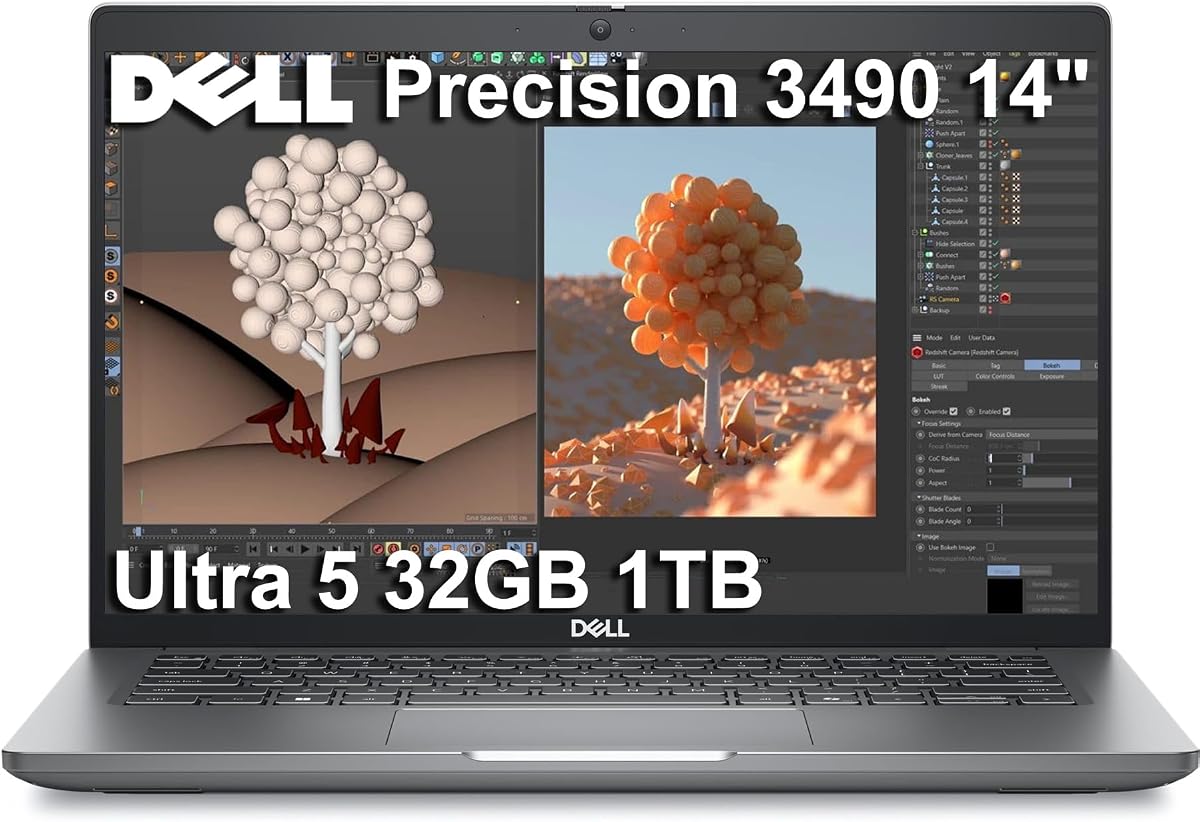
The Dell Precision 3490 marries professional-grade performance with portability to elevate your work-anywhere experience. With a perfect 5.0 rating, it hits the sweet balance between robustness and power without the excessive heft of flagship desktop replacements.
We may earn a commission when you buy through this link, at no additional cost to you.
Powered by the Intel Core Ultra 5 135H Processor and 32GB of DDR5 RAM, it delivers seamless multitasking and reduced load times. The 14-inch FHD display is vibrant, and connectivity options support up to three external monitors for expanded workspace.
While the screen is smaller than 16-inch models, its lightweight design makes it ideal for consultants and architects on the move. The built-in webcam with privacy shutter ensures clear communication during remote meetings and collaboration.
If you need a single, powerful workstation that you can carry comfortably to client sites, this is the ideal choice. It provides reliable performance for CAD design and general productivity without the weight penalty.
Weighing just 3.09 lbs, this laptop offers a sweet balance of power and portability for frequent travelers.
The Intel Core Ultra 5 processor includes AI-assisted productivity features to boost workflow efficiency and reduce load times.
We may earn a commission when you buy through this link, at no additional cost to you.
The Dell Precision 7780 showcases a high-end workstation design with powerful, scalable capabilities aligned with the Dell Pro Max series. Rated 5.0 stars, it features a 17.3-inch display that delivers sharp, vivid visuals essential for professional color work.
We may earn a commission when you buy through this link, at no additional cost to you.
With the NVIDIA RTX 4000 Ada 12GB GPU and 32GB DDR5 CAMM RAM, this machine provides top-tier performance for 3D rendering and design. The 500-nit brightness and 99% DCI-P3 color gamut ensure accurate representation of creative projects.
Connectivity allows for up to four external monitors, enabling flexible multi-screen setups for complex engineering tasks. The full-size keyboard with numeric keypad boosts productivity during long sessions of data entry or modeling.
Professionals in design and architecture who demand the best visuals and stability will find this laptop unmatched. It justifies its weight and cost with superior hardware that handles intensive workloads without compromise.
The 17.3-inch FHD display with 500-nit brightness ensures sharp and vivid visuals even in bright work environments.
The NVIDIA RTX 4000 Ada 12GB GPU delivers the stability and speed required for high-end design and photography workflows.
We may earn a commission when you buy through this link, at no additional cost to you.
Positioned at the apex of the Precision lineup, this 7680 model features the NVIDIA RTX 2000 Ada 8GB GPU to deliver robust performance for professionals in design and engineering. It supports demanding workflows like CAD design and video editing.
We may earn a commission when you buy through this link, at no additional cost to you.
Powered by the Intel Core i7-13850HX processor and 32GB of DDR5 RAM, it ensures seamless multitasking and fast storage. The anti-glare display delivers crisp visuals, and the connectivity options allow for four external monitors at 4K resolution.
While the user rating is moderate, the inclusion of 2TB storage and reliable ISV certifications makes it a practical choice for those needing large project storage. It supports durability across office and on-site environments.
Engineers requiring a balance of storage and processing power will appreciate this configuration. It provides the stability needed for complex simulations and content creation tasks effectively.
With a 2TB PCIe NVMe SSD, you have fast and fast storage for large design files and datasets.
Support for four external monitors enables flexible multi-screen setups essential for detailed engineering workflows.
We may earn a commission when you buy through this link, at no additional cost to you.
This configuration of the Precision 7780 Mobile Workstation features an incredible 128GB of DDR5 RAM, making it ideal for data science and complex computations. Rated 5.0, it pairs this memory with a 24-Core Intel processor and RTX 4000 graphics.
We may earn a commission when you buy through this link, at no additional cost to you.
The 17.3-inch display with 500-nits brightness offers a wide viewing angle and excellent comfort for long work sessions. Windows 11 Pro provides enterprise features, and the system includes a comprehensive connectivity suite for versatile connections.
While the SSD is 512GB, the massive RAM capacity allows for heavy multitasking and virtualization tasks without bottlenecks. This machine is built for power users who need desktop-level performance in a mobile chassis.
Architects and developers handling massive datasets or virtual machines will find this system unparalleled. It prioritizes memory and compute power above all else for the most demanding professional workloads.
The 128GB DDR5 RAM ensures seamless multitasking even for the most complex engineering and data science applications.
The design supports high-performance processors and GPUs with efficient thermal management for sustained workloads.
We may earn a commission when you buy through this link, at no additional cost to you.
This Dell Precision 7680 model leverages AI to optimize system performance for key applications, enabling accelerated workflow efficiency. With 64GB of DDR5 RAM and 2TB storage, it handles massive design files effortlessly.
We may earn a commission when you buy through this link, at no additional cost to you.
The NVIDIA RTX 2000 Ada 8GB GPU delivers robust performance for engineering tasks, while the anti-glare display ensures comfortable viewing. It supports four external monitors, which is crucial for complex multi-view design projects.
The keyboard includes a dedicated numeric keypad, boosting productivity during data-heavy tasks. With a perfect 5.0 rating, it is praised for its dependability and support for advanced professional workflows in various environments.
Engineers who need a blend of memory, storage, and graphics power will find this configuration ideal. It balances the needs of content creation and CAD rendering with reliable enterprise-grade features.
A full-size keyboard with a dedicated numeric keypad boosts productivity and convenience for entering data accurately.
The ability to connect four external monitors supports flexible multi-screen setups for detailed engineering work.
We may earn a commission when you buy through this link, at no additional cost to you.
The ThinkPad P16s Gen 4 combines the larger workspace of a 16-inch display with a more portable design than heavier performance-focused workstations. Rated 4.0, it delivers a balanced mix of mobility, reliability, and workstation-class capability.
We may earn a commission when you buy through this link, at no additional cost to you.
Powered by the Intel Core Ultra 7 255H processor, it ensures swift application loading and ample storage for professional workloads. The 16-inch display maximizes screen real estate, and connectivity supports three external monitors for expanded workflow.
It handles demanding home office workflows including multi-app multitasking and large file management efficiently. The inclusion of Wi-Fi 7 ensures fast and reliable connections for cloud work and wireless devices without lag.
Business owners and architects seeking a lighter workstation will appreciate this balance. It supports CAD and engineering tasks while remaining portable enough for daily transport to meetings or job sites.
This laptop offers a balanced mix of mobility, reliability, and workstation-class capability for CAD and creative work.
Wi-Fi 7 and Bluetooth 5.4 provide fast and reliable connections for cloud work and wireless devices without lag.
We may earn a commission when you buy through this link, at no additional cost to you.
Selecting the right laptop for computer-aided design involves understanding key technical specifications that directly impact your workflow. This guide breaks down the essential factors to consider so you can find a machine that meets your professional needs.
For CAD work, the central processing unit (CPU) is critical for handling complex calculations and rendering tasks. Look for multi-core processors like Intel Core i7 or i9 series, or Ultra series, which offer higher clock speeds and better multitasking capabilities.
Prioritize models with at least 12 cores to ensure smooth operation during heavy design projects and background processes.
Dedicated graphics cards significantly enhance performance for 3D modeling and rendering. Professional GPUs like NVIDIA RTX Ada series are optimized for stability with CAD software, offering certified drivers that reduce crashes.
Ensure the GPU has sufficient VRAM, ideally 6GB or more, to handle large textures and complex geometries without slowdown.
Memory is essential for running multiple applications simultaneously, such as CAD software alongside web browsers and communication tools. 32GB of DDR5 RAM is recommended for comfortable multitasking and handling large design files.
For extensive projects involving simulations or AI, consider models offering 64GB or more to prevent bottlenecks during peak usage.
A high-quality display is vital for precision work. Look for Full HD or higher resolution with anti-glare coatings to reduce eye strain. Brightness levels above 400 nits ensure visibility in various lighting conditions.
Choose a screen with accurate color coverage if your work involves visualization or client presentations to maintain fidelity.
Fast storage is crucial for quick load times of large project files and operating system responsiveness. PCIe NVMe SSDs are standard, but aim for capacities of 1TB or more to store extensive libraries and assets.
Additional storage slots allow for future upgrades, which is beneficial as your project archives grow over time.
ISV (Independent Software Vendor) certifications ensure that the hardware works reliably with specific professional software like AutoCAD or Revit. These certifications guarantee optimized performance and stability for your key tools.
Always check for these certifications to avoid potential compatibility issues or crashes during critical design phases.
If you travel to job sites, durability matters. Look for MIL-STD-810H testing ratings to ensure the device can withstand physical stress. However, balance this with weight if portability is a priority.
Lighter models under 4 lbs are better for daily commuting, while heavier desktop replacements offer more cooling and power for stationary work.
Versatile ports are necessary for connecting external monitors, mice, and projectors. Thunderbolt 4 and HDMI ports allow for flexible multi-screen setups which improve productivity.
Ensure the laptop includes Ethernet or robust Wi-Fi capabilities to maintain stable connections in diverse work environments.
To maximize performance, keep your software drivers updated and use the manufacturer's support app to manage system settings. This ensures that your hardware components like the GPU and processor are running efficiently for your specific design applications.
Proper thermal management is essential for these powerful machines. Use the laptop on a hard, flat surface to allow air vents to function correctly, and consider a cooling pad if you are working on intensive rendering tasks for extended periods.
Regularly back up your design files to external drives or cloud storage to protect against data loss. Additionally, calibrate your display occasionally to maintain color accuracy, which is crucial for professional presentation and visualization work.
For most CAD applications, 32GB of RAM is recommended to handle large files and multitasking comfortably. If you work with complex 3D models or simulations, upgrading to 64GB can provide additional headroom and prevent slowdowns during intensive operations.
Integrated graphics are generally insufficient for professional 3D modeling as they lack the dedicated memory and processing power needed for rendering. Dedicated GPUs like NVIDIA RTX series are essential for smooth performance and stability with CAD software.
ISV certifications ensure that the hardware is tested and optimized to work seamlessly with specific professional software. Choosing certified laptops reduces the risk of crashes and ensures you get the best performance from your design tools.
Full HD (1920×1080) or higher resolutions are ideal for detailed design work to ensure sharp lines and text. Anti-glare coatings are also important to reduce reflections and eye strain during long sessions at the workstation.
Yes, most professional workstations support multiple external monitors via HDMI and Thunderbolt ports. This capability allows you to expand your workspace for better multitasking and workflow efficiency while designing or reviewing projects.
Battery life is a compromise on high-performance workstations due to power-hungry components. Prioritize models with robust battery life if you need to work on-site, but expect to use power adapters for heavy rendering tasks to maintain full performance.
The Dell Precision 7680 stands out as our top choice for balancing flagship performance with professional reliability. It offers the power needed for complex projects while maintaining the stability required for critical engineering workflows.
When selecting a machine, prioritize processor speed and graphics capabilities based on your specific software needs. Ensure that your chosen model has ISV certifications to guarantee compatibility with your essential design tools.
Remember that configurations and availability can change frequently, so verify the exact specifications before finalizing your purchase. This ensures you get the precise system that meets your technical requirements for computer-aided design.