
Dell 24 Plus Monitor
4.7Editor score
144Hz Refresh Rate
1ms MPRT Response
Integrated 3W Speakers
Choosing the right monitor for CS2 is critical for competitive players who demand speed and clarity. A high refresh rate and low response time ensure that every movement and shot is registered instantly, giving you a edge in fast-paced matches.
We analyzed ten leading monitors based on their performance metrics, panel technology, and user feedback. Our selection covers a wide range of budgets and preferences, from affordable entry-level displays to premium OLED screens designed for professional esports environments.
Each pick highlights specific strengths and trade-offs to help you find the perfect match for your setup. Please note that pricing and availability can change frequently, so we recommend checking the latest deals before making your final purchase decision today.
4.7Editor score

4.6Editor score

4.7Editor score
As an Amazon Associate we earn from qualifying purchases.
This side-by-side comparison highlights the key specifications and features of each monitor to help you quickly identify which model best fits your gaming needs and budget constraints.





This monitor stands out as the top choice for competitive CS2 players due to its OLED technology. It delivers a stunning visual experience with true blacks and vibrant colors that make spotting enemies easier.
We may earn a commission when you buy through this link, at no additional cost to you.
The 240Hz refresh rate combined with a 0.03ms response time ensures that every movement is rendered smoothly without ghosting. This level of performance is critical for fast-paced tactical shooters where split-second reactions matter.
While the price is higher than traditional LCDs, the investment pays off in visual fidelity and speed. The OLED Care Pro technology helps mitigate burn-in risks, making it safer for long gaming sessions.
If you prioritize performance above all else and have the budget for it, this ASUS monitor is the ultimate upgrade for your CS2 setup. It offers a premium experience that justifies the cost for serious gamers.
OLED panels provide infinite contrast ratios and perfect blacks which enhance visibility in dark corners of maps where enemies might hide.
ASUS includes OLED Care Pro with a proximity sensor to reduce burn-in risk by switching to a black screen when you step away.
We may earn a commission when you buy through this link, at no additional cost to you.
Samsung joins the OLED race with a QD-OLED panel that offers even brighter colors than standard OLEDs. This is a top-tier option for those who want the best possible visual quality in their games.
We may earn a commission when you buy through this link, at no additional cost to you.
The 240Hz refresh rate ensures fluid motion that is essential for tracking enemies in CS2. The 0.03ms response time eliminates ghosting allowing you to see exactly where your opponent is moving.
The Glare Free Technology is a significant addition that reduces reflections from room lighting. This makes the screen easier to view in various environments without needing to dim the lights completely.
This monitor is perfect for enthusiasts who want a blend of performance and visual beauty. If you can afford it and need a screen that excels at both gaming and media, this is a standout choice.
QD-OLED technology delivers over 2000 lifelike colors and accurate skin tones for a rich and immersive viewing experience.
Glare Free Technology minimizes reflections from external light sources keeping the image clear even in brightly lit rooms.
We may earn a commission when you buy through this link, at no additional cost to you.
The Dell 24 Plus offers a fantastic entry point into high refresh rate gaming. It provides smooth visuals at a price point that is accessible to almost any gamer looking to upgrade from a basic screen.
We may earn a commission when you buy through this link, at no additional cost to you.
With a 144Hz refresh rate and 1ms response time, it handles fast movement well enough for competitive play. The TÜV certification ensures that long hours of gaming won't strain your eyes as much as other budget options.
The included speakers add convenience if you do not have external audio equipment. The stand allows for height and pivot adjustments which helps in finding a comfortable viewing angle during long sessions.
For those on a tight budget or with older hardware, this monitor is an excellent choice. It balances performance and value perfectly making it a highly recommended buy for beginners.
The display is TÜV certified to reduce harmful blue light emissions helping you maintain comfort during extended gaming sessions.
Dual 3W integrated speakers provide sound without the need for extra desk space for separate speakers.
We may earn a commission when you buy through this link, at no additional cost to you.
This Samsung monitor brings a large curved experience to the CS2 arena. The 32 inch size offers a wider view which can help you spot movements at the edges of your screen more effectively.
We may earn a commission when you buy through this link, at no additional cost to you.
The QHD resolution provides crisp details that make textures look sharper. While it is not the fastest on the list the 165Hz refresh rate ensures that gameplay remains fluid and responsive enough for competitive matches.
The 1000R curve wraps around your field of vision to reduce distractions. This design helps keep you focused on the center of the screen where the action typically happens in tactical shooters.
It is a great option for players who prefer a larger field of view and immersive feel. If you want to step up in screen real estate without spending a fortune this model delivers solid performance.
The 1000R curved display fills your peripheral vision to reduce external distractions and enhance focus on the game.
QHD resolution offers 1.7x pixel density of Full HD for razor sharp and highly detailed visuals.
We may earn a commission when you buy through this link, at no additional cost to you.
The ZZA monitor offers a rare combination of 240Hz speed and affordability. This makes it an attractive choice for players who want high refresh rates without paying premium prices for top-tier brands.
We may earn a commission when you buy through this link, at no additional cost to you.
The 2800R curve provides a gentle wrap that enhances immersion without being too aggressive. It helps align the screen with your natural field of view making it easier to track moving targets.
With 120% sRGB coverage colors appear vivid and engaging. This adds a bit of extra pop to the game graphics which can make the experience feel more dynamic during matches.
If your priority is raw speed on a budget this monitor delivers on that promise. It is a solid option for budget-conscious gamers who refuse to compromise on refresh rate performance.
The 240Hz refresh rate ensures silky smooth gameplay that eliminates motion blur for a competitive edge in FPS games.
With 120% sRGB color gamut the display offers vivid colors that outperform standard monitors in everyday use.
We may earn a commission when you buy through this link, at no additional cost to you.
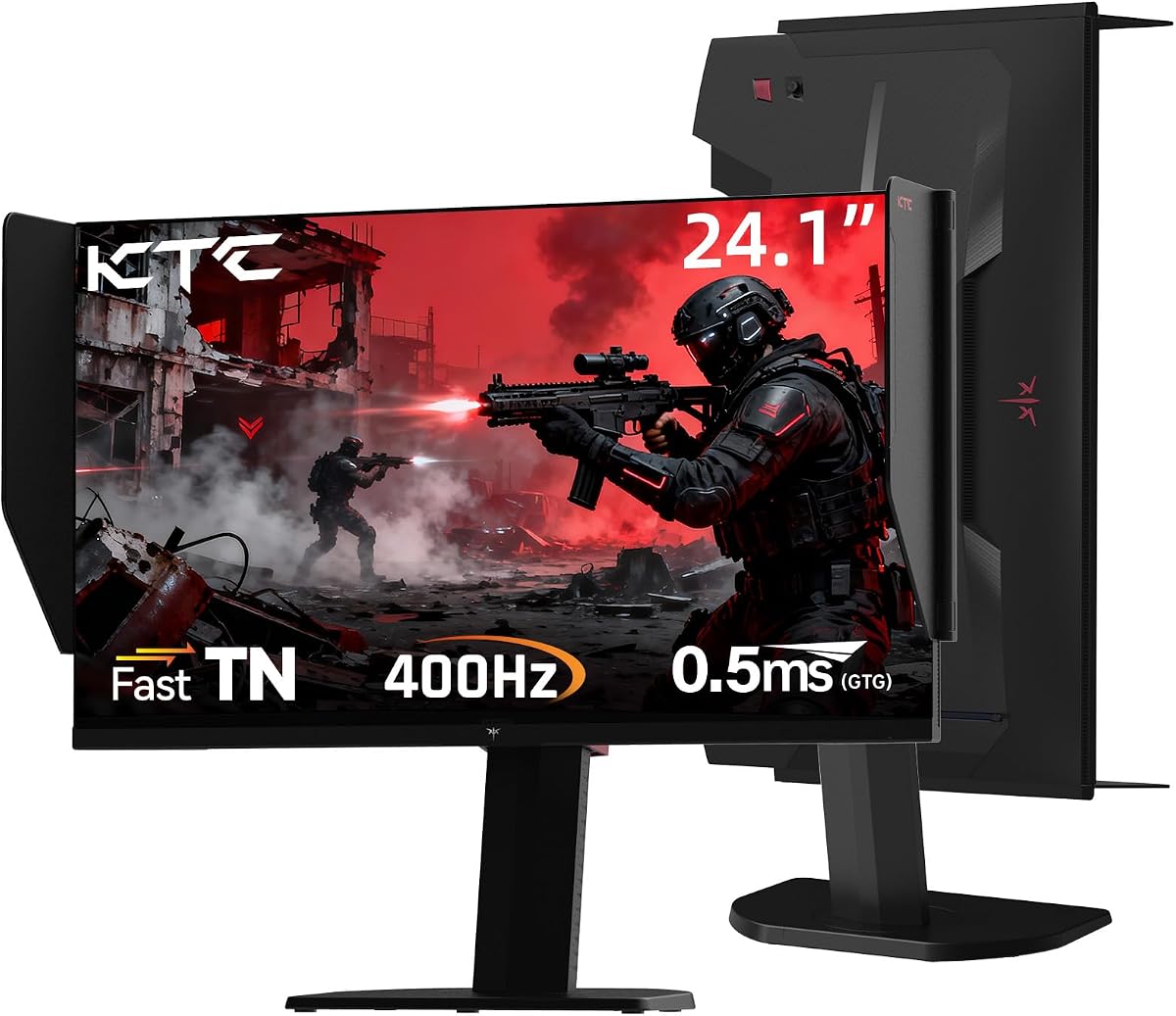
The KTC monitor is designed for players who demand the absolute fastest response times. With a 400Hz refresh rate it pushes the boundaries of what is possible for motion clarity on a desktop display.
We may earn a commission when you buy through this link, at no additional cost to you.
The TN panel ensures rapid pixel transitions which eliminates ghosting. While colors may not be as vibrant as IPS or OLED the speed is unmatched for tracking high speed targets in CS2.
A shielding hood is included to block reflections and improve contrast. This feature helps maintain focus on the game by reducing distractions from ambient light sources in the room.
This monitor is ideal for competitive players who prioritize reaction time over visual fidelity. If you play on high end PCs and need the fastest input possible this model is a strong candidate.
Fast TN panel with 0.5ms GTG response eliminates ghosting and input lag for ultimate speed in competitive esports titles.
The shielding hood helps eliminating frame reflections by absorbing light enhancing visual immersion and image contrast significantly.
We may earn a commission when you buy through this link, at no additional cost to you.
The Sceptre monitor is a compact solution for those with limited desk space. It brings 144Hz gaming to a smaller footprint making it easy to fit into tight setups without losing performance.
We may earn a commission when you buy through this link, at no additional cost to you.
Built-in speakers allow for immediate audio without extra cables. The Blue Light Shift technology helps reduce eye strain which is beneficial if you spend many hours in front of the screen daily.
While the screen is small it still delivers a responsive gaming experience. The minimal bezel design helps reduce distractions and allows you to focus entirely on the game content.
This is a great choice for secondary setups or budget builds. It offers a reliable entry point into gaming monitors without demanding too much money from your budget.
Blue light shift technology reduces harmful blue light emissions to help alleviate eye strain during long hours of use.
Minimal bezel design and compact size ensure undivided attention and save desk space for a clean setup.
We may earn a commission when you buy through this link, at no additional cost to you.
This portable monitor is a unique option for gamers who need flexibility. It allows you to take your CS2 experience on the go without sacrificing too much visual quality or smooth motion.
We may earn a commission when you buy through this link, at no additional cost to you.
The 120Hz refresh rate ensures that gameplay remains fluid even on a smaller display. The wide color gamut provides vivid visuals that make the gaming experience more immersive than standard portable screens.
USB-C connectivity makes it easy to plug into laptops or handheld devices instantly. This flexibility is perfect for LAN parties or traveling where a fixed monitor is not available.
While not a replacement for a desk setup it is a great supplementary tool. It delivers a solid gaming experience in a package that fits easily in a backpack for travel.
Slim and lightweight design fits easily in a backpack making it perfect for travel and outdoor gaming sessions.
120Hz refresh rate eliminates motion blur and ghosting for precise visual feedback in fast paced games.
We may earn a commission when you buy through this link, at no additional cost to you.
The Samsung S30GD offers a reliable IPS panel with consistent colors. This makes it a good choice for players who value image quality alongside gaming performance in their daily use.
We may earn a commission when you buy through this link, at no additional cost to you.
Viewing angles are excellent allowing you to see the screen clearly from any position. The slim border bezels give it a modern aesthetic that looks great on any desk setup.
Eye comfort technology reduces blue light to keep you comfortable over time. Game Mode helps adjust settings so you can see details clearly without needing complex manual adjustments.
This is a well rounded option for general gaming and work. If you want a screen that looks good and performs well for most tasks this model is a safe bet.
IPS panel keeps colors bright and clear across the screen even when you change angles for better visual fidelity.
Reduced blue light and screen flicker protect your vision so you can stay focused for longer periods.
We may earn a commission when you buy through this link, at no additional cost to you.
This monitor introduces curve technology at a very accessible price. The 27 inch size gives you plenty of room to see game details while the curve wraps around you for immersion.
We may earn a commission when you buy through this link, at no additional cost to you.
The 100Hz refresh rate reduces motion blur and lag enough for casual competitive play. It balances smoothness with affordability making it a strong contender for budget builds.
Advanced eye comfort tech minimizes flicker and blue light. This helps you stay focused on gameplay for longer periods without feeling fatigued by the end of a session.
It is a solid choice for those wanting a curved screen without spending much. If you need a larger display for general use this model offers good value and features.
Curved monitor wraps around your field of vision to enhance depth perception and minimize peripheral distraction.
TÜV certified eye comfort technology reduces eye strain by minimizing blue light and screen flicker during use.
We may earn a commission when you buy through this link, at no additional cost to you.
Selecting the right monitor involves understanding key technical specs that impact gaming performance. This section breaks down the most important factors to consider before you buy.
Refresh rate measured in Hertz determines how many frames per second the monitor can display. For CS2 a high refresh rate of 144Hz or higher ensures smooth motion and reduces visual stutter.
Higher refresh rates allow you to react faster to enemy movements. Aim for at least 144Hz for competitive play to gain a visible advantage in fast scenarios.
Response time indicates how quickly a pixel can change color. A lower response time reduces ghosting and motion blur making moving targets clearer.
Look for monitors with 1ms or lower response time. This ensures that your screen keeps up with the rapid action in CS2 without trailing effects.
Resolution defines the number of pixels on the screen. Higher resolutions like QHD provide sharper images but require a more powerful graphics card.
FHD is sufficient for high frame rates on mid-range systems while QHD offers better clarity. Choose based on your GPU power and preference for detail.
Panel types like IPS OLED and TN each have unique benefits. IPS offers better colors TN is faster and OLED provides perfect blacks and contrast.
Choose OLED for image quality or TN for pure speed. IPS is a balanced choice for those who mix gaming with other tasks.
Monitor size affects your field of view and desk usage. Larger screens provide immersion but may require more head movement.
24 to 27 inches is the sweet spot for esports. This size keeps critical elements within easy view without excessive scanning.
Gaming sessions can be long and hard on the eyes. Features like blue light filters and flicker-free technology help reduce strain.
Look for certifications like TÜV for eye comfort. These features ensure you can play longer without discomfort.
Modern monitors offer various ports for connecting to consoles or PCs. Ensure the monitor has HDMI and DisplayPort options for your setup.
DisplayPort is often needed for higher refresh rates. Verify your cables support the speed you need for optimal performance.
Adjustable stands help you position the screen at eye level. Height tilt and swivel options allow for a comfortable viewing position.
Proper ergonomics prevent neck strain during long sessions. A flexible stand is essential for maintaining good posture.
To get the best performance from your new monitor ensure your graphics card is connected via DisplayPort. This connection supports higher refresh rates than HDMI on many models.
Calibrate your display settings using the on-screen menu. Adjust brightness and color to reduce eye strain and ensure enemies are clearly visible in all lighting conditions.
Clean the screen regularly with a microfiber cloth to remove dust and smudges. Avoid harsh chemicals that could damage the coating and ensure you keep the vents clear for heat dissipation.
Yes 144Hz is a solid baseline for CS2 and provides a significant upgrade from standard 60Hz monitors. It offers smooth motion and responsiveness that is suitable for competitive play without requiring top-tier hardware.
Modern OLED monitors include advanced protection features like pixel shifting to reduce burn-in risk. While long static screens can cause issues gaming with changing visuals is generally safe for modern OLED panels.
For CS2 a refresh rate of 240Hz is ideal for competitive edge but 144Hz is also very capable. Higher rates reduce motion blur further allowing for more precise tracking of fast moving targets.
Most monitors are compatible with laptops via HDMI or USB-C. Ensure your laptop outputs the required resolution and refresh rate to take full advantage of the monitor capabilities.
Curved screens can enhance immersion by wrapping the view around you. However flat screens are often preferred for precision aiming as they avoid edge distortion.
Yes you should use a high-speed DisplayPort or HDMI cable to support high refresh rates. Using an older or low-bandwidth cable may limit your monitor to lower refresh rates.
A 27 inch monitor is standard for gaming and offers a good balance between size and detail. It is large enough for immersion but still fits comfortably on most desks without excessive movement.
Prioritize refresh rate and response time for gaming performance. These specs directly impact how quickly you see and react to game events in CS2.
We reviewed ten monitors ranging from budget friendly options to premium OLED displays. Each model offers distinct benefits depending on your budget and performance needs.
Consider your budget and setup space when choosing. High refresh rates are key for CS2 but resolution and color quality also matter for overall experience.
Prices fluctuate frequently so check the latest deals before buying. Your best choice will depend on current availability and specific personal gaming preferences.