
Iota C70 BK Curve
4.3Editor score
270 degree curved panoramic view
Digital temperature display included
Pre-installed four fans
Explore our expert guide comparing the top 10 PC cases with curved glass to find the perfect chassis for your next build and stunning display.
Building a custom PC today means prioritizing aesthetics alongside performance. Curved glass cases offer a seamless view of your components without harsh edges. They transform your setup into a visual centerpiece that impresses anyone walking by the desk.
We evaluated ten leading models based on airflow, compatibility, and build quality. Each option supports modern hardware including high-end GPUs and back-connect motherboards. Our analysis highlights thermal performance and ease of installation for every builder level.
Each pick showcases specific strengths like panoramic views or modular designs. Prices fluctuate frequently so verify current costs before purchasing. We aim to help you select the right chassis for your unique gaming or workstation needs today.
4.3Editor score

4.6Editor score

5.0Editor score
This table provides a quick side-by-side look at key specifications for every model reviewed. Use it to compare dimensions, cooling support, and special features before making your final decision.




The JONSBO TK-3 Black stands out as a top contender for builders seeking a panoramic view without breaking the bank. With a rating of 4.6 stars it delivers exceptional value through its one-piece curved glass design that eliminates column interruptions. This model supports modern standards including BTF motherboards and massive GPUs making it future-proof.
We may earn a commission when you buy through this link, at no additional cost to you.
Its cooling system is impressive allowing for dual 360 AIO radiators and ten fan positions throughout the chassis. The vertical upward path prevents heat accumulation ensuring your components run cool under heavy loads. The separated cabinet case design simplifies installation and improves airflow dynamics significantly for high-performance builds.
While the glass includes a protective film that users should not tear off initially the build materials feel slightly light compared to premium options. However this trade-off is acceptable given the price point and feature set. The ease of cable management adds to the overall user experience during assembly.
We recommend this case for enthusiasts who want a clean look and robust cooling at a reasonable price. It fits well in most setups and supports the latest hardware trends. The combination of style and functionality makes it a smart choice for your next PC upgrade.
The one-piece curved glass offers a column-less display that showcases your hardware beautifully without visual breaks.
Support for BTF motherboards and 40 series GPUs ensures this case remains relevant for years to come.
We may earn a commission when you buy through this link, at no additional cost to you.
The darkFlash L280 distinguishes itself with a digital display for real-time CPU and GPU temperature monitoring. This feature appeals to users who want constant visibility into system health without extra software. The three-glass design creates an immersive viewing experience that wraps around your components effectively.
We may earn a commission when you buy through this link, at no additional cost to you.
Spacious interior layout accommodates large 410mm GPUs and 360mm radiators comfortably. The snap-on design and ample room for work make assembly straightforward even for beginners. Dust filters help keep components clean while optimization holes on the back panel enhance airflow and stability.
Although the RGB hub is not included which requires a separate purchase the pre-installed fans provide decent initial lighting. Users should verify cable compatibility for the display module. The build quality offers a nice balance of elegance and functionality for gaming setups.
This case is ideal for gamers who prioritize system metrics and visual flair. It handles modern hardware well and provides a unique look with the digital screen. Consider checking compatibility with your specific motherboard before purchasing to ensure full functionality.
Track temperatures and usage in real-time with the integrated digital display for better performance tuning.
Three side glass panels offer a full view of your build from multiple angles for maximum aesthetic impact.
We may earn a commission when you buy through this link, at no additional cost to you.
The CORSAIR Frame 4500X delivers a stunning single-piece curved glass panel that provides an unobstructed wraparound view. This design choice ensures your hardware is the main focus without any bezels interrupting the display. It holds a 4.6 rating reflecting strong user satisfaction with its unique aesthetics.
We may earn a commission when you buy through this link, at no additional cost to you.
The FRAME modular system allows for extensive customization including changing the motherboard tray or swapping components. Reverse-rotor RGB fans blow cool air into the case while keeping LEDs visible for a clean effect. InfiniRail mounting gives unmatched flexibility for fan placement to target hot spots.
While it ships with only three fans and no RGB hub users might need to buy extras for full cooling. The price is higher than budget options but the build quality and innovation justify the cost. Cascading industrial design adds a unique look distinct from standard cases.
We recommend this case for enthusiasts who value customization and premium materials. The ability to adapt the chassis to different needs makes it a versatile long-term investment. If you want a truly standout PC build this model is a top contender.
Upgrade components like the PSU shroud or side fans easily with the revolutionary FRAME system.
Reverse-rotor fans and InfiniRail mounting ensure efficient cooling without blocking your view of the interior.
We may earn a commission when you buy through this link, at no additional cost to you.
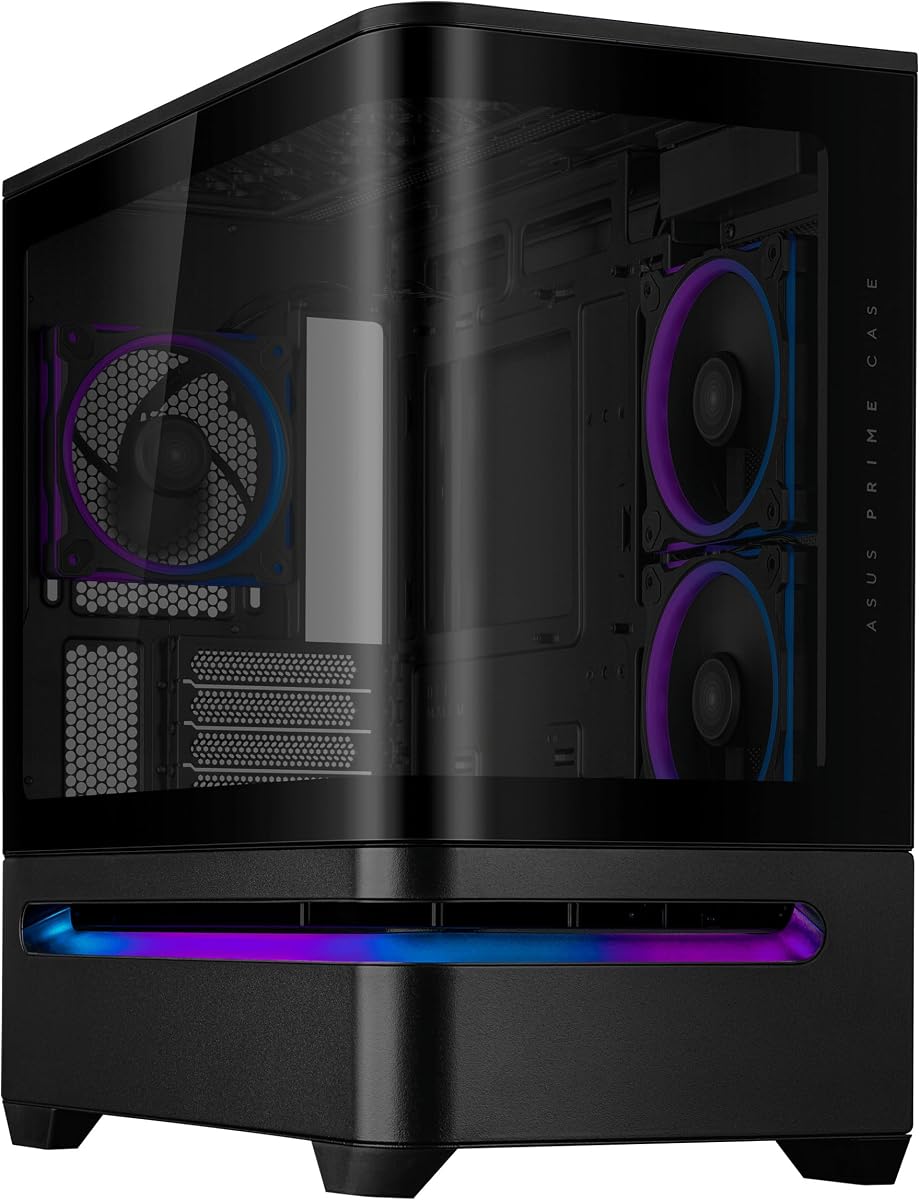
The ASUS Prime AP202 is designed for Micro-ATX builders needing a compact case with high aesthetics. Its curved tempered glass panel extends seamlessly from front to side offering a panoramic view of components. This case earns a strong 4.7 rating for its build quality and thoughtful design features.
We may earn a commission when you buy through this link, at no additional cost to you.
Easy-detach rails make panel removal and reattachment safe and simple for maintenance. The patented slot vent provides optimal graphics card cooling while maintaining airflow efficiency. Integrated ARGB light bands work seamlessly with Aura Sync for synchronized lighting effects across compatible hardware.
Limitations include Micro-ATX only support which may not fit larger motherboards. Additionally no fans are included so you must purchase them separately. Despite these constraints the case offers excellent thermal performance and visual appeal for smaller setups.
This case suits users prioritizing size without sacrificing style. It fits well in constrained spaces while still looking professional and modern. Consider your motherboard size and cooling needs before finalizing this purchase for your gaming or work PC.
Compact Micro-ATX footprint allows placement on smaller desks without losing premium features or looks.
Built-in ARGB bands sync with Aura Sync to create a cohesive lighting scheme across your system.
We may earn a commission when you buy through this link, at no additional cost to you.
The Antec C8 Curve Wood brings a unique twist to PC cases with its exotic wood front panel and curved tempered glass. This combination offers a warm and sophisticated look that stands out from typical black or steel chassis. It supports E-ATX boards and Back-Connect motherboards for high-end builds.
We may earn a commission when you buy through this link, at no additional cost to you.
Its dual chamber design and spacious interior allow for thick 360mm radiators on top bottom and side simultaneously. The full cut-out at the bottom with interchangeable brackets offers flexibility for air intake and cable management. This level of customization appeals to builders who want precise control.
Keep in mind that no fans are included so budget for additional purchases to achieve optimal cooling. The wood material also adds weight which could affect mobility. However the visual impact is unmatched for those seeking a premium aesthetic.
We suggest this case for enthusiasts who want a statement piece for their setup. It combines classic materials with modern thermal capabilities for a unique blend. Ensure your room has enough floor space to accommodate its full tower size comfortably.
Exotic wood front panel offers a unique natural look that blends modern tech with classic design.
Dual chamber design allows simultaneous radiator support for maximum cooling performance in large builds.
We may earn a commission when you buy through this link, at no additional cost to you.
The JONSBO TK-3 White offers the same exceptional features as the black version but in a clean white finish. It achieves a 4.8 rating reflecting high user satisfaction with its aesthetics and performance. The one-piece curved glass design delivers a stunning display of hardware without columns.
We may earn a commission when you buy through this link, at no additional cost to you.
Support for dual 360 AIO radiators and BTF motherboards makes this case versatile for various builds. The 10 fan positions allow extensive cooling options while vertical paths prevent heat accumulation. Easy installation and separated cabinet design simplify the build process significantly for users.
White cases can show dust more easily requiring frequent cleaning to maintain their pristine look. The protective film on the glass should be left intact until installation is complete. These minor cons are outweighed by the case's robust features and price point.
We recommend this case for white-themed builds wanting premium features without high costs. It fits both gaming and professional setups well while maintaining a sleek appearance. The combination of style and function makes it a smart choice for many users.
Premium white finish creates a bright and modern look that enhances any room setup visually.
Support for BTF boards and large GPUs ensures this case fits the latest hardware standards easily.
We may earn a commission when you buy through this link, at no additional cost to you.
The Iota C70 BK Curve delivers impressive features at a budget price making it accessible for many builders. It includes a real-time temperature display and four pre-installed fans ready for use. The 270 degree panoramic view offers excellent aesthetics without a high cost.
We may earn a commission when you buy through this link, at no additional cost to you.
The tool-free installation and snap-on glass design simplify assembly significantly. Dust filters on top and bottom protect internal components effectively. With support for ATX MATX and ITX boards it offers broad compatibility for various system configurations.
While the metal quality is basic compared to premium cases it remains robust for daily use. Fan noise might be noticeable depending on settings but is manageable. These trade-offs are acceptable given the low price point and feature set.
We recommend this case for budget-conscious builders needing reliable cooling and looks. It handles standard gaming components well and offers good value for money. Ideal for those entering the custom PC space without breaking the bank.
Pre-installed fans and tool-free design reduce additional costs and setup time for new builders.
Digital display module helps track temperatures easily without needing extra hardware or software tools.
We may earn a commission when you buy through this link, at no additional cost to you.
The Thermaltake Vision 330 CR ARGB includes six infinity ARGB fans for a fully lit build out of the box. Its hidden connector support helps route cables cleanly for a clutter-free appearance inside. The curved hinged tempered glass panel adds to the open and spacious viewing angles.
We may earn a commission when you buy through this link, at no additional cost to you.
Tool-free tear down using push clips makes panel removal and installation simple. It accommodates GPUs up to 420mm and radiators up to 360mm providing plenty of build space. This makes it a solid choice for high-end hardware needs.
Users may find fan noise higher than expected due to the included set. Assembly complexity can vary based on experience with cable management. Still the included fans and hidden support offer significant value for the price.
We recommend this case for users wanting full RGB lighting without buying extra fans. It supports modern motherboard styles well and offers great expansion potential. Consider sound dampening if noise levels are a concern.
Six infinity fans provide complete lighting coverage and cooling out of the box for convenience.
Hidden connector support enables a tidy interior look by reducing visible cable clutter effectively.
We may earn a commission when you buy through this link, at no additional cost to you.
The ASUS Prime AP202 ARGB White Edition offers a compact white solution for Micro-ATX builds. It features a seamless curved glass panel and integrated ARGB light band working with Aura Sync. A 4.4 rating indicates consistent quality and user trust in this model.
We may earn a commission when you buy through this link, at no additional cost to you.
Easy-detach rails simplify maintenance while patented slot vents optimize graphics card cooling. The white finish complements modern setups without needing extra paint or mods. It remains a strong option for small form factor enthusiasts wanting style.
Limitations include Micro-ATX only support and no included fans. Buyers should account for these needs separately. Despite these factors the build quality and aesthetics hold up well against competitors in its class.
We suggest this case for users prioritizing size and white aesthetics. It fits well in smaller spaces while delivering solid thermal performance. Check motherboard compatibility to ensure a perfect fit for your build.
White finish adds modern appeal while keeping the footprint small for limited desk spaces.
Patented vents and rail design ensure efficient airflow and easy maintenance for long-term use.
We may earn a commission when you buy through this link, at no additional cost to you.
The ASUS ROG Cronox White Edition is a premium powerhouse featuring a 9.2-inch LCD screen for system stats. With a perfect 5.0 rating it stands out as the most feature-rich case in this roundup. Its curved tempered glass with aluminum trim offers a seamless internal system view.
We may earn a commission when you buy through this link, at no additional cost to you.
Supreme thermal performance supports up to fourteen 120mm fans and dual 360mm radiators. The rotatable side fan bracket enables flexible airflow channels to match specific cooling needs. Hidden connector support ensures cleaner cable routing for a professional look.
The high price point places it out of reach for budget builders. Screen setup might require additional time and configuration. However the unique visual and functional features justify the investment for serious enthusiasts.
We recommend this case for users wanting a high-end workstation or gaming rig. It combines cutting-edge tech with robust cooling for top-tier performance. Ideal for those prioritizing aesthetics and functionality above all else.
9.2 inch LCD module shows stats and custom visuals directly on the case for a unique interface.
Support for fourteen fans and dual radiators ensures maximum thermal performance for overclocked systems.
We may earn a commission when you buy through this link, at no additional cost to you.
Selecting the right PC case requires balancing aesthetics with practical features. This guide breaks down key factors to consider before making your purchase.
Curved glass panels offer a seamless view of your components. Look for one-piece designs to avoid visual interruptions from columns. Ensure the glass is tempered for safety and durability during installation.
Check if the design allows for easy removal without tools. Panels that slide or snap off make cable management much simpler for most users.
Measure your desk space to ensure the case fits comfortably. Consider height and depth especially if you need room for large GPUs. E-ATX cases require more space but support larger motherboards.
Verify the case dimensions against your motherboard form factor. Micro-ATX cases save space while ATX and E-ATX offer more expansion room.
High-performance hardware needs strong airflow to stay cool. Look for support for large radiators like 360mm or bigger. Check fan positions for intake and exhaust to manage heat effectively.
Pre-installed fans can save money and installation time. Ensure the case supports both air and liquid cooling for flexibility in your setup.
Modern GPUs are getting longer requiring significant internal space. Verify the maximum GPU length supported by the case. Ensure clearance for CPU coolers and power supply units as well.
Allow extra room for future upgrades when choosing dimensions. This prevents bottlenecks and ensures your build remains compatible with new parts.
Good ventilation is critical for stable system performance over time. Look for dust filters on top and bottom to keep internals clean. Mesh panels help air circulate while the glass remains sealed.
Balance glass panels with adequate airflow openings. Too much glass without vents can trap heat and reduce component longevity.
Thick steel panels feel sturdy and reduce vibrations during operation. Check if the chassis has reinforced frames for added stability. Quality hinges and rails ensure panels stay secure over years of use.
Avoid overly light materials that feel cheap. A well-built case protects expensive components and enhances the overall look of your desk setup.
Some cases offer digital displays or RGB hubs built-in. Hidden connector support helps with cable management for a cleaner look. Modular designs allow you to upgrade specific parts later without replacing the case.
Identify which features matter most to your usage. Extra tech can enhance visuals but often adds to the overall cost significantly.
Clean cable routing improves airflow and aesthetics. Look for ample space behind the motherboard tray to hide cables. Velcro ties or zip ties help organize wires neatly.
Tool-free design for panels makes accessing cables easier. Consider the path for power and data cables when choosing a case model.
Always remove protective films from the glass before final assembly. Cleaning the glass with a microfiber cloth prevents scratches during handling. Keep the case on a stable surface to avoid tipping over while working inside.
Regularly check dust filters and clean them to maintain airflow. Use compressed air to blow out dust from fans and heatsinks. This practice prevents overheating and extends the life of your components significantly.
Handle glass panels with care when removing or installing them. Avoid forcing panels that stick by using the provided rails or clips. Store panels in a safe place during shipping to prevent breakage or damage.
Curved glass itself does not hinder cooling if the case includes proper ventilation. Look for mesh panels on the top or bottom to ensure airflow. Most modern cases balance glass aesthetics with effective thermal design.
Yes most models support radiators up to 360mm or more. Check the specific dimensions for top and front mounts before purchasing. Ensure the radiator fits without blocking other components inside.
Use a soft microfiber cloth and avoid harsh chemicals. Clean the glass after removing protective films to prevent residue buildup. Regular dusting helps maintain the clear look without scratches.
Tempered glass is durable and designed to withstand pressure. Handle panels carefully during assembly to avoid cracks. Most cases have reinforced frames to support the glass securely.
Some cases come with pre-installed fans while others do not. Check the product description to confirm what is included. Adding extra fans can improve cooling and lighting if needed.
ATX Mid Tower offers a balance between size and features. Micro-ATX cases save space for smaller desks. E-ATX provides room for high-end components but takes more space.
Our top picks highlight models like the CORSAIR Frame 4500X for modularity and the Iota C70 for budget value. Each case offers unique features to suit different needs and budgets effectively. Choosing the right one depends on your specific build requirements.
Prioritize cooling capacity and compatibility with your hardware components. A stylish case means nothing if it overheats your system. Ensure your chosen model supports your GPU and motherboard size comfortably.
Prices can change frequently so verify current costs before purchasing. Check the links provided for the latest deals and availability. This ensures you get the best value for your PC investment today.