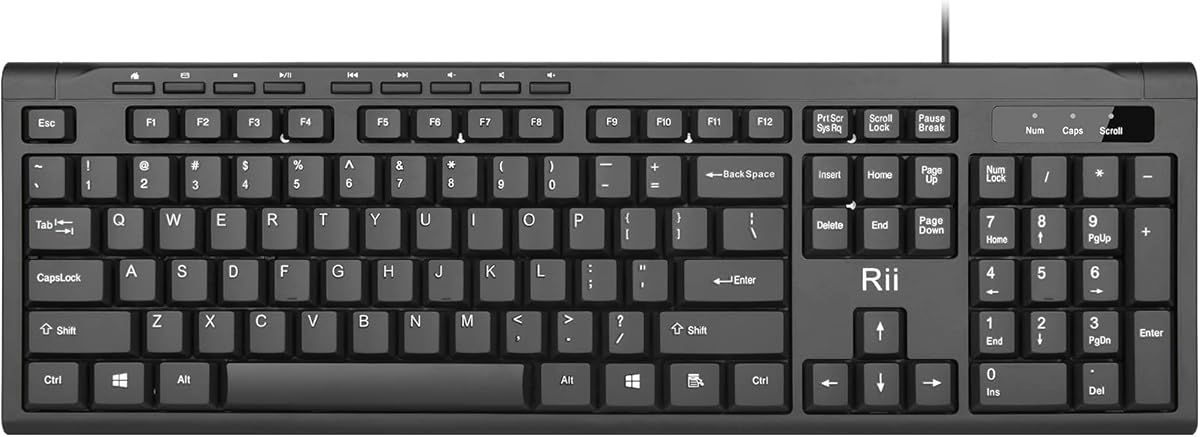
Rii RK907
4.5Editor score
Ultra-slim compact design
Quiet low-profile keys
Plug-and-play USB connection
This guide compares the best lightweight keyboard options for portability and performance, helping you choose the ideal compact typing solution for your
Finding the right lightweight keyboard can transform your daily computing experience. Whether you work from a coffee shop or need a portable setup for travel, a slim device saves space without sacrificing comfort or functionality.
We evaluated ten top models based on build quality, connectivity, battery life, and typing feel. Each product offers unique strengths, from ultra-compact foldable designs to full-size wireless layouts with durable materials.
Every pick includes detailed specs, pros, cons, and real-world insights. Note that prices and availability change frequently, so check current listings before purchasing to ensure you get the best value for your needs.
4.5Editor score

4.3Editor score

4.4Editor score
The following table breaks down key specifications for all ten reviewed models to help you quickly compare size, connectivity, battery performance, and unique features before making a decision.



The GEODMAER 65% Gaming Keyboard earns top marks for combining compact size with solid performance. With a 4.3 rating, users appreciate its balance of portability and functionality for gaming and office work.
We may earn a commission when you buy through this link, at no additional cost to you.
Its wired USB-C connection ensures stable low-latency input, while the LED backlight offers customizable brightness and breathing modes. The 68-key layout includes separate arrow keys, making navigation smoother than on 60% boards.
Trade-offs include the lack of wireless flexibility and a membrane feel that mimics mechanics but lacks true tactile feedback. These are acceptable for budget-conscious users prioritizing desk space and reliability.
This keyboard suits gamers or students needing a small footprint without sacrificing key layout. It is an excellent entry point for compact setups requiring durability and visual flair.
The 65% design removes the numpad but keeps essential navigation keys, freeing up desktop space for mouse movement.
Adjustable backlight modes let users tailor lighting to dark environments or personal aesthetics without draining power.
We may earn a commission when you buy through this link, at no additional cost to you.
The Logitech Pebble Keys 2 K380s stands out for seamless multi-device switching and eco-conscious design. Its 4.3 rating reflects strong user satisfaction with comfort and battery performance.
We may earn a commission when you buy through this link, at no additional cost to you.
Bluetooth connectivity allows quick toggling between three devices, ideal for hybrid workflows. The scooped keys match laptop typing habits, and the included batteries support up to three years of usage.
While the included batteries are convenient, the inability to customize Fn keys without the Logi Options Plus app may limit power users. These constraints are minor for general productivity use.
This keyboard is perfect for users juggling laptops, tablets, and phones. Its slim profile and quiet typing make it suitable for offices and public spaces.
Dedicated Easy-Switch buttons let you toggle between connected devices instantly without re-pairing or apps.
Built with minimum 49% post-consumer recycled plastic, this model aligns with eco-friendly preferences without compromising durability.
We may earn a commission when you buy through this link, at no additional cost to you.
The Arteck 2.4G USB Wireless Keyboard offers a premium full-size typing experience in an ultra-thin form. With a 4.4 rating, it appeals to users needing traditional layouts without bulk.
We may earn a commission when you buy through this link, at no additional cost to you.
Stainless steel construction provides a sturdy feel, while the rechargeable lithium battery supports up to six months per charge. Low-profile keys ensure comfort during extended sessions.
The lack of Bluetooth means it relies solely on a 2.4G USB receiver, which may not fit devices lacking USB-A ports. This limitation is acceptable for desktop and laptop users.
Ideal for home offices needing a reliable, space-saving full-size keyboard. Its durability and long battery life make it a strong value for productivity.
Stainless steel materials give the keyboard a heavy-duty, professional feel that resists wear over time.
A single recharge lasts up to six months with regular use, reducing maintenance and ensuring consistent uptime.
We may earn a commission when you buy through this link, at no additional cost to you.
The ProtoArc XK01 delivers full-size functionality in a travel-friendly foldable package. Its 4.3 rating highlights user appreciation for desktop-like typing on the go.
We may earn a commission when you buy through this link, at no additional cost to you.
The tri-fold design with aluminum hinges ensures portability while maintaining key count. Bluetooth 5.1 supports three-device switching, and USB-C charging provides convenience.
Though heavier than ultra-slim options, the trade-off is worth it for users who need number pads and function keys. The auto-sleep feature extends battery life significantly.
This keyboard suits remote workers and travelers needing complete layouts. Its sturdy build and quiet keys make it ideal for shared environments.
With 105 keys and navigation controls, it replicates a desktop keyboard's capabilities without sacrificing mobility.
Internal hinges are tested for over 10,000 folds, ensuring reliability during frequent packing and unpacking.
We may earn a commission when you buy through this link, at no additional cost to you.
The TECKNET 2.4G Wireless Keyboard balances compact size with essential media controls. Its 4.4 rating reflects strong satisfaction among users seeking simple, reliable typing.
We may earn a commission when you buy through this link, at no additional cost to you.
With media hotkeys and a low-profile chocolate keycap design, it offers smooth, quiet typing. The 2.4G USB connection ensures stable performance within a 32.8ft range.
The unique Enter key layout may require adjustment for standard users, and the need for AAA batteries adds recurring costs. These are manageable trade-offs for portability.
Best suited for home entertainment setups or coffee shop use. Its media controls and lightweight build make it practical for casual and multitasking workflows.
Dedicated hotkeys allow quick access to volume and playback controls without needing extra peripherals.
A 12-month battery life minimizes interruptions, ensuring the keyboard remains ready whenever you need it.
We may earn a commission when you buy through this link, at no additional cost to you.
The Rii RK907 offers exceptional value as an ultra-slim wired keyboard. With a 4.5 rating, it stands out for reliability and simplicity in budget-friendly categories.
We may earn a commission when you buy through this link, at no additional cost to you.
Low-profile keys ensure quiet typing, and the splash-resistant design adds protection for office environments. Its desktop-centric build supports long-term use.
The lack of wireless connectivity limits mobility, making it best for fixed workstations. This constraint is acceptable for users prioritizing cost and durability over portability.
Ideal for offices and home desks needing a straightforward, affordable solution. Its quiet, durable build makes it suitable for daily professional tasks.
Designed for budget-conscious buyers, it delivers essential typing comfort without unnecessary features or high price.
Splash resistance and sturdy construction help withstand accidental spills and frequent use in shared spaces.
We may earn a commission when you buy through this link, at no additional cost to you.
The Logitech MX Keys Mini combines premium smart features with minimalist design. Its 4.4 rating highlights user satisfaction with illumination, ergonomics, and build quality.
We may earn a commission when you buy through this link, at no additional cost to you.
Smart illumination activates on hand approach and adjusts to lighting, while USB-C charging supports up to 10 days on a full charge. The keys are shaped for precise typing.
While expensive, the added convenience of smart features and long-term reliability justify the investment. The reduced battery life with backlight on is a minor drawback.
Perfect for professionals seeking top-tier performance and aesthetics. Its multi-device flow and smart backlight elevate productivity in varied environments.
Backlight automatically adjusts to ambient light and turns on when hands approach, enhancing visibility and energy efficiency.
Keys are shaped to match fingertip contours, reducing strain and improving accuracy during extended typing sessions.
We may earn a commission when you buy through this link, at no additional cost to you.
The ProtoArc XK04 is purpose-built for mobile productivity with a compact two-fold layout. Its 4.4 rating reflects success in providing physical typing for phones and tablets.
We may earn a commission when you buy through this link, at no additional cost to you.
The included PU leather cover protects against scratches while adding style. Bluetooth 5.1 supports switching among three devices, and the 7.8oz weight ensures easy transport.
Its small keycaps and layout are tailored for messaging rather than heavy typing, limiting suitability for large documents. This design choice optimizes mobility over raw output speed.
Best for travelers and commuters needing on-the-go typing. Its protective case and lightweight design make it a practical everyday carry tool.
Key sizes and spacing are tuned for mobile devices, enabling efficient note-taking and messaging without clutter.
A built-in PU leather cover shields keys from damage, removing the need for additional carrying cases.
We may earn a commission when you buy through this link, at no additional cost to you.
This Arteck model offers a sleek stainless steel build paired with full-size functionality. With a 4.4 rating, users value its durability and ergonomic comfort.
We may earn a commission when you buy through this link, at no additional cost to you.
The 2.4G wireless connection ensures stability, and the rechargeable lithium battery provides six months of use per charge. Its ultra-thin profile saves desk space.
The heavier steel construction may not suit ultra-lightweight needs, and Bluetooth is unavailable for multi-device pairing. These trade-offs balance well for fixed setups.
Ideal for users seeking a premium look with practical typing. Its durable build and long battery life suit office and home use.
Stainless steel materials lend a high-end appearance, blending seamlessly into modern workspaces and tech environments.
Rechargeable batteries reduce waste and cost, ensuring reliable performance with minimal charging interruptions.
We may earn a commission when you buy through this link, at no additional cost to you.
The Logitech K400 Plus merges keyboard and touchpad into one device for TV control. Its 4.4 rating highlights user appreciation for seamless entertainment navigation.
We may earn a commission when you buy through this link, at no additional cost to you.
With a large touchpad and dedicated media keys, it simplifies browsing and playback without a separate mouse. Spill-resistant design adds durability for casual use.
Its large size limits portability, and the layout focuses on navigation rather than text entry. This makes it best for living room setups.
Perfect for HTPC users needing remote control. Its battery life and compatibility make it a reliable choice for entertainment systems.
The integrated touchpad replaces the need for a separate mouse, streamlining navigation for smart TVs and streaming devices.
Media keys and layout prioritize volume and playback control, making it ideal for living room media PCs.
We may earn a commission when you buy through this link, at no additional cost to you.
Selecting the right lightweight keyboard involves evaluating factors beyond size. Consider connectivity, battery life, build materials, and your primary use case to find the best fit for your needs.
Wireless options like Bluetooth or 2.4G receivers offer flexibility but require pairing and battery management. Wired USB-C or USB-A connections provide stability and no charging but limit mobility.
Choose wireless for multi-device setups and portability, or wired for gaming and tasks needing zero latency.
Battery performance varies widely between rechargeable and disposable models. Look for features like auto-sleep, low-power modes, and rechargeable USB-C ports to minimize interruptions.
Prioritize keyboards with six-month or longer battery life for travel or office environments where charging access may be limited.
Materials like stainless steel, aluminum hinges, or recycled plastics affect durability and weight. Metal builds feel premium but add weight; plastics offer lightness but may feel less robust.
Select materials that balance portability with durability based on your daily handling and environmental conditions.
Full-size, 65%, or compact layouts determine function availability. Full-size offers number pads and navigation keys, while smaller sizes save desk space and improve portability.
Match layout size to your workflow, keeping navigation keys if you need frequent cursor control or numeric input.
Switch type and key travel influence comfort. Low-profile scissor switches reduce noise and travel, while mechanical keys offer tactile feedback. Consider quiet typing for shared spaces.
Test key feel if possible, and choose switches that match your preference for noise and feedback during long sessions.
Ensure the keyboard supports your operating system and devices. Multi-device switching works across Windows, macOS, ChromeOS, and Android, but feature sets may vary.
Verify OS support and required ports or Bluetooth versions before purchasing to avoid connectivity issues.
Foldable designs, protective covers, and compact dimensions enhance transport. Consider weight and whether the keyboard folds into a travel-safe size for your bags.
Choose models with dedicated carrying solutions if you travel frequently or move between workspaces daily.
Backlights, media keys, and rechargeable options add value but may increase cost. Decide which features you actively need versus those that are nice to have.
Focus on essentials like backlighting for dark environments or media keys for entertainment setups to avoid unnecessary costs.
Start by connecting the keyboard via Bluetooth or the included USB receiver. Pair with up to three devices and switch between them using dedicated buttons for seamless multitasking.
Keep the keyboard clean by regularly wiping keys with a soft cloth and avoiding liquids. Store it in a protective sleeve or case to prevent scratches during transport.
For rechargeable models, charge fully before first use and allow auto-sleep to activate when idle. Replace disposable batteries as needed to maintain consistent performance and avoid downtime.
Yes, many lightweight models use reinforced materials like aluminum hinges or stainless steel for long-term reliability. Look for units with tested folding mechanisms and high keystroke lifespans.
Most support Bluetooth connectivity for pairing with mobile devices. Check compatibility lists to confirm support for iPadOS, Android, or ChromeOS before purchasing.
Battery duration ranges from 12 months for disposable models to 10 days on a single charge for rechargeable premium ones. Auto-sleep modes can extend these periods significantly.
Compact wired models often provide low-latency input suitable for gaming. Wireless options may introduce minor lag, so choose wired for competitive gaming needs.
Mechanical keyboards offer tactile feedback and durability, while membrane versions are quieter and lighter. Some lightweight models use membrane switches that mimic mechanical feel.
Some models feature splash-resistant designs to protect against minor spills. Always check product descriptions for specific spill resistance ratings before buying.
The top picks cover diverse needs, from budget wired options to premium smart keyboards. Each offers unique strengths in portability, battery life, or multi-device functionality.
Prioritize factors like connectivity type, key layout, and build materials based on your primary use case. Balancing cost with durability ensures long-term satisfaction.
Prices and availability fluctuate, so verify current listings before purchasing. Check warranty terms and return policies to secure the best value for your investment.