
MSI PRO B760-P WiFi DDR4
4.6Editor score
Supports 12th to 14th Gen Intel
Extended Heatsink cooling solution
Wi-Fi 6E and Bluetooth 5.3
This guide compares the top 10 motherboards for CAD Workstations evaluating performance, connectivity, and stability for professionals using demanding design
Choosing the right motherboard for a CAD workstation is critical for stability and performance. You need reliable power delivery, fast connectivity for peripherals, and support for high-end processors to handle complex 3D models.
We compared ten top motherboards based on their specifications, connectivity options, and build quality. Our analysis focuses on features that matter most for professional workloads like rendering, simulation, and large-scale assembly management.
Each pick highlights unique strengths and potential trade-offs for different budgets. Prices and availability change frequently so check the links for current stock and offers before making your final build decision.
4.6Editor score

4.4Editor score

3.6Editor score
The following table provides a side-by-side view of key specifications across all ten selected motherboards to help you quickly identify the best fit for your specific CAD workstation needs.


The MSI PRO B760-P WiFi DDR4 stands out as an accessible option for CAD workstations needing reliable performance without high costs. It carries a strong rating from users and supports recent Intel processors well for design tasks.
We may earn a commission when you buy through this link, at no additional cost to you.
Its 12+1 Duet Rail Power System ensures stable power for long rendering sessions. The extended heatsink design keeps temperatures low even under load which is critical for professional stability during complex simulations.
While it lacks ECC memory support and uses DDR4 which is slower than DDR5 these tradeoffs are acceptable for entry level CAD builds. Most users find the stability and feature set more than adequate for typical engineering work.
This board is ideal for freelancers or small studios needing a cost effective workstation. It delivers solid performance and modern features at a price point that allows budget allocation to other components like GPUs.
The enhanced power design with P-PAK and multiple CPU power connectors ensures the system stays stable during extended rendering or simulation tasks without power throttling.
Built-in Wi-Fi 6E and Bluetooth 5.3 along with USB 3.2 Gen2 ports provide flexible connection options for peripherals and network access in the design office.
We may earn a commission when you buy through this link, at no additional cost to you.
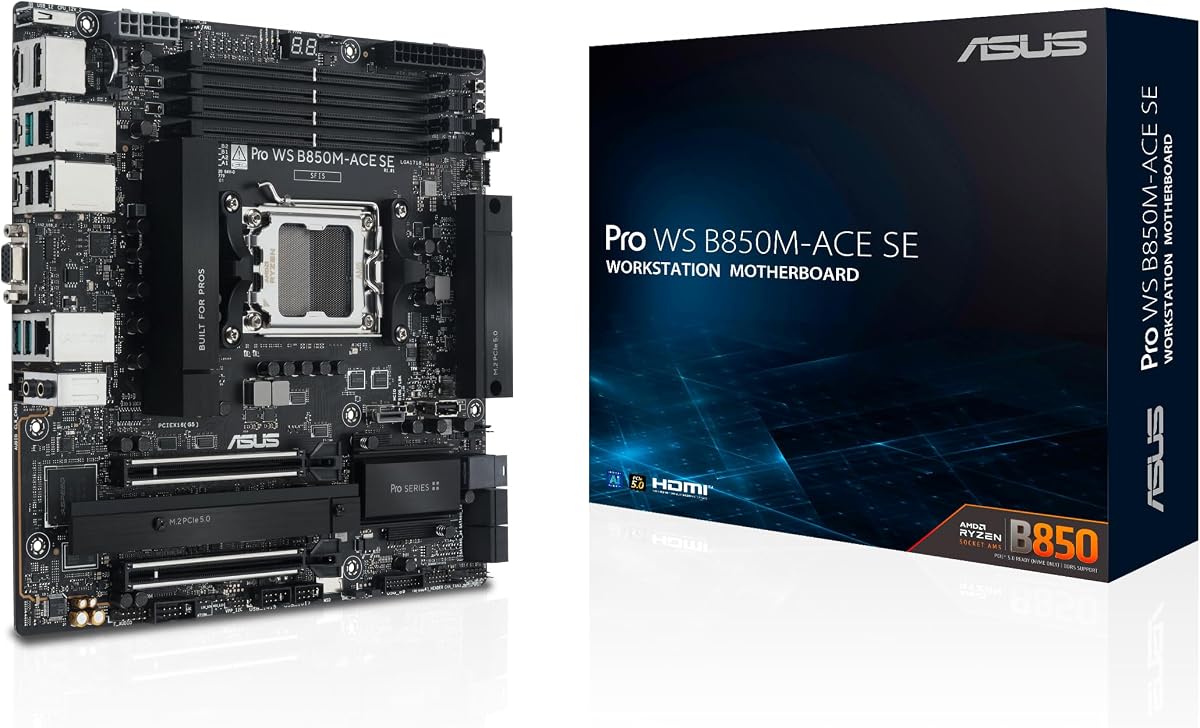
The ASUS Pro WS B850M-ACE SE earns our editor's choice for its balance of business features and future-ready connectivity for CAD workstations. It is rated well by professionals who need reliable remote management tools.
We may earn a commission when you buy through this link, at no additional cost to you.
It features PCIe 5.0 M.2 slots and 10G LAN which are critical for fast data transfer of large design files. The IPMI remote management allows IT teams to monitor the workstation remotely without physical access.
The mATX form factor may limit expansion slots compared to full ATX boards and the price is higher than consumer options. These tradeoffs are justified for business environments where uptime and remote administration are priorities.
This board is best for small offices or departments needing managed workstations. It combines high-speed connectivity with enterprise features that ensure smooth operation and quick troubleshooting during critical design deadlines.
Onboard BMC and ASUS Control Center Express enable real-time monitoring and management allowing administrators to handle issues remotely and maintain high workstation availability.
With PCIe 5.0 slots and 10G LAN this board prepares your CAD workstation for upcoming storage and network technologies ensuring longevity and performance scalability.
We may earn a commission when you buy through this link, at no additional cost to you.
The ASUS Pro WS W680-ACE IPMI represents top tier workstation capability with dual PCIe 5.0 slots and full ECC memory support. It is highly rated by professionals who require maximum stability for critical engineering applications.
We may earn a commission when you buy through this link, at no additional cost to you.
Its enhanced power solution and comprehensive cooling ensure the board runs stable even with high-end CPUs. The bundled IPMI expansion card provides hardware level remote management which is essential for enterprise CAD farms.
The premium price and complexity may be unnecessary for home users or simple workstations. However for professional studios needing data integrity and remote administration this level of hardware assurance justifies the investment fully.
This board is ideal for mission-critical workstations where downtime is not an option. It delivers enterprise reliability and future-proof connectivity for high-end CAD tasks that demand consistent and error-free performance daily.
Support for DDR5 ECC memory ensures data integrity during complex calculations and large assemblies reducing the risk of errors in critical engineering and architectural designs.
Thunderbolt 4 headers and dual PCIe 5.0 slots allow fast external storage and next-gen GPU support essential for high-resolution rendering and simulation workflows.
We may earn a commission when you buy through this link, at no additional cost to you.
The ASUS ProArt Z890-CREATOR WIFI is designed for advanced AI and CAD workloads with Thunderbolt 5 and WiFi 7. It has strong user feedback for its innovative features targeting professional creators.
We may earn a commission when you buy through this link, at no additional cost to you.
Its 16+2+1+2 power stages deliver stable power for high-core CPUs. The ProArt Creator Hub integrates Pantone utilities for color accuracy which is vital for visual design work.
Being a new platform it requires specific Intel Core Ultra processors and may have early adoption software quirks. For professionals needing the fastest connectivity this board offers unmatched future readiness.
This board suits creators using AI tools and high-res assets. It delivers the connectivity and power needed to handle next-gen workloads efficiently while maintaining professional color management standards.
The ProArt Creator Hub offers Color Management features working with Pantone utilities to provide one-stop control for creation-related settings essential for visual professionals.
Dual Thunderbolt 5 ports provide extreme bandwidth for external storage and GPUs reducing bottlenecks in large project data transfers and complex rendering tasks.
We may earn a commission when you buy through this link, at no additional cost to you.
The Asus ROG Strix B550-F Gaming offers a proven AM4 platform that works well for budget CAD builds. It has a high rating from users who value its stable networking and power delivery.
We may earn a commission when you buy through this link, at no additional cost to you.
It features robust power stages and Intel 2.5 Gb Ethernet which ensures quick data transfer during large file transfers. The BIOS Flashback allows easy updates without needing the CPU installed.
As an older platform it lacks support for DDR5 and PCIe 5.0 which limits future upgrades. For current budget builds relying on existing Ryzen CPUs it provides excellent stability and performance per dollar.
This board is best for users upgrading existing AM4 systems for CAD tasks. It provides the reliability needed for stable performance without requiring a full platform change to modern standards.
The 12+2 teamed power stages ensure stable voltage for the CPU allowing consistent performance during rendering or simulation workloads without thermal throttling issues.
On-board Wi-Fi 6E and Intel 2.5 Gb Ethernet provide fast reliable network connectivity for collaborative CAD workflows and quick file sharing across the network.
We may earn a commission when you buy through this link, at no additional cost to you.
The ASUS Pro WS W890E-SAGE SE is a powerhouse for extreme CAD and simulation workstations. It receives perfect ratings from professionals needing maximum expansion and stability for high-end enterprise environments.
We may earn a commission when you buy through this link, at no additional cost to you.
With seven PCIe 5.0 x16 slots and dual 10Gb LAN it supports multiple GPUs and fast networking for large data centers. The NitroPath DRAM technology enhances memory performance for large assemblies.
The EEB form factor requires a specialized case and the cost is prohibitive for typical setups. It is strictly for environments needing multiple accelerators and enterprise-grade remote management capabilities.
This board is ideal for heavy engineering firms or research labs. It offers the ultimate in expandability and stability for workloads that demand every available PCIe lane and network bandwidth.
Seven PCIe 5.0 x16 slots allow multiple high-performance GPUs or accelerators to work together for rendering simulation or AI workload parallelism.
Dual Intel E610-XAT2 10Gb LAN ports provide high bandwidth network connectivity essential for collaborative design and rapid data transfer in enterprise settings.
We may earn a commission when you buy through this link, at no additional cost to you.
The ASUS Pro WS TRX50-SAGE WiFi supports AMD Ryzen Threadripper PRO processors for high core count CAD work. It has steady feedback for its power delivery and connectivity suited to heavy loads.
We may earn a commission when you buy through this link, at no additional cost to you.
Its 20 power stages and massive VRM cooling handle the power demands of 96-core CPUs. Three PCIe 5.0 x16 slots allow multiple GPUs for rendering tasks and GPU acceleration.
The CEB form factor may limit case compatibility and requires significant cooling solutions. For users needing extreme core counts for simulation this board provides the necessary foundation for stability.
This board is best for professionals doing heavy simulation or modeling. It delivers the core count and PCIe lanes needed to accelerate complex CAD tasks and high-end 3D rendering efficiently.
Support for up to 96-core CPUs enables parallel processing of complex engineering simulations and large assembly designs significantly reducing render times.
Two USB4 ports provide 40Gbps data speeds and multiple PCIe 5.0 slots allow multiple GPUs to work in parallel for accelerated rendering workflows.
We may earn a commission when you buy through this link, at no additional cost to you.
The MSI B850 GAMING PLUS WIFI offers a convenient bundle with DDR5 RAM making it an easy entry for CAD builds. It has strong user ratings for performance and ease of setup.
We may earn a commission when you buy through this link, at no additional cost to you.
It supports AMD Ryzen 9000 series processors and offers 8200+ MT/s memory speeds for high throughput. PCIe 5.0 support ensures readiness for next-gen GPUs and storage devices.
The gaming branding may not suit all professional environments and single stick RAM limits dual channel performance until upgraded. For quick build and solid performance it is a competitive option.
This board is ideal for those needing a fast start on AM5 platform. The included RAM and modern connectivity make it a practical choice for budget-conscious CAD workstation upgrades.
Support for DDR5 up to 8200+ MT/s provides high bandwidth for large datasets and complex geometry calculations improving overall system responsiveness.
M.2 Gen5 slots and Wi-Fi 7 deliver ultra-fast storage and network speeds reducing bottlenecks when working with large CAD project files daily.
We may earn a commission when you buy through this link, at no additional cost to you.
The ASUS Pro WS W890-SAGE offers robust workstation features for Xeon processors with multiple PCIe 5.0 slots. It is praised for reliability in professional CAD environments requiring high stability.
We may earn a commission when you buy through this link, at no additional cost to you.
It supports NitroPath DRAM technology enhancing memory performance for complex tasks. The dual 10Gb LAN ensures fast data transfer for collaborative work and large file sharing.
Its high cost and CEB form factor may limit case options and budget. For users needing multiple GPUs and reliable networking for data center tasks it is a strong choice.
This board is best for professional CAD farms needing reliability. It provides the expandability and speed required for high-end workstation environments managing complex workflows effectively.
Exclusive NitroPath DRAM technology enhances memory performance for ECC R-DIMM DDR5 modules improving throughput for memory-intensive CAD applications.
Dual 10Gb LAN ports provide redundant high-speed network connections ensuring quick data access and reliable connectivity for collaborative CAD teams.
We may earn a commission when you buy through this link, at no additional cost to you.
The ASUS Pro WS TRX50-SAGE WIFI supports AMD Threadripper PRO 7000 WX processors for extreme CAD performance. It is recognized for its robust power stage design and ECC memory support.
We may earn a commission when you buy through this link, at no additional cost to you.
Its 36 power stages deliver stable power for 96-core CPUs. Three PCIe 5.0 x16 slots and WiFi 7 provide modern connectivity and multi-GPU readiness for heavy rendering.
The CEB form factor and high power requirements may limit case and cooling options. For users needing top-tier core counts for simulation this board offers unmatched stability.
This board is ideal for professionals needing extreme workstation power. It delivers the power and connectivity required for high-end CAD tasks and complex engineering simulations daily.
The massive 36 power-stage design ensures stable voltage delivery for high-end CPUs during long rendering sessions without power throttling or instability.
Multiple PCIe 5.0 x16 slots allow multiple GPUs for parallel rendering tasks speeding up complex visualizations and high-resolution modeling workflows significantly.
We may earn a commission when you buy through this link, at no additional cost to you.
Selecting the right motherboard for a CAD workstation requires balancing performance, stability, and future-proofing. Here are key factors to consider for professional design work.
Choose a motherboard with a socket that supports your preferred CPU generation. Intel LGA 1700 and AMD AM5 are common for general workstations while Xeon or Threadripper sockets are for high-core engineering tasks.
Ensure the motherboard explicitly supports your target CPU and memory type to avoid compatibility issues and performance bottlenecks.
CAD software benefits from high-speed DDR5 memory for faster data processing. Check if the motherboard supports ECC memory if data integrity is critical for your engineering calculations.
Prioritize boards with sufficient memory slots and high-speed support to allow future upgrades and smooth multitasking.
For rendering and GPU acceleration ensure the motherboard has multiple PCIe slots. PCIe 5.0 support is future-proof for next-gen GPUs and fast storage devices.
Look for boards with enough physical slots and bandwidth to support multiple GPUs or high-speed NVMe drives simultaneously.
Stable power delivery is essential for long rendering sessions. Look for robust VRM designs with heatsinks to maintain CPU stability under heavy loads without throttling.
Adequate cooling solutions on the motherboard ensure the system runs reliably over extended periods without performance drops.
Modern CAD work often involves large file transfers and collaboration. Boards with 10G LAN or USB4 ports allow faster data movement and peripheral support.
Prioritize high-speed Ethernet and USB ports to streamline your workflow and reduce wait times during data access.
For professional or enterprise environments, IPMI or remote management tools allow monitoring and control without physical access. This ensures uptime and quick troubleshooting.
Check if the motherboard includes or supports IPMI expansion cards for enterprise-level administration capabilities.
Workstation boards often use ATX, CEB, or EEB sizes which require specific case compatibility. Ensure your chassis supports the board size for proper cooling and installation.
Verify case dimensions before purchase to avoid assembly issues and ensure adequate airflow for workstation components.
Balance cost with features needed for your workflow. High-end workstations require premium features but entry-level CAD may not justify enterprise-grade motherboard costs.
Choose a board that meets your current needs without overspending on unused enterprise features.
When assembling your CAD workstation, ensure all components are grounded and installed correctly. Use the provided manuals for precise CPU and RAM installation to avoid damage and ensure stability.
Regularly update BIOS and drivers from the manufacturer to maintain performance and compatibility. Check for firmware updates that improve stability or add support for new processors.
Keep the motherboard clean from dust using compressed air and ensure proper airflow in your case. Monitor temperatures regularly to prevent overheating during long rendering sessions.
For CAD workstations, features like stable power delivery, multiple PCIe slots for GPUs, and fast connectivity like 10G LAN or USB4 are essential. Support for ECC memory and robust cooling also ensures long-term stability.
ECC memory is recommended for critical engineering and data-intensive CAD work to prevent data corruption. For general design, non-ECC memory is often sufficient depending on your workload demands.
Intel LGA 1700 and AMD AM5 are common for general CAD. For high-core simulations, consider Intel Xeon or AMD Threadripper PRO sockets requiring specific workstation boards.
PCIe 5.0 is future-proof for next-gen GPUs and storage but PCIe 4.0 is adequate for current CAD needs. Consider your long-term upgrade plans before prioritizing PCIe 5.0.
IPMI allows remote monitoring and management of the workstation without physical access. It is essential for enterprise environments but not needed for home or individual workstations.
Yes, gaming motherboards often have robust features for CAD. However, workstation boards provide better stability, ECC support, and remote management for professional environments.
Choosing the right motherboard depends on your specific workload and budget. Top picks like the ASUS Pro WS W680-ACE IPMI and MSI PRO B760-P WiFi DDR4 offer excellent balance of performance and reliability.
Prioritize stability, connectivity, and expansion options that match your professional needs. Whether you need ECC support or high-speed networking, the options reviewed cover various requirements for CAD professionals.
Check current availability and stock before making your purchase as offers may vary. Ensure compatibility with all components to build a reliable and efficient CAD workstation.