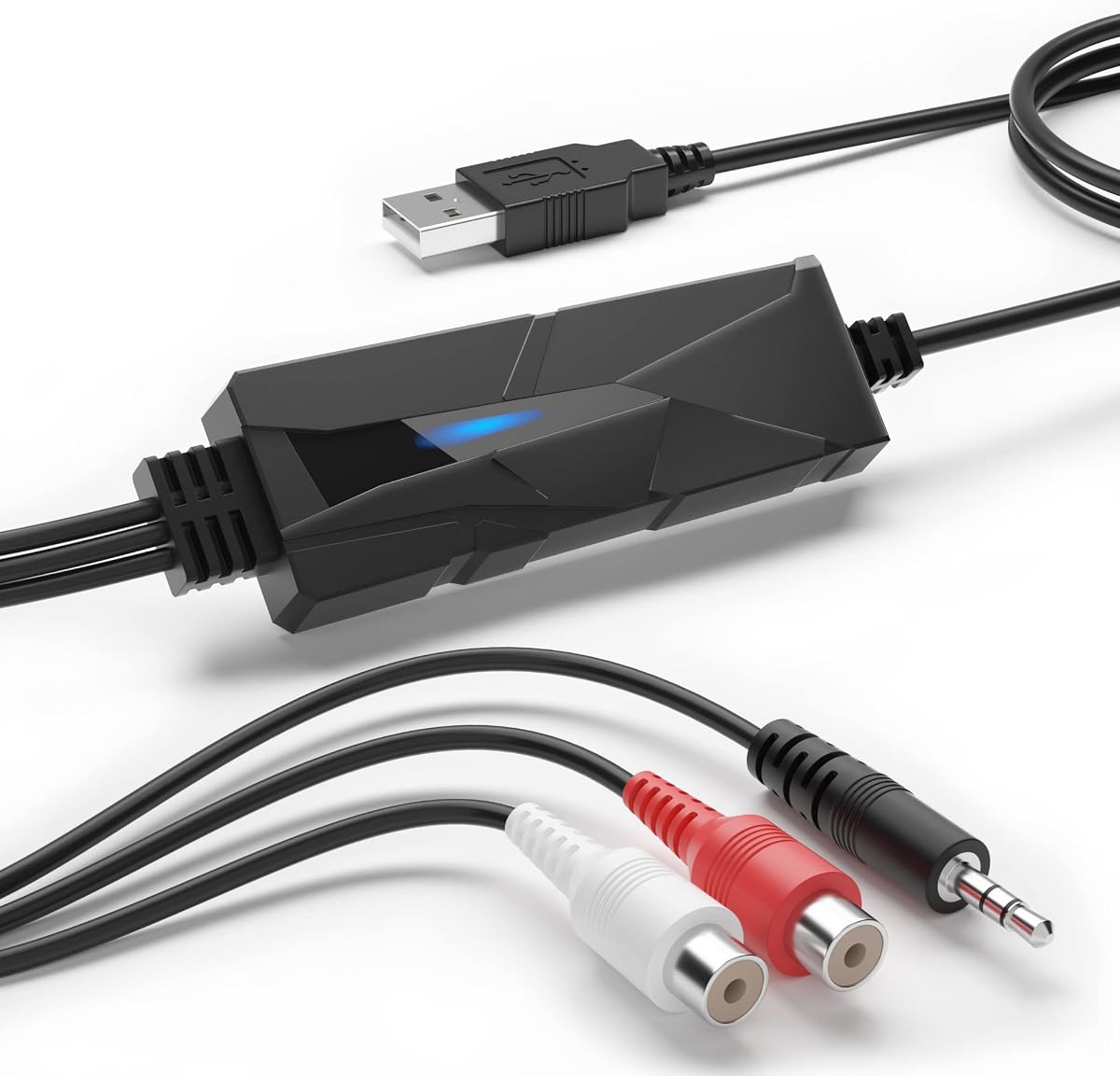
DriverGenius AudioXfer USB Audio Capture Card Device
4.2Editor score
Records analog to digital formats
Compatible with macOS 15
Includes audio capture software
Discover the top audio converters for Mac to enhance sound quality. We compare features, compatibility, and performance to help you choose the ideal device.
Audio converters for Mac help you connect legacy equipment or modern peripherals to your Apple setup. Choosing the right one ensures seamless compatibility and superior sound quality.
We evaluated ten top-rated models based on connectivity options, audio resolution support, and Mac OS compatibility. Our list covers diverse needs from simple adapters to high-fidelity DACs.
Each pick highlights key strengths and ideal use cases. Note that pricing and availability fluctuate, so verify current offers before purchasing your preferred converter.
4.2Editor score

4.4Editor score

4.5Editor score
This table compares all ten models side-by-side, highlighting key specifications and connectivity options to simplify your decision process for Mac users.


The DriverGenius AudioXfer serves as a straightforward solution for converting analog audio to digital on Mac systems. It offers essential capture functionality for old tapes and records.
We may earn a commission when you buy through this link, at no additional cost to you.
Its inclusion of Audacity software simplifies the editing workflow. The device supports 44.1 and 48kHz sample rates suitable for common digital formats.
While not designed for audiophile-grade fidelity, it fulfills basic archival needs effectively. Users should ensure their Mac OS version is compatible before purchasing.
This unit is ideal for hobbyists looking to digitize memories without significant investment. It provides a functional entry point into analog digitization.
This device offers an accessible way to digitize analog sources without breaking the bank.
Ensure your Mac system meets the specified compatibility requirements for optimal performance.
We may earn a commission when you buy through this link, at no additional cost to you.
The Fosi Audio K5 Pro combines a DAC with a headphone amplifier for enhanced audio output. It accepts multiple digital inputs including USB and optical.
We may earn a commission when you buy through this link, at no additional cost to you.
Its NE5532 op-amp chip ensures low noise and clean sound reproduction. Users can drive a wide range of headphones up to 300 Ohms.
While the volume and power buttons are combined, the unit delivers excellent performance for its size. It is suitable for both gaming and music listening.
This model bridges the gap between simple adapters and full desktop amps. It brings richer audio details to Mac setups easily.
The K5 Pro excels in gaming setups while maintaining high fidelity for music enjoyment.
Multiple digital inputs allow flexibility in connecting various Mac-compatible audio sources.
We may earn a commission when you buy through this link, at no additional cost to you.
The PROZOR 192KHz converter supports high-resolution audio up to 192KHz and 24bit. It uses an aluminum alloy housing for better heat dissipation and shielding.
We may earn a commission when you buy through this link, at no additional cost to you.
Its ability to handle uncompressed LPCM signals ensures accurate audio conversion. The unit outputs simultaneously via RCA and 3.5mm jack connections.
While it lacks a volume control, its performance in maintaining signal integrity is strong. It works well with Mac setups connected via optical outputs.
This converter is selected for its balance of quality and value. It offers reliable performance for home cinema or desktop audio upgrades.
The device supports up to 192KHz 24bit audio for high-fidelity playback.
Aluminum alloy construction provides durability and effective electromagnetic shielding.
We may earn a commission when you buy through this link, at no additional cost to you.
The Douk Audio U2PRO converts USB signals to optical and coaxial outputs for DACs. It features the XMOS XU316 chip for stable transmission.
We may earn a commission when you buy through this link, at no additional cost to you.
Users can enjoy support for PCM up to 32bit 768kHz and DSD512. The device operates without drivers on most systems.
While small, it offers robust functionality for audiophiles needing digital conversion. The indicators help monitor sample rates in real time.
This adapter is ideal for users wanting to upgrade their digital output easily. It ensures a jitter-free signal path to external DACs.
The chip ensures virtually no latency during signal transmission for immediate audio playback.
Expandable oscillator design allows DIYers to upgrade clocking for further precision.
We may earn a commission when you buy through this link, at no additional cost to you.
The SMSL SU-1 utilizes the AKM AK4493S chip for exceptional audio clarity. It supports MQA decoding to restore high-resolution studio signals.
We may earn a commission when you buy through this link, at no additional cost to you.
Distortion levels are exceptionally low at less than 0.00013%. It handles high bit rates up to 768kHz and 32-bit depth.
While it may require a driver on some Mac systems, performance is robust. It is designed for users seeking clean digital conversion.
This DAC is recommended for those wanting studio-quality audio on Mac. It ensures the authentic sound of high-resolution recordings.
The decoder restores high-resolution signals from MQA sources with authentication.
Support for 768kHz and 32-bit allows detailed playback of high-res files.
We may earn a commission when you buy through this link, at no additional cost to you.
The SMSL PO100 PRO is a compact USB interface supporting I2S and MQA. It allows high-resolution playback without additional software on computers.
We may earn a commission when you buy through this link, at no additional cost to you.
Users can switch modes to enable I2S output or standard digital outputs. It is small enough to fit in a travel bag easily.
While setup requires adjusting USB modes correctly, the sound quality is impressive. It serves well for portable audio setups or travel.
This model is best for users needing a small but powerful interface. It ensures high-fidelity audio output for Mac users on the go.
Playback does not require additional software, simplifying the setup process.
The mini design makes it ideal for travel and light usage scenarios.
We may earn a commission when you buy through this link, at no additional cost to you.
The Sound Blaster Play! 3 offers a simple USB solution for audio enhancement. It works without drivers on Mac and supports 24-bit 96kHz.
We may earn a commission when you buy through this link, at no additional cost to you.
Downloadable software provides powerful enhancements and optimized profiles for earphones. Users can connect various headsets easily without splitters.
While it lacks advanced connectivity options, it ensures basic functionality with ease. It is a straightforward choice for simple audio upgrades.
This adapter is recommended for users seeking simplicity over complexity. It delivers consistent performance for everyday audio needs.
Downloadable software gives control over enhancements and earphone profiles.
Compatible with all analog headsets from earbuds to studio-grade models.
We may earn a commission when you buy through this link, at no additional cost to you.
The iFi Audio Go Link Max uses dual ESS Sabre DAC chips for a balanced circuit. It supports 32-bit 384kHz PCM and native DSD 256.
We may earn a commission when you buy through this link, at no additional cost to you.
Its 4.4mm output provides up to 241mW of power for demanding headphones. The unit features silver-plated copper conductors for signal purity.
While it is more expensive than basic adapters, the sound quality justifies the cost. It delivers Hi-Res audio with dynamic range enhancement.
This dongle is perfect for Mac users seeking top-tier portable performance. It ensures high-fidelity output from USB-C ports easily.
Dual ESS Sabre DAC chips form a balanced circuit for improved audio fidelity.
Support for PCM 384kHz and DSD 256 allows detailed audio playback.
We may earn a commission when you buy through this link, at no additional cost to you.
The Fosi Audio Q6 Mini is a compact desktop DAC supporting high sampling rates. It features AK4493S DAC and XMOS XU316 for accurate conversion.
We may earn a commission when you buy through this link, at no additional cost to you.
Inputs include Optical, Coaxial, and USB-C for flexible connection. Outputs include RCA and Sub-Out for amplifiers and subwoofers.
While it cannot drive headphones directly, it provides clean audio for amplifiers. The aluminum alloy housing ensures durability and heat dissipation.
This unit is ideal for home setups needing high-quality digital conversion. It seamlessly connects Mac sources to high-end audio systems.
Supports up to 768kHz and DSD512 for crystal-clear audio playback.
Multiple digital inputs allow connection to various Mac-compatible audio sources.
We may earn a commission when you buy through this link, at no additional cost to you.
The Shure MVX2U Gen 2 is an interface designed for professional recording and streaming. It features onboard DSP for real-time audio processing.
We may earn a commission when you buy through this link, at no additional cost to you.
Users get Auto Level Mode and popper stopper for consistent output without latency. It supports XLR microphones with 48V phantom power.
While it is targeted at mic inputs, the conversion quality is top-tier. It ensures zero-latency audio for Mac setups easily.
This interface is best for podcasters and streamers needing reliable performance. It combines convenience with professional-grade audio quality.
Features DSP including Denoiser and Popper Stopper for professional results.
Works on desktop, tablet, or smartphone with any XLR microphone.
We may earn a commission when you buy through this link, at no additional cost to you.
Selecting the right converter involves understanding your connection needs and desired audio quality levels.
Verify that the device supports your current macOS version before purchasing. Some models require specific drivers or software versions.
Ensure driverless operation if possible to avoid compatibility issues.
Determine whether you need to convert analog sources like cassettes or digital signals like optical. This dictates the input type.
Match the input to your existing hardware to ensure seamless integration.
Look for support for high sample rates like 192kHz or 384kHz if high-resolution audio is a priority. Higher bit depth improves dynamic range.
Standard rates are sufficient for basic listening but audiophiles need more.
Check if you need RCA, 3.5mm jack, or balanced outputs to connect to speakers or headphones. Different outputs serve different systems.
Ensure the output matches the input of your amplifier or DAC.
Metal housings offer better shielding and heat dissipation than plastic. This can improve long-term reliability and performance.
Choose a durable build to prevent signal interference.
USB bus-powered units are portable but may not drive high-impedance devices well. Some require external power for full functionality.
Consider how you plan to power the device.
Some models include EQ software or recording tools which can be useful. Check if additional apps are available for your platform.
Software can enhance the basic hardware capabilities.
Connect the converter to your Mac's USB port or audio jack. Ensure the device receives power if required.
Select the correct input and output settings in your system audio preferences. Test with a known file or source.
Keep the unit away from moisture and excessive heat. Store it in a dry place when not in use.
Most modern converters work plug-and-play on macOS without drivers. However, some high-end models may require specific software. Always check product specs before purchasing.
Yes, models with analog inputs like 3.5mm can record cassette tapes. You will need software to save the audio. These devices convert analog signals to digital files.
A DAC converts digital signals to analog for speakers. An ADC converts analog signals to digital for storage. Ensure you choose the correct type.
Many USB-C adapters work with modern iPhones. Ensure the adapter supports iOS audio protocols. Some may require a Lightning to USB cable.
For most listeners, 48kHz is sufficient. Higher rates benefit professional audio or audiophiles. Choose based on your specific listening needs.
Yes, converters with optical outputs can connect to home theater systems. Ensure your system supports the input type. This expands your audio setup.
MQA is a high-resolution audio format. Some converters support decoding it for better quality. Ensure your player supports MQA for full benefits.
Check your headphone impedance. If it is high, choose a DAC with sufficient power. Match the device capabilities to your audio gear.
We reviewed ten converters for Mac ranging from budget adapters to premium interfaces. Each offers distinct advantages for different audio needs.
Prioritize compatibility and audio quality requirements. Select a unit that supports your specific input and output connections.
Always verify current availability and details on manufacturer sites. Prices and specs can change, so double-check before finalizing your purchase.