
ASRock DeskMini X300 2.5G Series
4.2Editor score
Ultra-Compact 1.92L Form Factor
Supports AMD Ryzen 5000 Series
Triple Display Output Options
This guide compares the top barebone mini pc models for performance and value. We evaluate processors, cooling, and ports to help you build the perfect compact
Barebone mini PCs offer a unique way to build compact desktop systems tailored to specific needs. These kits provide the core chassis, motherboard, and power supply while leaving RAM and storage up to you. This flexibility allows for significant cost savings and customization options.
We analyzed ten leading barebone mini PC models available in October 2026. Our comparison focuses on processor capabilities, thermal design, connectivity options, and overall build quality. We prioritize units that support modern standards like DDR5 memory and USB4 interfaces.
Each pick highlights key strengths and ideal use cases for different buyers. Whether you need a gaming rig or a business workstation, these kits provide the foundation you require. Remember that component availability and prices may vary based on market conditions.
4.2Editor score

4.0Editor score

5.0Editor score
The following table provides a side-by-side overview of all ten models included in this guide. Each entry details the core processor architecture, memory support, and key connectivity features to help you differentiate between them quickly.




The AOOSTAR MACO stands out as a powerful option for demanding tasks. It features the AMD Ryzen 7 PRO 8845HS processor which offers strong multi-threaded performance. This barebone unit supports DDR5 memory and includes OCuLink for external GPUs. It is well-suited for gaming or video editing workloads.
We may earn a commission when you buy through this link, at no additional cost to you.
Performance is a major strength here with 8 cores and 16 threads handling heavy multitasking. The Radeon 780M graphics provide solid integrated performance for casual gaming. Connectivity is excellent with dual USB4 ports and dual 2.5G LAN ports. The chassis uses recycled aluminum which adds durability and sustainability.
While powerful, this unit requires you to buy RAM and storage separately. The OCuLink port does not support hot swapping which requires careful handling. It also includes a Windows 11 Pro key for customers which adds value. Ensure you have compatible components before purchasing.
Buyers seeking high performance in a small form factor should consider this model. It balances power with connectivity better than many competitors in its class. The cooling system manages heat well under load. It is a robust choice for creators and gamers alike.
The Ryzen 7 PRO 8845HS processor provides up to 5.1GHz turbo speeds. This ensures smooth performance for demanding applications and multitasking scenarios.
Dual USB4 ports allow for triple-screen connectivity and high-speed data transfer. OCuLink support offers lower latency for external GPU setups.
We may earn a commission when you buy through this link, at no additional cost to you.
This ASUS NUC 15 Pro barebone kit brings enterprise-grade reliability to compact computing. It is powered by the Intel Core Ultra 5 225H processor which delivers AI-optimized performance. The unit includes robust connectivity options and durability certifications. It is designed for business environments requiring stable operation.
We may earn a commission when you buy through this link, at no additional cost to you.
Connectivity is enhanced with Intel Wi-Fi 7 offering faster transfer rates. The chassis features a tool-less design that simplifies upgrades and maintenance. It supports up to four 4K displays via HDMI 2.1 and Thunderbolt 4. The sync power-off feature improves energy efficiency significantly.
Business users will appreciate the 3-year warranty and 24/7 reliability testing. The eco-friendly packaging aligns with corporate sustainability goals. However, the price is higher compared to some consumer-grade alternatives. It assumes you have specific needs for Intel-based AI workloads.
This model is ideal for professionals who prioritize stability and future-proof connectivity. The Wi-Fi 7 support ensures your network stays current. It is a premium choice for those needing certified durability. The tool-less design adds convenience for IT management tasks.
MIL-STD-810H certification ensures the unit withstands extreme conditions. Rigorous testing guarantees 24/7 reliability for critical deployments.
Intel Wi-Fi 7 provides up to 2.4x faster transfer rates than previous standards. Proximity sensing enhances audio quality and connection stability.
We may earn a commission when you buy through this link, at no additional cost to you.
The ASRock DeskMini X300 offers exceptional value for users seeking a small form factor. Its 1.92L volume makes it one of the smallest barebone kits available. It supports a wide range of AMD Ryzen 5000 series processors. This allows you to use existing components or choose budget CPUs effectively.
We may earn a commission when you buy through this link, at no additional cost to you.
Triple display capability makes it perfect for office multitasking. It includes 2.5G LAN for fast wired network connections. The chassis supports up to 128GB of DDR4 memory for heavy workloads. You can also add Wi-Fi via an internal slot if wireless is needed.
While it lacks the latest Wi-Fi 7 standard the pricing remains competitive. It uses DDR4 memory which is cheaper than DDR5. This makes it an accessible entry point for DIY builders. The storage options include two M.2 slots for NVMe SSDs.
Budget-conscious buyers will find this kit difficult to beat for size. It is perfect for home offices or basic gaming setups. The flexibility to choose your own CPU is a major advantage. It keeps build costs low while maintaining solid performance.
At just 1.92 liters this unit saves significant desk space. It fits easily in tight setups or behind monitors.
Supports AMD Ryzen 5000 and 4000 series CPUs up to 65W. This allows for cost-effective processor choices.
We may earn a commission when you buy through this link, at no additional cost to you.
This ASRock DeskMeet X300 is distinct for its PCIe expansion capability. It offers a full x16 slot which allows adding dedicated GPUs. This transforms it from a mini PC into a small form factor gaming rig. The 500W power supply is included making setup easier.
We may earn a commission when you buy through this link, at no additional cost to you.
The chassis supports standard AM4 Ryzen processors up to 65W. It has four DDR4 slots allowing up to 128GB of memory. Storage is flexible with two M.2 slots and SATA options. Display options include HDMI and DisplayPort for multiple screens.
While larger than typical mini PCs it maintains a compact 8-liter size. The included PSU is a rare feature that saves extra costs. You should verify CPU cooler height compatibility before assembly. It is a powerful base for home server tasks too.
Users needing GPU upgrades in a small case should look here. It bridges the gap between mini PCs and full desktops. The PCIe slot provides unmatched versatility in this category. It is a robust solution for demanding creative work.
A full PCIe 3.0 x16 slot enables dedicated graphics card installation. This significantly boosts graphical performance for tasks.
The 500W 80+ Bronze PSU supports expansion cards and high-draw CPUs. It removes the need for external power adapters.
We may earn a commission when you buy through this link, at no additional cost to you.
The AOOSTAR GEM12+ is designed for users needing multiple displays. It supports four 4K screens simultaneously via HDMI and USB4. This makes it ideal for financial trading or complex design workflows. The AMD Ryzen 7 PRO processor ensures smooth performance across all outputs.
We may earn a commission when you buy through this link, at no additional cost to you.
OCuLink support allows high-bandwidth external GPU connections. It provides 64Gbps throughput without occupying M.2 slots. The cooling system uses a vapor chamber to manage heat efficiently. You can adjust BIOS modes for silent or performance needs.
Storage expansion is generous with dual M.2 slots supporting up to 8TB. It includes energy-saving features that reduce power consumption significantly. Be sure to check compatibility for external GPU adapters. The package includes essential mounting accessories.
Professionals who need maximum screen real estate will benefit most. The connectivity options exceed many other barebone options available. It balances thermal performance with high bandwidth needs. It is a top choice for multi-monitor setups.
Connect four independent 4K displays using HDMI2.1 and USB4 ports. This maximizes workspace efficiency for professionals.
Vapor chamber technology ensures even heat distribution under load. It extends lifespan by lowering component temperatures.
We may earn a commission when you buy through this link, at no additional cost to you.
The ASRock DeskMini X300 offers exceptional value for users seeking a small form factor. Its 1.92L volume makes it one of the smallest barebone kits available. It supports a wide range of AMD Ryzen 5000 series processors. This allows you to use existing components or choose budget CPUs effectively.
We may earn a commission when you buy through this link, at no additional cost to you.
Triple display capability makes it perfect for office multitasking. It includes 2.5G LAN for fast wired network connections. The chassis supports up to 128GB of DDR4 memory for heavy workloads. You can also add Wi-Fi via an internal slot if wireless is needed.
While it lacks the latest Wi-Fi 7 standard the pricing remains competitive. It uses DDR4 memory which is cheaper than DDR5. This makes it an accessible entry point for DIY builders. The storage options include two M.2 slots for NVMe SSDs.
Budget-conscious buyers will find this kit difficult to beat for size. It is perfect for home offices or basic gaming setups. The flexibility to choose your own CPU is a major advantage. It keeps build costs low while maintaining solid performance.
At just 1.92 liters this unit saves significant desk space. It fits easily in tight setups or behind monitors.
Supports AMD Ryzen 5000 and 4000 series CPUs up to 65W. This allows for cost-effective processor choices.
We may earn a commission when you buy through this link, at no additional cost to you.
This ASUS NUC 15 Pro barebone kit utilizes the Core Ultra 7 processor. It is designed for advanced AI tasks and high-performance computing. The unit includes robust connectivity options and durability certifications. It is ideal for business environments requiring stable operation.
We may earn a commission when you buy through this link, at no additional cost to you.
Connectivity is enhanced with Intel Wi-Fi 7 offering faster transfer rates. The chassis features a tool-less design that simplifies upgrades. It supports up to four 4K displays via HDMI 2.1 and Thunderbolt 4. The sync power-off feature improves energy efficiency significantly.
Business users will appreciate the 3-year warranty and reliability testing. The eco-friendly packaging aligns with corporate sustainability goals. However, the price is higher compared to some consumer-grade alternatives. It assumes you have specific needs for Intel-based AI workloads.
This model is ideal for professionals who prioritize stability and future-proof connectivity. The Wi-Fi 7 support ensures your network stays current. It is a premium choice for those needing certified durability. The tool-less design adds convenience for IT management tasks.
The Core Ultra 7 processor provides optimized power for AI tasks. It balances performance with efficiency effectively.
Wi-Fi 7 enables rapid data transfer and low latency connections. It ensures seamless network performance for modern applications.
We may earn a commission when you buy through this link, at no additional cost to you.
This AOOSTAR GEM12+ PRO model stands out with its built-in fingerprint unlock. It simplifies secure access without tedious passwords. It features the AMD Ryzen 7 PRO processor for strong performance. The system supports OCuLink for external GPU connections.
We may earn a commission when you buy through this link, at no additional cost to you.
It includes a customizable built-in display for real-time monitoring. You can view CPU and GPU data directly via dedicated software. The cooling system uses vapor chamber technology to lower temperatures. It supports 4-screen 4K output for diverse workflows.
Security features are enhanced with biometric authentication. The package includes essential accessories like VESA mounts and power. Be aware that OS and storage must be installed separately. It is suitable for those prioritizing security and customization.
Buyers needing secure access will appreciate the fingerprint reader. It balances performance with robust security measures effectively. The customizable display adds convenience for monitoring. It is a strong choice for home office environments.
Built-in fingerprint recognition simplifies login and secures data. It reduces reliance on complex passwords.
Customizable display allows real-time monitoring of system stats. It provides quick insights into performance.
We may earn a commission when you buy through this link, at no additional cost to you.
This ASUS NUC 15 Pro barebone kit is powered by the Core Ultra 5. It is designed for advanced AI tasks and high-performance computing. The unit includes robust connectivity options and durability certifications. It is ideal for business environments requiring stable operation.
We may earn a commission when you buy through this link, at no additional cost to you.
Connectivity is enhanced with Intel Wi-Fi 7 offering faster transfer rates. The chassis features a tool-less design that simplifies upgrades. It supports up to four 4K displays via HDMI 2.1 and Thunderbolt 4. The sync power-off feature improves energy efficiency significantly.
Business users will appreciate the 3-year warranty and reliability testing. The eco-friendly packaging aligns with corporate sustainability goals. However, the price is higher compared to some consumer-grade alternatives. It assumes you have specific needs for Intel-based AI workloads.
This model is ideal for professionals who prioritize stability and future-proof connectivity. The Wi-Fi 7 support ensures your network stays current. It is a premium choice for those needing certified durability. The tool-less design adds convenience for IT management tasks.
The Core Ultra 5 processor provides optimized power for AI tasks. It balances performance with efficiency effectively.
Wi-Fi 7 enables rapid data transfer and low latency connections. It ensures seamless network performance for modern applications.
We may earn a commission when you buy through this link, at no additional cost to you.
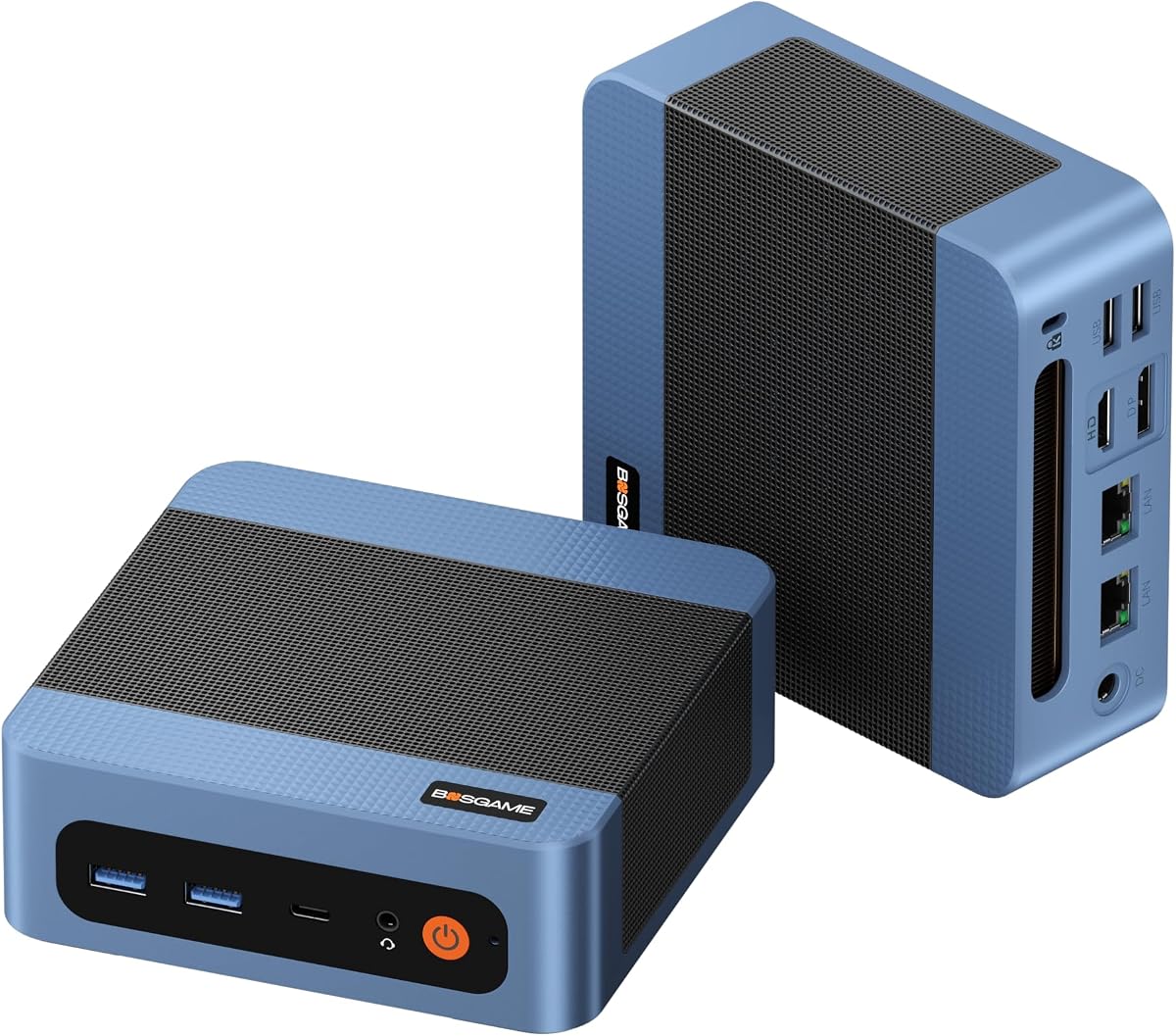
This BOSGAME E5 11 Pro offers a convenient ready-to-use experience. It includes pre-installed Windows 11 Pro and essential hardware. The Ryzen 3 5300U provides adequate power for office tasks. It supports Linux Ubuntu for developers who need flexibility.
We may earn a commission when you buy through this link, at no additional cost to you.
It includes dual 2.5GbE LAN ports which allow advanced networking. You can configure it for router or firewall duties easily. The Type-C port supports Power Delivery for single-cable operation. It also supports silent cooling for quiet environments.
While it lacks the latest DDR5 support it is a complete package. You can expand memory up to 64GB via SODIMM slots. The price point is affordable compared to barebone alternatives. It suits users who do not want to install an OS.
Buyers needing an immediate workstation should consider this model. It offers robust networking capabilities for home labs. The silent design is great for libraries or offices. It is a reliable choice for general business use.
Pre-installed Windows 11 Pro eliminates OS installation hassles. It allows immediate productivity upon setup.
Dual 2.5GbE LAN ports enable router and firewall configurations. It supports home lab and server tasks well.
We may earn a commission when you buy through this link, at no additional cost to you.
Selecting the right barebone mini PC requires understanding your specific performance and connectivity needs. We have outlined key factors to help you make an informed decision.
The CPU determines the baseline performance of your system. For general office work a quad-core processor may suffice but creators need 8 cores or more. Look for modern architectures like Zen 4 or Intel Core Ultra for better efficiency.
Prioritize the processor core count and generation to ensure longevity.
Check how many memory slots and what generation they support. DDR5 offers higher speeds but DDR4 is often more budget-friendly. Ensure the unit supports multiple M.2 slots for flexible storage scaling.
Verify memory type and slot count to match your capacity needs.
Modern barebone units offer high-speed USB4 or Thunderbolt connections. These are essential for daisy-chaining displays or transferring large files quickly. Consider if you need OCuLink ports for external GPU support.
Select units with sufficient high-speed ports to support your peripherals.
High performance in a small case generates significant heat. Look for vapor chambers or dedicated thermal fans to maintain stability. Silent modes are beneficial if you work in quiet environments.
Choose models with advanced thermal designs to prevent overheating.
Barebone kits usually exclude operating systems which lets you install Windows or Linux. Ensure the hardware is compatible with your preferred OS. Some units offer bundled keys which adds convenience.
Confirm OS support and key availability before making a purchase.
Wi-Fi 7 is emerging in premium units offering significantly faster speeds. It is vital for future-proofing your wireless connections. Check if the unit includes an integrated M.2 slot for modules.
Ensure the wireless standard meets your current and future bandwidth needs.
The physical size affects where you can place the PC. Look for MIL-STD certifications if durability is a priority. Tool-less designs simplify maintenance and upgrades significantly.
Opt for durable materials and compact dimensions that fit your space.
Cost should be weighed against the features offered by the unit. Premium features like OCuLink cost more but add significant utility. Compare total component costs to understand true value.
Balance your budget with the specific features you require.
Install your chosen RAM and SSDs carefully using the slots provided. Ensure components are seated firmly before powering on the system. Check that cooling fans are free from dust or blockages.
Set up your operating system by connecting the unit to a monitor. Follow the on-screen prompts to configure your account and settings. Update drivers to ensure all hardware functions correctly.
Maintain your system by keeping it in a well-ventilated area. Dust it regularly to prevent airflow restrictions. Perform periodic firmware updates to keep features secure.
A barebone mini PC includes the main case motherboard and power supply but excludes memory storage and OS. This allows you to customize the build to your specific needs. It is a cost-effective way to upgrade your desktop setup.
Basic assembly skills are needed to install RAM and SSDs. Most kits use tool-less designs that simplify the process significantly. If you are comfortable swapping laptop memory it should be straightforward.
Many models support external GPUs via OCuLink or Thunderbolt ports. OCuLink offers lower latency for better gaming performance. Ensure the specific model supports your chosen eGPU adapter.
Modern kits typically support DDR5 speeds up to 5600MHz or higher. Some older models may still use DDR4 which is more budget-friendly. Check the specs for exact speed limits before buying.
They can handle casual gaming well with integrated graphics. For AAA titles you will need an external GPU or dedicated card. Select models with good cooling for sustained performance.
You will need a USB drive with your preferred OS installer. Boot from the drive and follow the standard setup instructions. Some kits include Windows keys to simplify the process.
We have reviewed ten top models ranging from budget options to premium workstations. The AOOSTAR MACO and ASUS NUC 15 Pro stand out for high performance and connectivity. Each option serves different needs from compact gaming to office reliability.
Prioritize factors like processor generation and cooling to ensure your system lasts. Consider whether you need specific features like OCuLink or Wi-Fi 7. Matching your workload to the right chassis is essential.
Keep in mind that availability and pricing may change quickly. Check the latest details on your preferred model before finalizing your order. We hope this guide helps you build the ideal compact desktop.