
GOLDENMATE 2000VA/1600W Lithium UPS Battery Backup & Surge Protector, White
4.4Editor score
LiFePO4 battery long lifespan
Pure Sine Wave Line-Interactive
Eight NEMA 5-15P outlets
This guide compares the top battery backup for workstation PC options to help you choose reliable power protection and surge safety for your critical computing
Power interruptions can cripple workstation productivity and damage expensive hardware components over time. Selecting a quality battery backup ensures your system stays online during outages while protecting against surges that degrade electronics gradually.
We evaluated ten leading UPS models based on output waveforms, runtime capacity, outlet configurations, and management software features. Our analysis prioritizes units that support active PFC power supplies common in modern workstations.
Each pick highlights specific strengths like sine wave output or long warranties to match different budget and performance needs. Keep in mind that pricing fluctuates frequently so verify current offers before purchasing any unit.
4.4Editor score

4.5Editor score

4.7Editor score
The following side-by-side comparison details core specifications for all ten evaluated models including VA ratings, wattage limits, outlet counts, and key technologies like AVR or sine wave output to streamline your selection process.


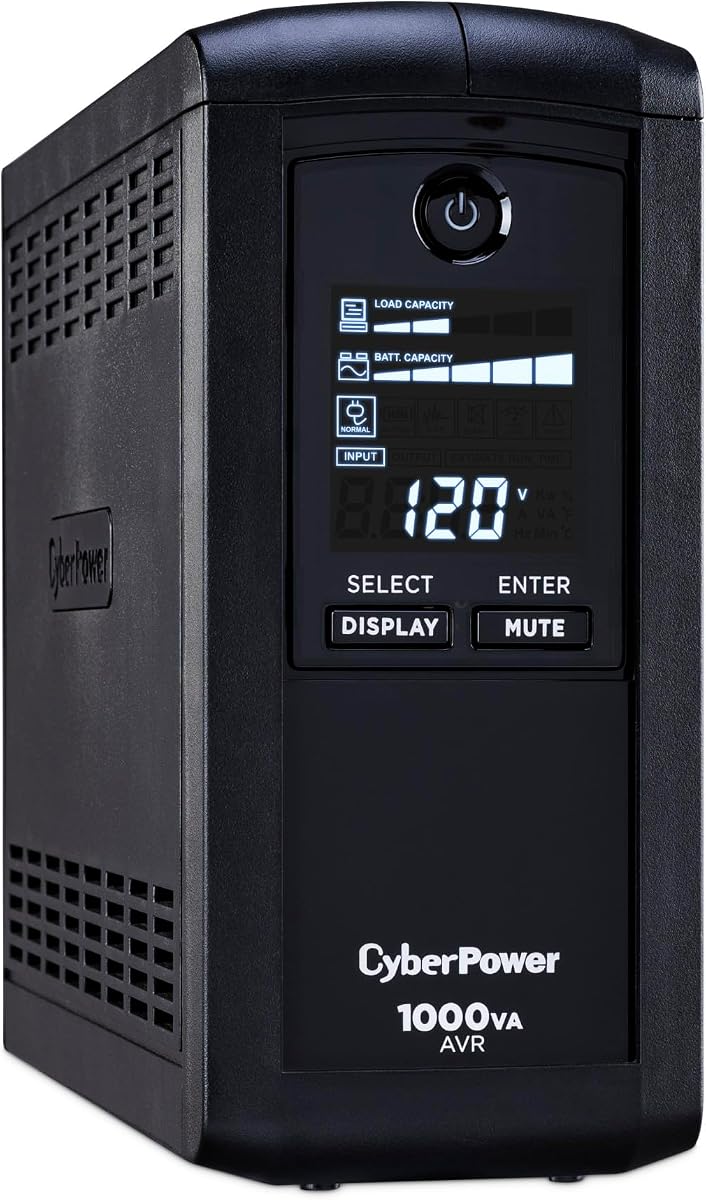


The CyberPower CP1500PFCLCD earns our top recommendation for workstations needing reliable power protection. With a 4.5 rating from users it delivers a true PFC Sinewave output that safeguards active PFC power supplies found in modern computers effectively.
We may earn a commission when you buy through this link, at no additional cost to you.
Its 1500VA capacity ensures critical components stay online during outages. The multifunction color LCD displays real-time battery load and power conditions clearly. Six outlets receive both backup and surge protection while six additional outlets offer surge protection only for less critical gear.
While the unit is heavier due to robust internal components it justifies the build quality with consistent performance. Users appreciate the automatic voltage regulation that corrects minor fluctuations without consuming battery life prematurely extending runtime during genuine outages.
This unit suits professionals who cannot afford downtime or equipment damage. The included PowerPanel software allows safe shutdowns and monitoring. For those needing maximum compatibility with high-end workstations this remains the benchmark choice in 2026.
The PFC Sinewave output ensures compatibility with active power factor correction supplies often used in professional computing environments.
The color LCD and included software provide deep insights into power quality and battery health without technical expertise.
We may earn a commission when you buy through this link, at no additional cost to you.
The GOLDENMATE Lithium UPS disrupts the market with long-lasting LiFePO4 battery technology. Rated 4.4 it offers 2000VA capacity with pure sine wave output at a competitive price point making it ideal for budget-conscious workstation owners seeking longevity.
We may earn a commission when you buy through this link, at no additional cost to you.
Unlike traditional units it supports over 3000 charge cycles reducing replacement frequency significantly. The Automatic Voltage Regulation handles common electrical issues efficiently. Eight outlets accommodate both backup and surge protection needs for desktops and peripherals alike.
The tradeoff involves a larger enclosure due to transformer requirements for the high-voltage lithium system. Users must ensure generator compatibility as the unit may not accept generator power inputs reliably leading to battery discharge without recharge.
For those prioritizing long-term savings and minimal maintenance this model stands out. Its high wattage handles power-hungry workstation components. If you need enduring power security without frequent battery swaps this represents exceptional value.
LiFePO4 chemistry enables over 10 years of service life eliminating the need for periodic battery replacements common with lead-acid.
With 1600W of output it powers even high-end workstation builds ensuring smooth operation during extended power interruptions.
We may earn a commission when you buy through this link, at no additional cost to you.
The CyberPower BRG1500AVRLCD2 leads our premium tier with an exceptional 4.7 rating. It combines a robust 5-year warranty with versatile outlet options making it a safe long-term investment for businesses and power users requiring dependable power continuity.
We may earn a commission when you buy through this link, at no additional cost to you.
Its Intelligent LCD color display keeps operators informed about status conditions instantly. Six outlets deliver full backup while six offer surge protection. USB ports add convenience for keeping communication devices charged during outages seamlessly.
While the simulated sine wave may not suit active PFC supplies it covers most standard workstation loads effectively. The remote management feature adds enterprise-level control when paired with optional cards for centralized monitoring capabilities.
This unit fits those valuing warranty assurance and professional features. The five-year coverage surpasses standard three-year terms widely offered. For businesses where reliability justifies upfront cost this model offers superior peace of mind.
A five-year warranty including the battery reduces total cost of ownership significantly compared to standard three-year competitor offerings.
Optional management cards allow network administrators to monitor power status remotely ensuring uptime across multiple locations.
We may earn a commission when you buy through this link, at no additional cost to you.
The CP1500AVRLCD3 offers substantial capacity for the workstation environment with a 4.5 rating. Its 1500VA rating supports demanding setups while maintaining standard simulated sine wave output for conventional equipment efficiently without complex wave requirements.
We may earn a commission when you buy through this link, at no additional cost to you.
A color LCD panel provides immediate visual feedback on power conditions. The unit features twelve outlets split between backup and surge protection to accommodate various peripherals. USB ports ensure mobile devices remain charged for communication during outages.
Its main limitation is the simulated waveform which may not be ideal for systems with active PFC power supplies. However for standard setups this unit delivers excellent value and reliability with a comprehensive 3-year warranty covering essential components.
Ideal for offices needing robust protection without premium costs. The balance of capacity and features makes it a strong contender for general workstation use where cost efficiency matters alongside dependable power backup performance.
With 900W of continuous power it handles demanding workstation tasks without straining the battery during brief interruptions.
The color LCD displays detailed information quickly allowing users to assess system health at a glance.
We may earn a commission when you buy through this link, at no additional cost to you.
The EC850LCD introduces smart energy-saving features ideal for office settings. Rated 4.4 it uses ECO mode to cut power to peripherals when the computer sleeps reducing energy waste and costs significantly over time.
We may earn a commission when you buy through this link, at no additional cost to you.
It offers twelve outlets with six receiving full backup and surge protection while three ECO controlled outlets help manage peripheral power consumption. The standard LCD panel gives clear battery status without color complexity.
While its 850VA capacity limits support for high-end workstations it suits standard office PCs perfectly. The built-in AVR adjusts voltage fluctuations automatically saving battery life. Its focused design emphasizes efficiency alongside protection.
Choose this for energy-conscious environments or lighter workstation loads. The ECO feature is a standout benefit for lowering operating costs. It remains a practical choice where minimizing idle power draw is a priority.
ECO outlets shut down peripherals like monitors when the main PC sleeps saving energy without manual intervention.
With twelve outlets it connects multiple devices easily while ECO modes add extra value to the setup.
We may earn a commission when you buy through this link, at no additional cost to you.
The CP1000PFCLCD is a solid choice for active PFC compatible systems. With a 4.2 rating it delivers pure sine wave output at 1000VA ensuring compatibility with workstation power supplies that demand stable waveform integrity during operation.
We may earn a commission when you buy through this link, at no additional cost to you.
Its ten outlets provide ample room for desktop towers peripherals and networking gear. The color LCD panel displays real-time info while USB ports keep phones charged. AVR stabilizes voltage without triggering battery usage unnecessarily.
While it carries a slightly lower rating than larger models it remains reliable for standard workstation needs. The sine wave feature is critical for avoiding shutdowns on sensitive power supplies that reject simulated outputs under load.
Pick this when PFC support is mandatory but budget remains constrained. It balances waveform quality and outlet count effectively. For users prioritizing compatibility over maximum capacity this delivers dependable performance within a mid-range size.
The PFC Sinewave output ensures stable power for supplies that require pure sine waves to operate correctly.
Automatic Voltage Regulation corrects minor issues instantly preventing unnecessary battery use and prolonging battery lifespan.
We may earn a commission when you buy through this link, at no additional cost to you.
The AVRG900LCD stands out for its data line protection feature which safeguards connected telephone lines from surges. Rating 4.6 it offers a strong 12-outlet layout ideal for offices needing both power and communication line security.
We may earn a commission when you buy through this link, at no additional cost to you.
It delivers 900VA capacity with simulated sine wave output suitable for general computing tasks. The Intelligent LCD shows immediate status updates while AVR manages minor fluctuations automatically reducing battery wear over years of operation.
While its wattage is lower than premium models it fits standard workstations well. The added data protection is rare among similar units. This makes it particularly valuable where modem or fax lines connect directly to the workstation environment.
Select this for office workstations requiring telecom surge protection. It combines solid power backup with communication line safety seamlessly. For mixed usage environments protecting both computers and phone lines it offers distinct practical value.
Data line protection prevents damage from surges traveling through telephone cables ensuring connected modems remain intact.
With twelve outlets it accommodates multiple peripherals without needing power strips while maintaining reliable backup coverage.
We may earn a commission when you buy through this link, at no additional cost to you.
The CP1000AVRLCD provides balanced capacity for general workstations. Rating 4.5 it delivers 1000VA power with clear LCD feedback. Its ten outlets accommodate essential equipment while AVR maintains stable voltage without unnecessary battery use during minor dips.
We may earn a commission when you buy through this link, at no additional cost to you.
Designed for efficiency this unit handles routine power fluctuations well. The LCD panel offers runtime and load data clearly. It uses simulated sine wave output sufficient for standard power supplies not requiring active PFC compatibility specifically.
Its main trade-off is standard simulated waveform technology which may not fit high-end hardware. However for most users it offers reliable surge protection and short-term battery backup. The warranty and rating reflect dependable performance over time.
Ideal for budget-conscious buyers needing solid protection. This model balances cost and functionality effectively. If your workstation runs standard equipment this provides adequate security without premium pricing or advanced waveform needs.
Automatic voltage regulation keeps power consistent during minor outages ensuring smooth operation of connected devices.
The intelligent LCD panel keeps users informed about battery status and load instantly without external tools.
We may earn a commission when you buy through this link, at no additional cost to you.
The ST900U excels in space-constrained workspaces with its slim profile design. Rating 4.5 it offers 900VA capacity suitable for standard home office or light workstation needs efficiently without consuming valuable desk or floor real estate.
We may earn a commission when you buy through this link, at no additional cost to you.
Twelve outlets include four widely spaced slots for large plugs. GreenPower technology reduces idle power consumption enhancing efficiency. The standard LCD displays status while AVR stabilizes voltage without engaging battery resources for minor fluctuations.
While not ideal for high-load professional workstations it protects standard PCs and peripherals effectively. Its slim build suits under-desk mounting. For users prioritizing physical footprint this delivers reliable backup where space is tight.
Perfect for compact office setups needing surge protection. Its efficiency and outlet spread are practical benefits. If your priority is saving space while maintaining basic protection this model offers a tailored solution.
Slim footprint allows discreet installation under desks or in tight corners without sacrificing outlet count.
GreenPower technology minimizes standby power draw reducing electricity costs and heat generation during normal use.
We may earn a commission when you buy through this link, at no additional cost to you.
The CP850AVRLCD serves as a compact entry option for basic workstation protection. Rating 4.5 it provides 850VA capacity sufficient for standard home office setups. Its nine outlets accommodate essentials while LCD feedback ensures status visibility during operation.
We may earn a commission when you buy through this link, at no additional cost to you.
Automatic voltage regulation protects connected devices from minor power fluctuations efficiently. The LCD panel displays battery status clearly. Simulated sine wave output works for typical power supplies not requiring pure waveform compatibility for stable operation.
Its capacity limits use with power-hungry workstation components. However for basic office tasks this unit delivers solid reliability. The compact size fits comfortably under desks where larger units might overwhelm available space unnecessarily.
Best for small setups needing essential surge protection. It balances capacity and footprint effectively. If you need a reliable backup for light computing tasks without bulk this provides a practical entry-level solution.
Delivers reliable backup for standard office PCs keeping them online briefly during unexpected power interruptions.
The LCD panel keeps users informed about remaining battery time and power load easily without complexity.
We may earn a commission when you buy through this link, at no additional cost to you.
Selecting the right UPS requires evaluating key technical specifications and features that match your hardware demands and environment. This section breaks down critical factors to consider before purchase to ensure optimal protection and reliability.
Workstations with active PFC power supplies require pure or PFC Sinewave output to avoid shutdowns during battery mode. Simulated sine wave units are cheaper but may not support high-end hardware properly leading to potential system instability.
Always check your power supply requirements before choosing a waveform type to ensure compatibility.
VA rating indicates maximum power capacity while wattage defines actual usable power. Ensure the wattage exceeds your workstation's total power draw by 20 percent to prevent overloading during outages.
Higher wattage models support more demanding components like GPUs without draining batteries quickly.
Traditional lead-acid batteries last 3 to 5 years whereas newer LiFePO4 units offer over 10 years of life. Lithium models reduce total cost of ownership despite higher upfront costs due to fewer replacements required.
Consider long-term maintenance costs when selecting battery chemistry for extended use.
AVR corrects minor voltage fluctuations without using battery power prolonging battery life. This feature is essential for areas with unstable grid power where frequent brownouts occur regularly.
Choose units with AVR to reduce unnecessary battery draining during common electrical issues.
Workstations need multiple outlets for PCs monitors routers and peripherals. Ensure enough outlets receive full backup while others can handle surge-only devices to maximize flexibility and protection.
Look for units with widely spaced outlets to accommodate bulky power adapters comfortably.
Management software like PowerPanel allows remote monitoring and automatic shutdowns to prevent data loss during outages. Look for LCD displays showing runtime and load data for better awareness of system status.
Software support ensures safe shutdowns and protects critical files automatically.
Some UPS models include telephone line ports to protect modems or fax machines from surges. This is valuable for workstations still relying on DSL or other legacy communication lines.
Check if data line protection is included if you have connected communication devices.
Warranties typically cover the battery and connected equipment for 3 to 5 years. Longer warranties indicate confidence in build quality. Ensure coverage includes both battery replacement and equipment damage.
Prioritize brands offering comprehensive warranties to reduce long-term ownership risks.
Begin by placing the UPS on a flat surface away from walls to ensure proper ventilation. Connect critical devices to battery-backed outlets while less important items like printers go to surge-only ports to save energy.
Test the unit regularly by unplugging it to confirm it switches to battery power smoothly. Monitor the LCD for any warnings and replace the battery promptly if the unit indicates low capacity or end of life.
Avoid overloading the UPS by calculating total wattage of connected devices. Keep the unit away from direct sunlight and extreme temperatures to maximize battery life and overall reliability over time.
No only systems with active PFC power supplies demand pure sine wave output. Standard power supplies work fine with simulated sine wave units but check your hardware specs before buying to ensure compatibility.
Traditional lead-acid batteries usually last 3 to 5 years under normal conditions. Newer lithium models can last over 10 years reducing maintenance needs significantly but costing more upfront initially.
Some units may not recognize generator inputs due to waveform differences leading to continuous battery mode. Verify generator compatibility with the manufacturer before relying on generator-powered UPS setups.
AVR stands for Automatic Voltage Regulation which stabilizes incoming voltage without using battery power. This feature extends battery life by correcting minor fluctuations automatically during brownouts.
Most workstations need at least 6 to 12 outlets to cover the PC monitor speakers and networking gear. Ensure enough outlets receive full backup while others serve surge-only devices efficiently.
High-quality UPS units offer surge protection for both power lines and data cables. Check the connected equipment guarantee details for coverage limits regarding specific surge damage claims.
Most units allow DIY battery replacement via user-accessible doors but consult the manual for safety steps. Some newer lithium models may not allow replacements due to integrated designs.
Continuous beeping often signals a low battery or overload condition. Check the LCD display for specific warnings and reduce connected load or charge the unit fully to silence alarms.
The CyberPower CP1500PFCLCD leads our top picks with pure sine wave output and robust capacity for demanding setups. The GOLDENMATE Lithium UPS offers exceptional longevity while the BRG1500AVRLCD2 provides enterprise-grade warranty coverage.
Prioritize waveform compatibility and wattage capacity over outlet count when selecting for high-performance workstations. Features like AVR and smart monitoring add significant value for long-term reliability and safety.
Prices change frequently so verify current offers and stock before finalizing your purchase. Investing in a quality UPS safeguards your data and hardware from unexpected power events effectively.