
Brother HL-L2405W
4.1Editor score
Compact design for home offices
Dual-band wireless connectivity
250-sheet paper tray
This guide compares the top Brother Laser Printer models for performance and value to help you choose the right device for your home or office needs.
Finding the right Brother Laser Printer can transform your workflow by delivering sharp text and reliable performance. These machines excel at handling daily documents with speed and efficiency.
We evaluated ten distinct models based on connectivity, speed, and feature sets. This list covers monochrome and color options suitable for various work environments.
Each pick highlights key strengths and trade-offs to guide your decision. Note that availability and offers may change over time so verify details before buying.
4.1Editor score

4.1Editor score

4.1Editor score
The following table offers a side-by-side comparison of all ten models focusing on core specifications and capabilities to assist your selection process.



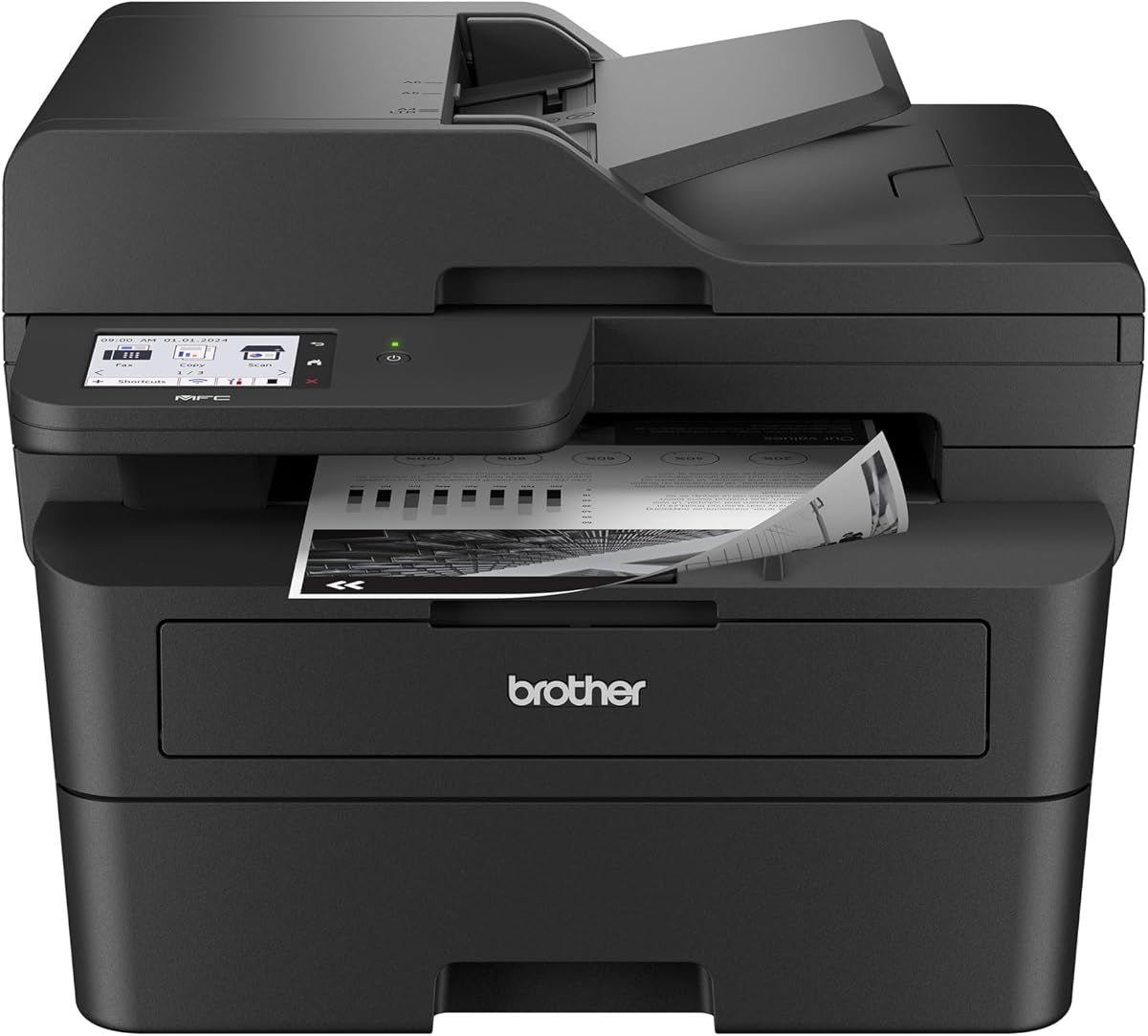


The Brother DCP-L2640DW stands out as a robust multifunction unit for small businesses needing reliable black and white output. It combines printing copying and scanning into a single device that handles high volumes efficiently.
We may earn a commission when you buy through this link, at no additional cost to you.
Its 36 ppm speed ensures documents move quickly through the workflow while dual-band wireless and Ethernet provide flexible network options. The built-in 50-page auto document feeder simplifies multi-page tasks without constant manual loading.
While it lacks color capabilities the focus on monochrome allows for sharper text and lower operating costs. The interface is straightforward though a larger display would enhance navigation during complex settings adjustments.
This model is ideal for users seeking a balanced mix of speed connectivity and compact design. It delivers consistent performance for daily office tasks without requiring extensive technical setup or maintenance.
The combination of print scan and copy functions in one chassis reduces desk clutter and streamlines daily operations effectively.
Dual-band wireless and Ethernet ports ensure stable connections for multiple devices while maintaining robust network security protocols.
We may earn a commission when you buy through this link, at no additional cost to you.
For home users prioritizing affordability the Brother HL-L2405W offers solid performance without unnecessary features. It delivers crisp black and white prints at a speed suitable for personal projects and schoolwork.
We may earn a commission when you buy through this link, at no additional cost to you.
The compact footprint makes it easy to place in tight spaces while dual-band wireless allows seamless printing from laptops and phones. Voice control via Alexa adds convenience for hands-free operation tasks.
Lacking duplex and scanning capabilities keeps costs down but means manual page turning for double-sided jobs. The 250-sheet tray reduces refill frequency which is helpful for moderate usage environments.
This printer is perfect for individuals who need a dependable dedicated machine for occasional high-volume single-sided tasks. It balances cost and functionality well for those not requiring multifunction versatility.
Integration with Alexa enables voice-activated printing commands which simplifies workflow for users managing multiple smart home devices.
Its small footprint allows placement on shelves or desks without dominating the workspace making it ideal for home offices.
We may earn a commission when you buy through this link, at no additional cost to you.
The Brother HL-6210DW targets environments where speed and security are paramount. With a 50 ppm rate it handles heavy workloads effortlessly ensuring minimal downtime during peak business hours.
We may earn a commission when you buy through this link, at no additional cost to you.
Robust paper handling includes a 520-sheet main tray and optional expansion to nearly 1700 sheets. Gigabit Ethernet and dual-band wireless ensure reliable connections across large networks with advanced Triple Layer Security.
The investment is higher than entry models but the efficiency gains and security features justify the cost for professional settings. Large capacity trays mean less maintenance and more continuous operation.
Businesses dealing with strict compliance or high-volume needs will find this printer indispensable. Its design prioritizes uninterrupted workflow and data protection over compact aesthetics.
At 50 ppm the printer drastically reduces wait times for large documents improving overall office productivity significantly.
Triple Layer Security features safeguard data during transmission and printing ensuring compliance with corporate security policies.
We may earn a commission when you buy through this link, at no additional cost to you.
The Brother MFC-L2820DW brings essential business features including faxing into a compact all-in-one design. It is ideal for small teams needing versatile document handling without dedicated fax lines.
We may earn a commission when you buy through this link, at no additional cost to you.
The 2.7-inch touchscreen simplifies navigation through complex menus and cloud integration allows direct printing from services like Google Drive. Dual-band wireless and Ethernet ensure stable connections across varied office environments.
Fax capabilities add a layer of utility often missing in modern printers though digital workflows may reduce reliance on it. The ADF handles multi-page copies efficiently saving time during document processing.
This model is best suited for small offices that still require faxing alongside standard print and scan needs. The interface and connectivity options make it user-friendly for mixed technical skill levels.
Direct access to cloud services streamlines document retrieval and printing eliminating the need for local file transfers.
A 50-page ADF reduces manual loading during batch copying or scanning tasks improving overall efficiency.
We may earn a commission when you buy through this link, at no additional cost to you.
The Brother HL-L3220CDW introduces vibrant color capability to professional home offices needing marketing materials or colored charts. It delivers crisp text and graphics at a steady 19 ppm pace for double-sided printing.
We may earn a commission when you buy through this link, at no additional cost to you.
Wireless connectivity includes advanced security protocols to protect sensitive business documents during transmission. The 250-sheet tray and manual feed slot support various media types for diverse printing projects.
While color printing naturally consumes more resources than monochrome this model balances quality with efficiency. The duplex feature helps manage paper costs despite the added color toner requirements.
Users requiring visual impact in their documents will appreciate the vivid output. It is a strong choice for businesses that need occasional high-quality color without investing in large enterprise machines.
Stunning color laser quality ensures professional presentation for client-facing materials and reports requiring visual emphasis.
Built-in security protocols protect data integrity during wireless transmission maintaining confidentiality for sensitive files.
We may earn a commission when you buy through this link, at no additional cost to you.
The Brother HL-L2480DW merges multifunction utility with a compact design suitable for smaller workspaces. It delivers fast monochrome output and versatile scanning capabilities within a small physical footprint.
We may earn a commission when you buy through this link, at no additional cost to you.
The intuitive 2.7-inch touchscreen makes navigating settings and cloud services straightforward. Dual-band wireless ensures reliable connectivity while the manual feed slot adds versatility for specialty paper types.
Alexa compatibility allows voice commands for printing tasks simplifying workflows for smart home integrated offices. The 250-sheet tray supports moderate volume usage without frequent refilling interruptions.
This printer is an excellent pick for work-from-home professionals needing efficient all-in-one capabilities. It balances speed and connectivity without consuming excessive desk space.
The responsive touchscreen simplifies access to cloud apps and settings reducing the learning curve for new users.
Despite offering copy and scan functions the unit maintains a small footprint ideal for limited desk space.
We may earn a commission when you buy through this link, at no additional cost to you.
The Brother MFC-L2900DW is engineered for professional environments requiring rapid document processing. Its 36 ppm speed and single-pass scanning ensure high throughput for busy daily workflows.
We may earn a commission when you buy through this link, at no additional cost to you.
A large 3.5-inch touchscreen provides an intuitive interface for managing print scan and cloud tasks. Energy-efficient design reduces electricity consumption while maintaining fast warm-up times from sleep mode.
The combination of duplex printing and scanning saves paper and time for large batches. Connectivity options like dual-band wireless and Ethernet support seamless integration into diverse network setups.
Small businesses seeking a reliable efficient workhorse will find this model valuable. It prioritizes speed and ease of use for consistent performance over extended periods.
Automatic duplex scanning reduces processing time by capturing both sides of a document in one pass.
Enhanced fuser design reduces power usage and minimizes environmental impact during standard office operations.
We may earn a commission when you buy through this link, at no additional cost to you.
The Brother HL-6210DW delivers exceptional volume handling with a 50 ppm output and massive paper capacity. It is designed for environments where constant printing without interruption is critical.
We may earn a commission when you buy through this link, at no additional cost to you.
A 520-sheet main tray and expandability to over 1600 sheets significantly reduce maintenance frequency. Gigabit Ethernet and dual-band wireless enable secure and fast network sharing across multiple users.
Ultra high-yield toner cartridges extend replacement intervals lowering operational costs over time. Security features ensure that sensitive documents remain protected throughout the printing process.
High-volume offices needing reliability and speed will appreciate this printer's robust capabilities. It is built to handle demanding daily requirements without compromising performance.
Large paper capacities allow long jobs to run without frequent refills maximizing uptime for busy offices.
High-yield cartridges deliver up to 18000 pages reducing the cost per page for heavy users.
We may earn a commission when you buy through this link, at no additional cost to you.
The Brother MFC-L3720CDW offers a complete color all-in-one solution for businesses needing versatile document output. It delivers vivid color prints alongside standard scan and fax functions.
We may earn a commission when you buy through this link, at no additional cost to you.
A 3.5-inch color touchscreen provides easy access to 48 customizable shortcuts and cloud services. Wi-Fi Direct enables quick connections without complex network configurations for mobile devices.
The 50-sheet ADF streamlines multi-page tasks while automatic duplex saves paper on two-sided documents. Although color toner is an investment the quality ensures professional-grade materials.
Organizations requiring frequent color faxing and scanning will find this model highly capable. It balances comprehensive features with robust connectivity options for varied office setups.
48 customizable shortcuts on the touchscreen allow users to tailor the interface for their most frequent tasks.
Wi-Fi Direct allows seamless device connection without requiring a central router simplifying ad-hoc printing.
We may earn a commission when you buy through this link, at no additional cost to you.
The Brother Work Smart 1360 offers a color capable all-in-one solution at an accessible entry point. It is suited for home offices with light printing needs and occasional color requirements.
We may earn a commission when you buy through this link, at no additional cost to you.
Cloud app connections and a simple 1.8-inch display make navigation straightforward for basic tasks. The Page Gauge feature helps monitor ink levels to prevent unexpected runouts during important jobs.
Automatic duplex and a 20-sheet ADF handle basic multi-page tasks efficiently. While speeds are slower than laser models it provides sufficient performance for casual users.
This model is ideal for those needing color versatility without the complexity or cost of larger machines. It balances essential features with affordability for everyday use.
Support for multiple cloud apps allows flexible file management and printing without needing local storage.
Page Gauge tracking helps users plan replacements efficiently reducing downtime due to running out of supplies.
We may earn a commission when you buy through this link, at no additional cost to you.
Selecting the right Brother Laser Printer requires understanding your specific needs and how each model fits your workspace and workflow demands.
Speed varies from 16 ppm to 50 ppm across models. Faster speeds are essential for high-volume environments to minimize wait times.
Choose a speed that matches your daily document volume to maintain productivity.
All-in-One models combine print scan copy and fax. Single function units focus solely on printing.
Decide if you need scanning or faxing to determine if a multifunction unit justifies extra cost.
Tray capacity ranges from 150 sheets to 520 sheets. Larger trays reduce the frequency of refilling.
Higher capacity is better for shared offices to avoid constant manual reloading.
Most models offer dual-band wireless and Ethernet. Some include USB for direct connection.
Ensure the printer supports your network setup and mobile devices for seamless sharing.
Monochrome models are cost-effective for text documents. Color printers are necessary for graphics.
Select color only if your workflow requires visual output to save on consumables.
Business models include advanced security like Triple Layer Security. Home models focus on basic access.
Prioritize security features if handling sensitive corporate data to protect against breaches.
Interfaces range from 1.8 inches to 3.5 inches. Larger screens simplify navigation.
A larger display is beneficial for accessing cloud apps and complex settings easily.
Energy efficient models reduce electricity consumption. Look for specific energy-saving designations.
Energy features help lower long-term operating costs and environmental impact.
Start by installing the printer software via the provided USB or wireless connection. Ensure the device is connected to your network using the touchscreen or Mobile Connect app for optimal setup.
Keep the printer away from direct sunlight and dust sources to maintain internal component health. Regularly clean the glass platen and external surfaces with a soft cloth.
Use genuine toner cartridges to prevent jams and maintain output quality. Follow the built-in maintenance alerts for cleaning rollers and fuser maintenance as needed.
Single-band wireless operates only on the 2.4GHz band which is common but can be congested. Dual-band supports both 2.4GHz and 5GHz bands allowing for less interference and faster speeds on compatible networks.
Yes most models support mobile printing via the Brother Mobile Connect app. You can print directly from iOS or Android devices without needing a computer in between the file source and printer.
Typically you open the front cover remove the old toner and insert the new one until it clicks. The printer usually prompts you to replace it when levels are low via the display or app.
Many models listed support automatic duplex which prints on both sides of the page. Always check the specific specs to confirm this feature is included on your chosen unit.
The app allows remote management printing and scanning from mobile devices. It also lets you track toner usage and order supplies directly from the application interface.
Most modern models are compatible with macOS drivers available for download. Ensure you download the latest software versions for full functionality with Apple systems.
Place your documents face up in the feeder tray and adjust the guides. Select the scan or copy function and choose the ADF option on the display to initiate the process.
It is a service that delivers toner when you run out automatically. It includes discounts on genuine supplies and helps you track usage so you never face unexpected stockouts.
Choosing the right Brother Laser Printer depends on balancing speed connectivity and specific needs. The top picks offer reliable options for budget conscious home users and high-volume offices.
Prioritize features like duplex printing or color if they align with your workflow. Consider the total cost of ownership including toner availability for long-term value.
Always check current availability and features before purchasing as models may update. This guide aims to streamline your search for a printer that meets your daily demands.