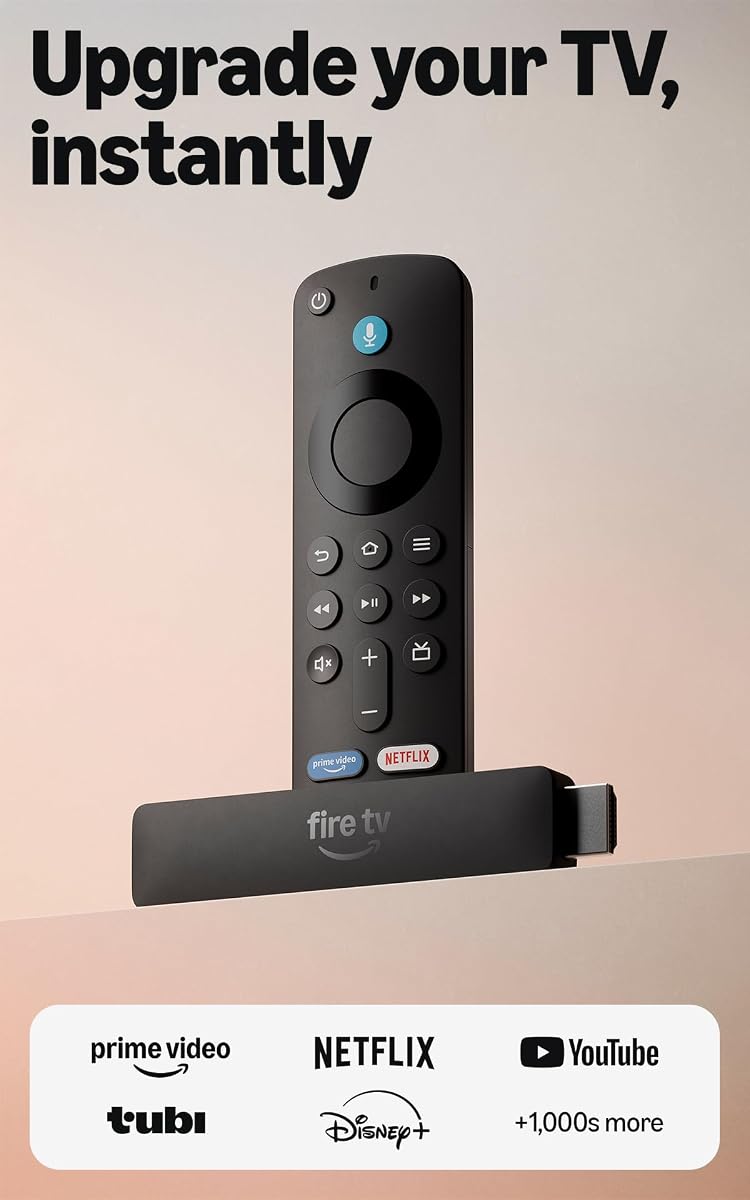
Amazon Fire TV Stick HD
4.1Editor score
Affordable Price Point
Alexa Voice Control
Direct Power via TV
This guide compares the top HDMI streaming devices of October 2026 to help you choose the best player for 4K video, voice control, and seamless smart home
Finding the right HDMI streaming device can transform your regular television into a powerful smart entertainment hub. Modern players offer access to thousands of apps, high resolution video output, and intuitive voice controls that make navigation effortless for everyone in the household.
We evaluated ten leading models based on performance, video quality, ease of setup, and ecosystem integration. Our analysis considers real-world usage scenarios including gaming, media streaming, and smart home control to ensure you get a device that meets your specific viewing needs effectively.
Each pick highlights key strengths, potential limitations, and ideal use cases to guide your decision making process. Remember that product availability and specifications may vary over time, so always verify current details before making your final purchase decision online or in store.
4.1Editor score

4.7Editor score

4.4Editor score
The following table provides a side-by-side comparison of all ten devices reviewed in this guide. Use this overview to quickly identify key specifications, video capabilities, and unique features before diving into the detailed reviews below.




The Roku Streaming Stick 4K earns our top spot for its exceptional balance of performance and ease of use. With a high user rating and robust features like Dolby Vision and HDR10+, it delivers a cinematic experience right from your living room couch.
We may earn a commission when you buy through this link, at no additional cost to you.
Its standout qualities include a long-range Wi-Fi receiver that maintains strong connections even in rooms far from your router. The sleek design ensures it stays hidden behind your TV without blocking neighboring ports, making it ideal for users with limited space.
While it lacks an Ethernet port for wired connections, the wireless performance is generally reliable for most households. Gaming capabilities are limited compared to dedicated consoles, but for streaming media, it excels with fast app launches and intuitive navigation.
This device is perfect for anyone seeking a simple yet powerful way to upgrade their TV setup. Whether you are new to streaming or looking to replace an older model, the Roku Stick 4K offers a premium experience at a reasonable cost.
Enjoy rich details and lifelike colors with support for 4K resolution and HDR formats that make every show look incredible.
Find your favorite content quickly with a simple remote and a clean interface designed to minimize scrolling and maximize watching time.
We may earn a commission when you buy through this link, at no additional cost to you.
The Amazon Fire TV Stick HD is an excellent choice for budget-conscious viewers who still want smart features and reliable streaming. It brings the latest Fire TV experience to your existing television without breaking the bank or requiring complex installation steps.
We may earn a commission when you buy through this link, at no additional cost to you.
A key benefit is its direct power capability, which allows it to run off your TV via USB instead of needing a wall adapter. This makes it incredibly portable and simple to set up in guest rooms or while traveling for temporary entertainment needs.
While it does not support 4K resolution, it delivers crisp Full HD video that is perfect for standard televisions. The remote control includes basic buttons but relies heavily on Alexa for voice commands which may take some getting used to for some users.
Choose this device if you need a no-fuss upgrade for a secondary TV or have a strict budget. It provides access to major streaming services and voice control at a price point that is hard to beat in the current market.
Get started in minutes with direct power and an easy plug-in process that eliminates extra cables and wall adapters completely.
Use natural language to find shows and control smart home devices with Alexa built directly into the remote for hands-free convenience.
We may earn a commission when you buy through this link, at no additional cost to you.
The Roku Ultra stands out as the ultimate streaming player for users who demand top-tier performance and advanced connectivity options. It offers a 30% speed boost over other Roku players, ensuring lightning-fast app launches and a smooth user interface experience.
We may earn a commission when you buy through this link, at no additional cost to you.
One of its most valuable features is the included Ethernet port, which provides a stable wired connection for critical streaming situations. The rechargeable Voice Remote Pro includes backlit buttons and a lost remote finder, solving common annoyances faced by many streaming device users.
While it is more expensive than stick models, the extra power and features justify the cost for dedicated home theater enthusiasts. The only real drawback is its larger size compared to sticks, which might be more visible behind your TV setup.
If you want the best possible streaming experience with reliable connections and premium remote features, the Roku Ultra is the clear winner. It is ideal for large homes or heavy users who prioritize speed and convenience over compact size.
Enjoy seamless streaming with Wi-Fi 6 or hardwire your connection with an Ethernet port for zero buffering during peak hours.
Control your experience with a rechargeable remote that has backlit buttons and voice commands to keep your setup clutter-free.
We may earn a commission when you buy through this link, at no additional cost to you.
The Roku Ultra LT offers a compelling middle ground between standard sticks and premium box players. It delivers stunning 4K picture quality with Dolby Vision and HDR support, making it a great choice for those who want high-resolution streaming without the premium price tag.
We may earn a commission when you buy through this link, at no additional cost to you.
Its dual-band Wi-Fi ensures a steady connection for high bitrate content, while the included Voice Remote makes navigation simple and intuitive. The box design is compact enough to sit discreetly behind most televisions without obstructing other ports or vents.
While it lacks the Ethernet port and advanced remote features of the Ultra, it covers all the essentials for daily use. Some users might miss the lost remote finder, but the overall performance and ease of use make it a reliable daily driver.
This device is perfect for households looking for an affordable upgrade to 4K streaming. It balances cost and performance effectively, making it an excellent option for families who want quality entertainment without overspending.
Experience rich detail and vibrant colors with 4K UHD and HDR support that brings movies and shows to life on any TV.
Use the included Voice Remote to find content quickly and control playback with simple commands instead of typing manually.
We may earn a commission when you buy through this link, at no additional cost to you.
The Fire TV Stick 4K Plus elevates streaming with advanced features like Wi-Fi 6 and cloud gaming capabilities. It delivers vibrant 4K Ultra HD video with Dolby Vision and Atmos, making it a strong contender for movie enthusiasts and casual gamers alike.
We may earn a commission when you buy through this link, at no additional cost to you.
A major advantage is its support for cloud gaming, allowing you to play popular titles without a dedicated console. The AI-powered search helps you find content faster across apps, and Alexa+ provides smart recommendations that improve over time with use.
The main trade-off is the potential for ads on the home screen, which can be distracting for some users. Additionally, full gaming access requires subscriptions, but the hardware itself is powerful enough to handle most streaming and gaming needs smoothly.
This stick is ideal for gamers and tech-savvy users who want a modern interface. If you already use Alexa and Amazon services, the integration is seamless and offers a rich ecosystem of content and smart home features right on your TV.
Play popular games directly from the cloud without needing a console, offering a unique entertainment option on your streaming stick.
Enjoy smooth streaming even in busy networks thanks to Wi-Fi 6 support that handles multiple connected devices efficiently.
We may earn a commission when you buy through this link, at no additional cost to you.
The Fire TV Stick 4K Select brings 4K resolution to a mid-range price point, making high-quality streaming more accessible. It includes essential features like HDR10+ and AI-powered search, ensuring you find content quickly without needing advanced tech skills.
We may earn a commission when you buy through this link, at no additional cost to you.
Its simple plug-and-play setup is a highlight, getting you watching within minutes of unboxing. The remote allows for voice commands and controls basic TV functions, while the ecosystem integrates well with smart home devices for added convenience.
While it lacks some premium gaming features found in other models, it excels at standard streaming tasks. The interface is modern and intuitive, though it may show ads that some users find intrusive, but performance remains reliable for daily viewing.
Choose this device if you want 4K capability without paying for premium features. It suits casual viewers and families who primarily need reliable access to popular streaming apps and voice control for their main television.
Get everything you need to stream in vibrant 4K Ultra HD with HDR support that improves contrast and color accuracy significantly.
Find what to watch quickly with a modern interface and AI search that learns your preferences to suggest relevant shows and movies.
We may earn a commission when you buy through this link, at no additional cost to you.
The Fire TV Stick 4K Max is the most powerful stick in its lineup, featuring Wi-Fi 6E and double the storage of similar models. This ensures lightning-fast navigation and ample space for apps, making it ideal for heavy users with many subscriptions.
We may earn a commission when you buy through this link, at no additional cost to you.
It supports Wi-Fi 6E which helps with congested networks by utilizing a dedicated frequency band. The Ambient Experience turns your screen into art when not in use, adding a decorative touch to your living room setup without extra hardware.
Storage is a standout feature allowing you to keep more games and apps installed locally. However, it comes at a higher price than standard models, and the interface still includes ads which might not appeal to everyone looking for a clean experience.
For power users who need speed and storage, this is the best option. It balances performance and features effectively, providing a robust platform for streaming, gaming, and smart home control in a small form factor.
Experience lightning-fast starts with a powerful processor that handles multitasking and heavy apps without any lag or buffering issues.
Turn your TV into a digital frame with the Ambient Experience that displays over 2000 pieces of art for a unique visual effect.
We may earn a commission when you buy through this link, at no additional cost to you.
The ONN Android TV 4K device provides direct access to the Google Play Store and the full Android TV experience. It is designed for those who want to install a wide variety of apps beyond standard streaming channels on their television.
We may earn a commission when you buy through this link, at no additional cost to you.
Key features include Chromecast built-in which allows easy casting from mobile devices, and Google Assistant for voice search and commands. The included high-speed HDMI cable ensures you have everything needed for a quick start right out of the box.
While it covers most major streaming services, some apps on Android TV may behave differently than on other platforms. The remote is functional but basic, lacking advanced programmable buttons found in competitors' remotes for power users.
This device is perfect for Android users or anyone who wants the flexibility of Google services. It offers a straightforward way to turn any TV into a smart hub with excellent video resolution and solid audio capabilities for the price.
Access a massive library of apps through the Google Play Store to customize your TV experience exactly how you want it.
Easily cast content from your phone to your TV with built-in Chromecast support for seamless media sharing across devices.
We may earn a commission when you buy through this link, at no additional cost to you.
The 2023 Roku Ultra LT combines speed and features in a compact package ideal for various setups. It includes a quad-core processor for fast app launches and offers private listening capabilities through the remote jack for quiet viewing sessions.
We may earn a commission when you buy through this link, at no additional cost to you.
Ethernet connectivity is a major plus for stable streaming in areas with weak Wi-Fi signals. The device delivers sharp 4K picture quality with HDR support ensuring colors look vibrant and clear on compatible displays for a premium viewing experience.
While it is an older model year it remains highly capable and often available at a discount. The standard remote is reliable but lacks some of the advanced features found in the newer Ultra Voice Remote Pro like rechargeable batteries.
This device is excellent for travelers or those who need reliable wired connections. It balances performance and price well, making it a smart choice for anyone needing a dependable streaming player without the highest price point.
Plug headphones into the remote for private audio without waking others or using Bluetooth headphones for a quiet experience.
Ensure uninterrupted streaming with an Ethernet port that offers a stable wired connection for optimal video quality at all times.
We may earn a commission when you buy through this link, at no additional cost to you.
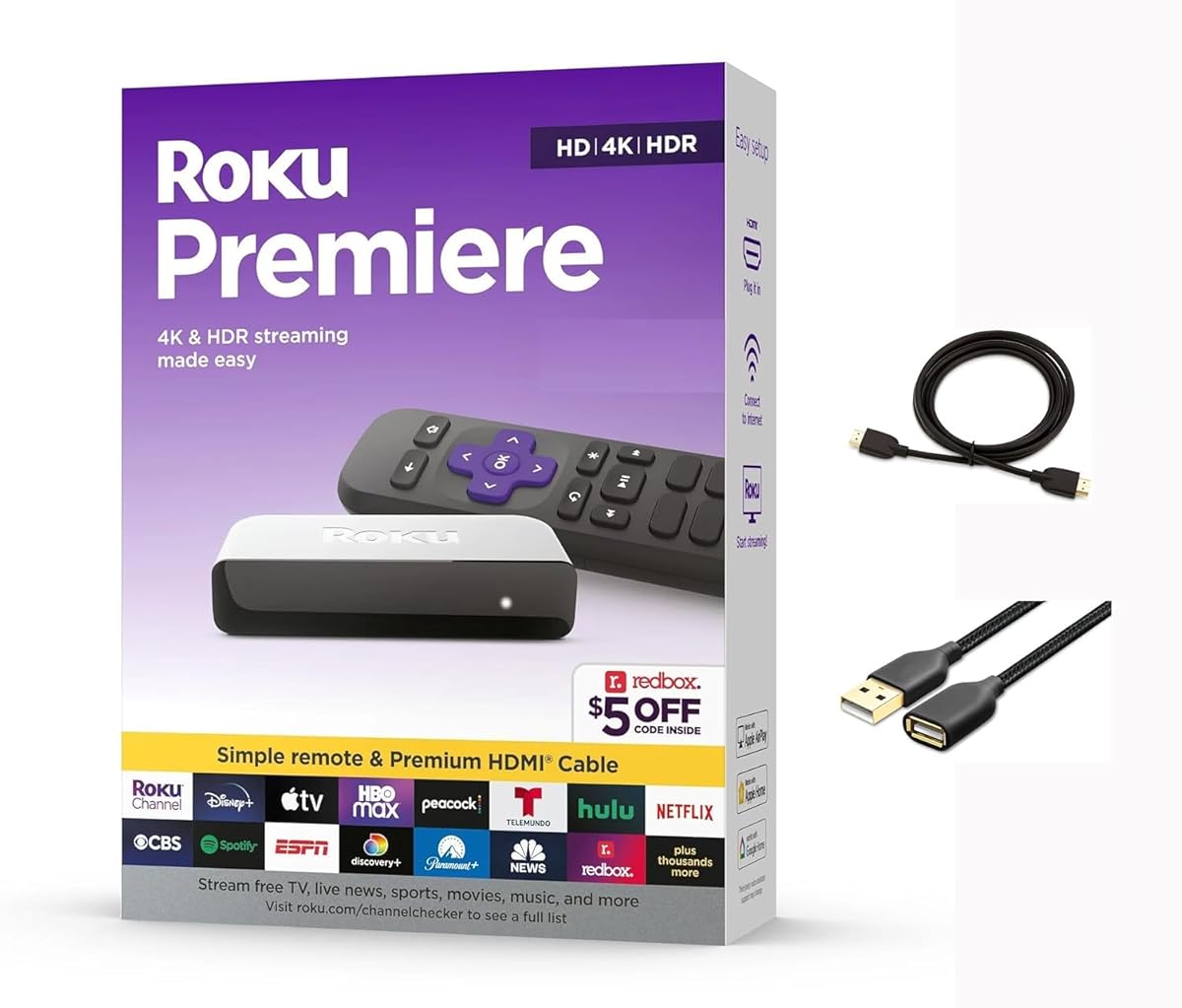
The Roku Premiere offers a simple and reliable way to stream content without extra complexity. It supports 4K HDR and includes a Premium High Speed HDMI Cable to get you started quickly with a guided setup process.
We may earn a commission when you buy through this link, at no additional cost to you.
Its simple remote includes shortcut buttons for popular channels making it easy to jump straight to your favorite content. Apple AirPlay support allows you to share photos and videos from your phone to the TV for seamless family sharing.
Voice control is not built into the remote though you can use other assistants. This lack of voice features makes it less convenient for search but it remains a solid value for users who prefer physical buttons over voice commands.
This model is great for seniors or those who prefer simplicity. It provides all the essentials for streaming high-quality video and offers automatic updates to ensure long-term performance without needing technical knowledge.
Connect and start watching in minutes with a guided setup process that simplifies every step of getting your TV connected.
Effortlessly share content from Apple devices to your TV using AirPlay to display photos and videos directly on the big screen.
We may earn a commission when you buy through this link, at no additional cost to you.
Selecting the right streaming device involves considering video quality, connectivity, and user interface. This guide breaks down key factors to help you make an informed decision based on your specific needs.
Look for devices that support at least 4K UHD resolution if you have a modern TV. HDR formats like HDR10+ and Dolby Vision enhance contrast and color, making movies look more lifelike.
Prioritize 4K HDR support for the best picture quality and ensure your TV can handle these formats to fully benefit from the upgrade.
Wi-Fi 6 and Ethernet ports are critical for stable streaming without buffering. If your router is far away, choose a model with a strong receiver or an Ethernet port for reliability.
Always check for modern wireless standards or wired ports to prevent lag during peak viewing hours in multi-device households.
Voice remotes allow for faster searches and smart home control. Systems like Alexa or Google Assistant simplify finding content and managing devices through simple spoken commands.
Opt for a device with a voice remote if you want hands-free control and easier navigation across multiple streaming apps quickly.
The interface determines how easily you find shows. Systems like Roku and Fire TV offer intuitive menus that organize content by app or genre efficiently.
Choose an interface that matches your habits, ensuring you can navigate menus without frustration every time you turn on the TV.
Remotes with dedicated app buttons save time. Advanced models may include rechargeable batteries or headphone jacks for private listening during late night sessions.
Select a remote with features like rechargeable batteries or headphone jacks for a more comfortable and versatile viewing experience.
Ensure the device supports all your favorite streaming apps. Most major platforms are available but niche services might be limited on certain operating systems.
Verify your essential apps are supported before buying to ensure full access to the content you watch most often regularly.
Budget devices often lack 4K or advanced features. Consider if you need a box or stick model based on your TV size and usage habits.
Balance cost with the features you actually need to find a model that offers the best performance for your budget range.
Devices with extra storage and newer wireless standards last longer. They handle software updates and future app demands better than older models.
Invest in a device with Wi-Fi 6 or ample storage to keep it relevant for several years without needing immediate replacement or upgrades.
Connect your device to an HDMI port on your TV and power it via USB or wall adapter. Follow the on-screen instructions to link it to your Wi-Fi network and log into your preferred streaming accounts.
Use the included remote to navigate menus and launch apps. Voice commands can help search for titles quickly, while physical buttons allow precise control over playback and volume.
Keep your device ventilated to prevent overheating. Place it in a flat space and avoid covering it with objects to ensure proper airflow and long-lasting performance for years.
Sticks are compact and plug directly into the TV HDMI port, while boxes sit separately and often offer more features like Ethernet ports and better processing. Boxes are generally better for larger setups, while sticks are ideal for portability and saving space.
No, you can use many free apps like YouTube or Pluto TV. However, accessing premium content like Netflix or HBO Max requires separate subscriptions, but the device itself works without them for free channels.
Yes, that is one of the main benefits. Any TV with an HDMI port can become a smart TV with these devices, providing full access to apps and streaming services without built-in smart features.
Use built-in casting features like Chromecast or AirPlay on your phone or computer. Connect both devices to the same Wi-Fi network and select the cast option to stream media directly to your TV.
Buffering often results from slow internet speeds or weak Wi-Fi signals. Ensure you have a strong connection, use Wi-Fi 6 if available, and consider an Ethernet adapter for a more stable stream.
Yes, they can be used on TVs that also have consoles. Some devices even support cloud gaming so you can play games directly on the device using a controller without a separate console.
Our top picks cover a range of needs from budget friendly options to premium models with advanced features. The Roku Streaming Stick 4K offers the best balance while the Fire TV Stick HD is perfect for low budgets.
Prioritize 4K resolution and reliable connectivity if you want a future proof experience. Voice control and app availability also play key roles in daily satisfaction and ease of use for the whole family.
Remember that technology evolves quickly so always check current prices and specs before buying. A device that fits your needs today might not be the same as next year so choose wisely based on current reviews.