
eufy Security 5-Piece Home Alarm Kit
4.3Editor score
Simple setup without monthly fees
Includes keypad and motion sensor
Instant alerts via mobile app
Securing your home requires reliable technology that you can control easily. Keypad control home security systems offer a tangible interface for arming and disarming your property. They provide a sense of direct control and immediate feedback that app-only solutions sometimes lack for many homeowners seeking peace of mind.
We have evaluated ten distinct models based on their interface quality, integration capabilities, and overall reliability. Each system was reviewed for its ease of setup, sensor compatibility, and user feedback regarding daily use. This list covers everything from simple touch panels to advanced wireless control centers for modern households.
Each selection highlights specific strengths such as touchscreen clarity, voice assistant support, or budget friendliness. Note that availability and stock levels change frequently so always verify current details before purchasing. Our goal is to provide clear insights that help you make an informed decision for your specific security needs.
4.3Editor score
4.6Editor score

4.6Editor score
As an Amazon Associate we earn from qualifying purchases.
This side by side comparison outlines the core specifications and interface types for all ten selected systems to help you distinguish between basic keypads and advanced touch controllers.



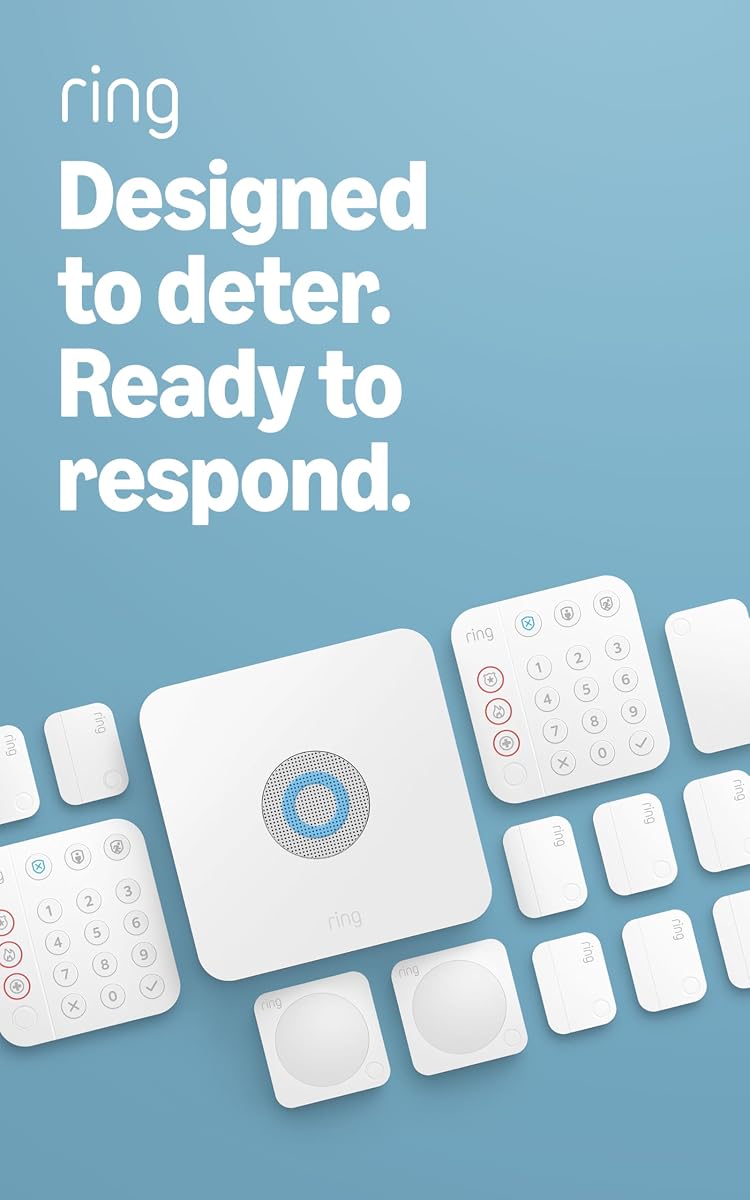
The Ring Alarm 14-Piece Kit stands out as a comprehensive solution for modern security needs. It earns a strong rating from users who appreciate the flexibility of wireless installation and the convenience of mobile control. This system is designed for homes that require multiple entry points and a central control interface.
We may earn a commission when you buy through this link, at no additional cost to you.
At the heart of this kit are two intuitive keypads that allow you to arm and disarm the system with ease. The contact sensors detect when doors or windows open providing immediate feedback through the Ring app. You can also add motion detectors and range extenders to cover more area without complex wiring.
While the system is robust it does rely on a subscription for certain advanced features like remote arming and professional monitoring. Additionally if your Wi-Fi connection drops the local alarms still work but remote access may be limited. These trade-offs are generally acceptable given the overall value and ease of setup.
This kit is ideal for homeowners who want a balance of simplicity and advanced control. It suits those who prefer physical keypad access alongside app management. For anyone seeking a scalable system that grows with their security needs this model offers a solid foundation for protection.
The inclusion of two keypads ensures you have control points in multiple locations for convenience.
Integration with Alexa allows for voice commands and seamless interaction with other smart home devices.
We may earn a commission when you buy through this link, at no additional cost to you.
The eufy Security 5-Piece Home Alarm Kit is an excellent choice for budget-conscious buyers. It simplifies the setup process allowing you to install the system yourself in minutes. The keypad provides a straightforward way to manage arming and disarming without needing to open an app every time.
We may earn a commission when you buy through this link, at no additional cost to you.
This system includes essential entry sensors for doors and windows along with a motion detector for interior coverage. Alerts are sent instantly via the eufy Security app ensuring you know if a breach occurs. The one-time purchase model eliminates recurring costs which is a significant advantage over subscription-based competitors.
Because it is a smaller kit it covers less area than larger setups. You may need to buy additional sensors separately to protect more doors or rooms. The keypad is functional but lacks advanced features found in premium models. Still it delivers reliable protection for smaller homes.
Choose this kit if you want a no-nonsense security system without hidden costs. It works well for renters or homeowners who need basic protection and prefer a simple interface. It is a practical starting point for building a layered security strategy.
The absence of monthly fees makes this a financially predictable option for long-term security.
Installation is designed to be quick and easy requiring minimal technical knowledge from the user.
We may earn a commission when you buy through this link, at no additional cost to you.
The Honeywell 6290W Touch Center offers a high-end experience for security management. Its 7-inch color display provides a clear and modern way to interact with your alarm system. This keypad is designed for users who want a sleek interface that feels more like a tablet than a traditional panel.
We may earn a commission when you buy through this link, at no additional cost to you.
Voice command support adds another layer of convenience allowing you to control the system without touching the screen. The wireless design means you can mount it in a central location without running cables to a control panel. It delivers a responsive experience that enhances daily usability.
This unit is part of a broader ecosystem so it requires a compatible Honeywell alarm panel to function fully. The cost is higher than basic keypads but the visual feedback and touch capabilities justify the investment for many users. It may not fit every budget but it excels in quality.
Invest in this control panel if you want the best visual interface available. It suits tech-savvy users who appreciate modern design and advanced features. This keypad transforms the mundane task of arming your security into a smooth and engaging interaction.
The large color screen makes it easy to see system status and messages at a glance.
Built-in voice support allows for hands-free control which is useful in various home scenarios.
We may earn a commission when you buy through this link, at no additional cost to you.
The Honeywell Ademco 6150 is a classic fixed display keypad for alarm panels. It provides a straightforward interface that displays system status in English without complex graphics. This unit is a staple for traditional security systems that prioritize reliability over modern aesthetics.
We may earn a commission when you buy through this link, at no additional cost to you.
It is designed to be compatible with Adecco Vista alarm panels ensuring seamless integration. The keypad uses a hardwired connection which ensures constant power and communication without battery concerns. Users appreciate its simplicity and the lack of unnecessary features that might complicate daily use.
The fixed display can be harder to read in low light compared to backlit screens. It also requires wiring which can make installation more involved than wireless options. These factors are typical for legacy systems and might not appeal to those seeking modern convenience.
Choose this keypad if you have an existing Honeywell system that needs a replacement. It offers dependable performance and a familiar interface for users who prefer standard controls. It remains a solid option for functional security management in professional settings.
This unit ensures older alarm panels remain functional with a standard and reliable control interface.
The focus on core arming and disarming features makes it easy to use without distractions.
We may earn a commission when you buy through this link, at no additional cost to you.
The Ring Alarm 8-Piece Kit is tailored for smaller residences and apartments. It includes a single intuitive keypad for managing your alarm alongside essential contact sensors. This kit allows you to arm and disarm with a button press and monitor activity through the Ring app.
We may earn a commission when you buy through this link, at no additional cost to you.
Contact sensors detect when doors or windows open providing critical alerts to your phone. The range extender ensures the signal reaches all devices across a modest floor plan. Users rate this kit highly for its balance of simplicity and functionality for compact living spaces.
Since it comes with one keypad you may find less flexibility than a 14-piece set. Also subscription plans are recommended for advanced features like remote control and professional monitoring. However for basic protection this kit provides excellent value and easy setup for entry-level users.
This system is perfect for renters or small homeowners who want professional-grade security. It scales easily if you decide to add more sensors later. The keypad provides a reliable anchor for daily security management in smaller environments.
Designed to fit 1-2 bedroom homes without cluttering your space with unnecessary components.
Seamless integration with the Ring app allows you to check status from anywhere at any time.
We may earn a commission when you buy through this link, at no additional cost to you.
The eufy Keypad E10 is a specialized accessory designed for quick and safe system access. It offers four modes for arming and disarming to suit different situations. A standout feature is the Covert Duress Alarm which triggers an emergency dispatch silently if you are under pressure.
We may earn a commission when you buy through this link, at no additional cost to you.
It also includes a dedicated SOS button on top that can be held to call for help immediately. This adds a critical layer of personal safety beyond standard intrusion detection. The keypad connects to HomeBase with a range up to 656 ft for flexible placement in your home.
Because it requires a HomeBase 2, 3, or Pro you cannot use it as a standalone system. It is an add-on rather than a complete kit so you need existing infrastructure. This dependency might limit its appeal if you do not already own an eufy ecosystem.
Select this keypad if you prioritize personal safety features alongside standard security. It is ideal for those who want quick emergency access and covert protection. It enhances an existing system with critical tools for unexpected situations.
The SOS button allows for immediate distress signaling without needing to navigate a menu.
Duress codes let you protect yourself silently in dangerous situations without alerting the intruder.
We may earn a commission when you buy through this link, at no additional cost to you.
The Ring Alarm Keypad 2nd Gen is a sleek add-on for existing Ring security users. It allows you to arm and disarm your system with a simple touch. The new design features an emergency response button that provides quick access during critical moments.
We may earn a commission when you buy through this link, at no additional cost to you.
This keypad is designed to work seamlessly with the Ring ecosystem for consistent control. It offers a clean interface that fits modern home decor. Users find it intuitive and reliable for daily use when leaving or returning home.
It requires a Ring Home subscription to fully utilize all features. Also it is not a standalone system and needs a Ring base station to function. These constraints are typical for add-ons but should be considered before purchase.
Buy this keypad if you already have a Ring system and want an extra control point. It enhances your setup with a modern look and emergency access. It is a practical upgrade for better access to your security system.
The updated aesthetic blends well with contemporary interiors while providing necessary functionality.
The dedicated button ensures that help is never far away when you need immediate assistance.
We may earn a commission when you buy through this link, at no additional cost to you.
The Honeywell Security 6160 is an Alpha Display Keypad designed for professional and residential systems. It provides clear information on the screen and is easy to use for daily control. This keypad is a reliable tool for managing security panels with precision.
We may earn a commission when you buy through this link, at no additional cost to you.
It can be used to program Adecco Vista alarm panels making it versatile for various setups. The package dimensions and weight make it easy to handle during installation. Users appreciate its straightforward interface and consistent performance over time.
The display is less modern than touchscreens which might limit visual appeal. It also requires a wired connection for power and data which limits placement options. These factors make it better suited for fixed installation points rather than flexible setups.
This keypad suits those who value reliability and clear information over flashy features. It is a good match for existing professional systems needing a replacement. It remains a trusted option for essential alarm control in homes and businesses.
This unit allows you to configure alarm panels directly which simplifies the setup process.
The compact form factor makes it easy to mount and maintain without heavy hardware.
We may earn a commission when you buy through this link, at no additional cost to you.
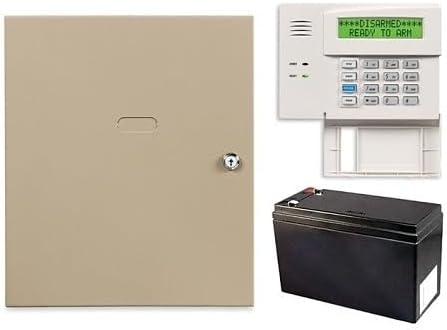
The Honeywell Home VISTA-20P 3-Piece Control Panel Kit offers a complete solution for security management. It includes the control panel, a keypad, and a battery for reliable operation. This kit supports IP and cellular radio alarm reporting for secure communication.
We may earn a commission when you buy through this link, at no additional cost to you.
It is compatible with Z-wave enabled smart home devices like lights and locks allowing for automation. The panel supports up to four graphic touchscreen keypads for extended control. Users give it a perfect rating for its reliability and robust feature set.
The included keypad is a standard model rather than a touchscreen so you may want to upgrade later. Wiring is required for connection to the panel which adds to the installation effort. These details are common for professional-grade kits.
This kit is ideal for those building a new security system or replacing an old one. It provides a stable foundation for advanced automation and reporting. It is a solid choice for reliable home protection with future growth potential.
Compatibility with Z-wave devices allows you to integrate security with lighting and locking systems.
IP and cellular radio ensure that your alarm status is communicated reliably even if one path fails.
We may earn a commission when you buy through this link, at no additional cost to you.
The TUXEDO 7 Touchscreen Security and Smart Controller is a sleek interface for Honeywell systems. It features a 7-inch touchscreen that provides a modern way to interact with your security. This unit is hard wired to ensure continuous operation without internal battery management.
We may earn a commission when you buy through this link, at no additional cost to you.
Because it relies on the system battery backup it can operate during power outages if the main system has backup. It simplifies installation by removing the need to service a keypad battery. The smart controller design allows for intuitive navigation and control.
This model does not include its own battery so it depends on the broader system. If the main system fails the keypad will not work. Users should ensure their main panel has a robust backup to maintain functionality.
Choose this controller if you want a stylish and responsive interface for your security system. It is suitable for modern homes where reliability of the main panel is high. It transforms your security control into a sophisticated and easy experience.
The touchscreen design offers a user-friendly experience that feels natural and responsive.
Hardwired connection ensures stable power and data transfer without maintenance of batteries.
We may earn a commission when you buy through this link, at no additional cost to you.
Selecting the right system depends on understanding your home size, technical skills, and desired control methods. This section breaks down the key factors to consider before you buy.
Consider the number of doors and windows you need to protect. Larger kits include more sensors and keypads to cover multiple zones effectively. Ensure the range and extender options match the layout of your home.
Choose a kit that covers all entry points without leaving gaps. Adding sensors later is easier if the system is expandable.
Decide between a fixed display keypad and a touchscreen. Touchscreens offer better visual feedback but may cost more. Fixed keypads are simpler and more reliable for basic tasks.
Select a display type that matches your comfort level with technology. A clear interface reduces the chance of accidental arming errors.
Check if the system works with platforms like Alexa or Google Assistant. Compatibility allows voice control and integration with smart lights and locks. This feature is vital for automated routines and centralized control.
Prioritize models that offer broad compatibility if you plan to expand your smart home ecosystem later.
Wireless systems allow for quick self-installation without drilling or wiring. Hardwired systems may require professional setup but offer greater reliability. Consider your ability to manage cables and mounting hardware.
Pick a wireless option if you are not technically inclined or need to rent a space.
Some systems require a subscription for professional monitoring while others do not. Self-monitoring saves money but requires you to respond to alerts. Professional monitoring ensures emergency dispatch without your intervention.
Weigh the cost of monthly fees against the peace of mind professional monitoring provides.
Look for systems with battery backup to maintain function during power outages. Keypads that rely on the main system battery must be supported by a robust backup source. Hardwired units draw power from the panel and should have a stable source.
Ensure your power setup includes a backup solution to prevent system failures during storms.
Features like SOS buttons or covert duress alarms add a layer of personal safety. These allow you to trigger an emergency alert silently or instantly in danger. Consider the needs of your household when evaluating safety tools.
Invest in models that offer these specific safety features if personal protection is a priority.
A good mobile app lets you arm and disarm from anywhere. Check for notifications and status updates to keep you informed. Reliable connectivity is essential for real-time monitoring.
Ensure the app is user-friendly and supports the features you need for remote control.
To start using your system follow the on-screen instructions to pair sensors and keypads. Mount the keypad at a convenient location near your main exit for easy daily access. Ensure the signal range is sufficient for all your devices.
Regularly test your system by triggering sensors to confirm alerts are received. Check battery levels on wireless sensors and keypads every few months to prevent unexpected failures. Clean the keypad screen gently with a soft cloth to avoid damage.
Update your system firmware through the app to ensure security patches are applied. Change your access codes periodically to maintain protection. Keep contact information current in the monitoring app for emergency responders.
Not all systems require a subscription. Basic self-monitoring can be done without a monthly fee on many models. However professional monitoring usually requires a subscription to dispatch emergency services. Check the specific plan details before you purchase.
Most modern systems are expandable and allow you to add keypads. You should check compatibility with your existing model and base station. Additional keypads provide more control points in different rooms for convenience.
Local alarms will still work if the main panel is powered. Remote access via app may stop until connection is restored. Some systems offer cellular backup to ensure continuous communication.
Touchscreen keypads offer better visual feedback and modern aesthetics. Traditional keypads may be more durable and easier to use in bright light. Choose the one that fits your preference for interface technology.
Refer to the user manual for reset instructions specific to your model. You may need to access the main panel or use the app. Some systems allow a master reset via a physical button sequence.
It depends on your comfort level with alerts. Professional monitoring ensures emergency services are called if you cannot respond. It is a valuable layer of protection for those away from home often.
The Ring Alarm 14-Piece Kit, eufy Security 5-Piece Kit, and Honeywell 6290W Touch Center represent the top options for different needs. Each offers a unique balance of control features and integration capabilities. Your final choice depends on your home size and technical preferences.
Prioritize systems that offer clear interfaces and reliable connectivity for daily use. Consider how you interact with your security and whether voice or touch control matters. A well-matched system will be easier to manage over time.
Remember to check the latest availability and features before making a purchase. Technology evolves quickly so current models may offer new capabilities. This guide provides a solid starting point for securing your home effectively.