
TP-Link ER605, Wired Gigabit VPN Router
4.4Editor score
Five Gigabit Ports
USB WAN Support
Advanced Firewall
Discover the top load balancing routers for seamless network management. This guide compares ten top-rated models for performance, security, and reliability in
In today's connected world, maintaining a stable and efficient network is crucial for both home offices and small businesses. Load balancing routers distribute internet traffic across multiple connections, ensuring optimal bandwidth usage and minimizing downtime during outages.
Our team evaluated ten leading load balancing routers based on port flexibility, security features, VPN support, and ease of management. We prioritized models that offer reliable failover, robust hardware acceleration, and scalable options for growing network demands.
Each pick below highlights specific strengths, from budget-friendly entry-level units to enterprise-grade gateways. While pricing varies by retailer and stock, these models represent the current best choices for ensuring uninterrupted connectivity and advanced network control.
4.4Editor score

4.7Editor score

4.0Editor score
The table below outlines key specifications for each model, helping you compare port types, WAN capabilities, and unique features at a glance to find the right fit for your network infrastructure.



The Omada Fusion 2.5G Router stands out as the top choice for modern networks needing high-speed wired connections. With a 4.7 rating, it offers exceptional performance and ease of use for both beginners and IT professionals.
We may earn a commission when you buy through this link, at no additional cost to you.
Its quad-core processor ensures rapid traffic processing, while the five 2.5G ports provide ample bandwidth for multiple devices. The built-in touchscreen allows quick status checks without requiring a laptop, streamlining on-site maintenance.
While it lacks Wi-Fi, pairing it with Omada access points creates a cohesive ecosystem. The license-free cloud access and simplified Bluetooth setup make deployment straightforward, though the cost is higher than entry-level models.
This router is ideal for businesses or advanced home labs requiring robust failover and multi-gigabit speeds. Its blend of hardware power and intuitive management makes it the most reliable solution for demanding network environments.
The touchscreen provides instant health scores and real-time traffic insights, reducing the need for external tools during routine checks.
Access the network remotely via the Omada portal without extra licensing fees, ensuring flexibility for distributed teams.
We may earn a commission when you buy through this link, at no additional cost to you.
The Alta Labs Route10 delivers top-tier performance for users needing 10Gbps speeds and advanced routing capabilities. Its hardware-accelerated processor ensures low latency, making it suitable for bandwidth-heavy tasks like video streaming or large file transfers.
We may earn a commission when you buy through this link, at no additional cost to you.
With two 10G SFP+ ports and four 2.5G ports, this router supports future-proof connectivity. The integrated PoE+ output powers access points directly, reducing clutter and simplifying network installations in professional or home office settings.
Its enterprise-grade features include VLAN tagging and QoS prioritization, though setup may require networking knowledge. The real-time monitoring tools help administrators optimize traffic flow, though the premium price reflects its advanced hardware design.
Choose this router if you need maximum wired performance and robust control. It excels in environments where reliability and speed are paramount, offering a comprehensive solution for high-demand network infrastructure.
PoE+ support allows powering compatible devices directly through Ethernet cables, cutting down on adapter requirements.
Live statistics on WAN and LAN traffic help quickly identify bottlenecks and maintain stable performance.
We may earn a commission when you buy through this link, at no additional cost to you.
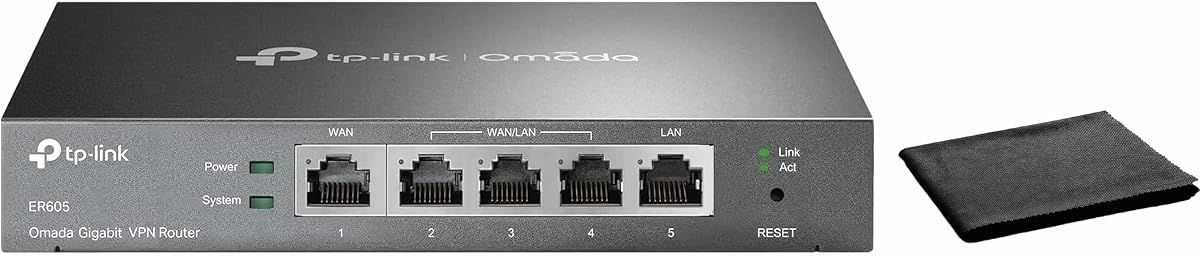
The TP-Link ER605 offers excellent value for small businesses needing reliable load balancing without breaking the bank. With a 4.4 rating, it provides essential tools for bandwidth optimization and security in compact, easy-to-use hardware.
We may earn a commission when you buy through this link, at no additional cost to you.
It includes five gigabit ports, allowing flexible WAN configurations to maximize internet speed. The USB port supports 4G/3G backup, ensuring uptime even if primary connections fail, while advanced firewall policies protect sensitive data.
While it lacks a touchscreen, the web interface and Omada app compatibility simplify management. The VPN support covers multiple protocols, though advanced SDN integration is missing compared to higher-end models.
This model suits users prioritizing cost-effective connectivity and failover reliability. Its straightforward design and robust security make it a practical choice for offices or homes needing stable, balanced internet access.
USB WAN support for mobile broadband ensures your network stays online during primary ISP outages.
Up to three WAN ports allow diverse internet sources, enhancing bandwidth usage and redundancy.
We may earn a commission when you buy through this link, at no additional cost to you.
The TP-Link ER7206 is built for users invested in the Omada SDN ecosystem, offering seamless integration with other network devices. Its ability to manage up to 700 clients makes it ideal for larger small businesses or public Wi-Fi hotspots.
We may earn a commission when you buy through this link, at no additional cost to you.
With up to four WAN ports, it provides ample bandwidth options. The SDN compatibility allows centralized control via hardware, software, or cloud controllers, simplifying multi-site network administration and ensuring consistent policy enforcement.
While standalone mode works, full benefits require compatible Omada devices. The remote cloud access is convenient, though some cloud-based plans may involve additional fees. This router balances performance and scalability well for growing networks.
Choose this router for scalable, centrally managed environments. Its robust client support and Omada integration make it a powerful tool for organizations needing reliable, coordinated network infrastructure across multiple locations.
Omada SDN integrates gateways, access points, and switches into one platform for simplified administration.
Support for up to 700 clients ensures stable connections in high-density areas without performance drops.
We may earn a commission when you buy through this link, at no additional cost to you.
The Cudy R700 appeals to tech-savvy users seeking open-source flexibility with its OpenWRT-ready design. It supports automatic failover across up to five ISPs, keeping networks online with minimal manual intervention.
We may earn a commission when you buy through this link, at no additional cost to you.
Its VPN suite includes WireGuard, OpenVPN, and more, allowing secure site-to-site tunnels. Professional security tools like SPI firewall and DMZ hosting protect networks while maintaining access to critical services.
While the web GUI is user-friendly, unlocking full potential may require community packages. The TR-069 support enables carrier-grade management, though users should be comfortable with networking concepts for optimal configuration.
This router is perfect for advanced home labs or remote offices needing customization. Its open-platform approach and robust failover features make it a versatile choice for those who value control and extensibility.
OpenWRT unlocks advanced firewall rules, VLAN segmentation, and community-developed packages for tailored networks.
Automatic failover instantly reroutes traffic if a connection drops, ensuring uninterrupted service for remote offices.
We may earn a commission when you buy through this link, at no additional cost to you.
The Omada ER7412-M2 supports up to 11 WAN ports, maximizing broadband utilization for high-bandwidth needs. With two 2.5G ports, it delivers faster throughput, ideal for businesses relying on multiple internet lines for redundancy.
We may earn a commission when you buy through this link, at no additional cost to you.
Its security suite includes DPI and IPS/IDS, providing deep protection against threats. The VPN options cover modern protocols like WireGuard and IPsec, ensuring secure remote access without compromising network performance.
While powerful, optimizing all features requires familiarity with SDN management. The high port count may exceed basic needs but offers future scalability. This router fits environments where bandwidth and security are non-negotiable.
Choose it for demanding professional networks needing robust failover and high-speed WAN. Its comprehensive security and multi-gigabit support make it a strong candidate for offices with intensive internet usage.
Load balancing across up to 11 WAN ports significantly increases utilization rates for multi-line broadband setups.
DPI and IPS/IDS capabilities add layers of security to detect and block malicious network traffic.
We may earn a commission when you buy through this link, at no additional cost to you.
The TP-Link TL-R470T+ delivers cost-effective load balancing for small offices needing multiple WAN connections. With four 10/100M ports, it ensures bandwidth efficiency and backup capabilities for environments not yet requiring gigabit speeds.
We may earn a commission when you buy through this link, at no additional cost to you.
Its portal authentication simplifies client management, while lightning protection safeguards hardware from surges. The PPPoE server allows administrators to manage client accounts directly, enhancing control over network access.
Though speeds are capped at 100Mbps per port, it remains practical for basic needs. The compact case suits cafes or small offices, though users seeking higher throughput may need newer models with gigabit capabilities.
This router is a smart pick for tight budgets prioritizing reliability over raw speed. Its balance of features and affordability makes it a practical solution for basic multi-WAN requirements in low-bandwidth scenarios.
Four WAN ports with load balance guarantee maximum bandwidth and backup without expensive hardware.
Portal authentication and PPPoE server help administrators manage client accounts and enforce policies.
We may earn a commission when you buy through this link, at no additional cost to you.
The TP-Link TL-R480T+ offers a straightforward approach to load balancing with three configurable WAN/LAN ports. Designed for simplicity, it handles basic failover needs effectively in small setups where advanced management isn't required.
We may earn a commission when you buy through this link, at no additional cost to you.
Its compact design fits easily into tight spaces, and the load balance mode ensures even traffic distribution. While it lacks newer security features, it provides reliable connectivity for users prioritizing essential functionality.
Setup is minimal, making it accessible for non-technical users. However, the aging hardware may not support modern high-speed connections. This router serves well for legacy systems or temporary network expansions.
Choose this for simple, no-fuss multi-WAN needs. Its ease of use and low cost make it a viable option for small offices or homes needing basic redundancy without complex configuration.
Three ports can be configured as WAN or LAN, allowing adaptable connection setups for different network layouts.
A small case ensures easy placement in constrained spaces while maintaining stable load balancing performance.
We may earn a commission when you buy through this link, at no additional cost to you.
The TP-Link ER-605 focuses on easy cloud monitoring and bandwidth optimization for small businesses. With dual WAN ports and load balancing, it ensures consistent performance while the Omada app provides real-time network status updates.
We may earn a commission when you buy through this link, at no additional cost to you.
Its SPI firewall and VPN support (IPsec, PPTP, L2TP) secure remote access efficiently. The intuitive web interface and cloud tools simplify management, though it lacks the depth of higher-end models.
The included cloth suggests attention to installation care, and the compact design fits varied environments. While suitable for small to medium businesses, power users might find its feature set limited.
This router suits users needing reliable cloud-based oversight without complexity. Its balance of security and ease of use makes it a practical choice for offices prioritizing remote visibility and stable connectivity.
Cloud monitoring enables real-time status checks from anywhere, reducing the need for on-site troubleshooting.
Bandwidth optimization ensures critical applications receive necessary resources for smooth performance.
We may earn a commission when you buy through this link, at no additional cost to you.
The Ubiquiti EdgeRouter 4 offers deep customization for advanced users needing precise control. With three gigabit ports and an SFP slot, it supports varied connectivity while its fanless design ensures quiet, reliable operation.
We may earn a commission when you buy through this link, at no additional cost to you.
Its low power consumption of 13 watts makes it efficient for always-on deployments. The flexible mounting options suit desks, walls, or racks, providing versatility in diverse installation environments.
However, setup requires manual configuration and networking knowledge, making it less friendly for beginners. The lack of cloud features means reliance on local interfaces, which may deter some users seeking remote management.
Choose this router for tailored network solutions in controlled environments. Its robust hardware and customization options make it ideal for tech enthusiasts or professionals who value full control over their infrastructure.
Fanless design ensures quiet operation, perfect for noise-sensitive spaces, while consuming minimal power.
Desk, wall, and rack mount capabilities allow placement anywhere to suit specific space requirements.
We may earn a commission when you buy through this link, at no additional cost to you.
Selecting the right load balancing router depends on your network size, budget, and specific connectivity needs. Consider these factors to ensure the device meets both current and future demands effectively.
The number and type of WAN ports determine how many internet connections you can use simultaneously. Look for routers offering multiple gigabit or 2.5G ports if you plan to aggregate bandwidth from several ISPs.
Ensure the ports match your needs, such as SFP for fiber or RJ45 for copper, to avoid compatibility issues.
Failover keeps your network online by switching to a backup connection when the primary fails. Load balancing distributes traffic across connections to maximize speed and utilization. Check if the router supports both or offers customizable strategies.
Prioritize models with automatic failover to minimize downtime, especially for critical business applications.
Robust security includes SPI firewalls, DoS protection, and intrusion detection systems. Verify support for modern VPN protocols like WireGuard or IPsec to secure remote access and data transmission.
Advanced options like content filtering or VLAN segmentation add layers of protection for sensitive networks.
A powerful processor ensures smooth packet processing, especially with encryption or QoS enabled. Hardware-accelerated VPNs reduce latency and prevent bottlenecks during heavy traffic.
Check throughput ratings to confirm the router can handle your expected peak loads without slowdowns.
Cloud, mobile app, or web-based management affects setup ease and ongoing maintenance. User-friendly interfaces with visual dashboards simplify monitoring and configuration for non-technical users.
Support for APIs or command-line interfaces can benefit administrators needing automation or detailed control.
Consider whether the router integrates with other network devices like access points or switches. Ecosystems like Omada offer centralized control for multi-site deployments.
Ensure the model supports future expansion, such as adding more WAN ports or higher throughput capabilities.
Efficient power use reduces operational costs, especially for 24/7 deployments. Fanless designs offer quiet operation, suitable for offices or home environments.
Check thermal performance to ensure stability under load, particularly for compact units in warm spaces.
Balance cost against features, ensuring you don't overspend on unnecessary capabilities. Entry-level models may suffice for basic needs, while advanced users benefit from premium options.
Evaluate long-term value by considering durability, warranty, and upgrade paths when making your decision.
Connect your modem to the primary WAN port using an Ethernet cable. Plug in backup internet lines to additional WAN ports, ensuring each is active and configured with the correct connection type, such as DHCP or static IP.
Access the router's admin interface via a web browser or mobile app. Set up load balancing rules based on weight or connection type, and enable automatic failover to ensure seamless switching during outages.
Regularly update firmware to maintain security and performance. Monitor traffic stats to identify bottlenecks, and restart the device periodically to clear memory. Keep the unit in a well-ventilated area to prevent overheating.
Load balancing distributes internet traffic across multiple connections to optimize bandwidth and reduce strain on any single line. It ensures faster speeds and better reliability by using all available connections simultaneously.
Failover automatically switches traffic to a backup internet connection if the primary one goes down. This minimizes downtime and keeps your network operational without manual intervention during outages.
You need separate modems or ISPs for each WAN connection. Most routers support standard modems, but ensure they provide distinct internet feeds to allow effective balancing and redundancy.
Yes, but most load balancing routers do not broadcast Wi-Fi. You will need separate access points to create wireless coverage while the router manages wired internet distribution.
Cloud management simplifies remote monitoring and configuration but isn't essential. Local interfaces work fine for basic setups, while cloud tools are ideal for multi-site or large networks.
Prioritize SPI firewalls, intrusion detection, and strong VPN protocols like IPsec or WireGuard. Ensure firmware updates are available to patch vulnerabilities and protect against emerging threats.
The Omada Fusion 2.5G stands out as the top overall choice, offering high-speed ports and intuitive management. For budget-conscious buyers, the TP-Link ER605 provides reliable features without overspending.
When choosing, prioritize port flexibility and failover capabilities to match your business needs. Advanced users may prefer the Alta Labs Route10 for raw performance, while smaller offices could benefit from simpler models like the TL-R470T+.
Prices and stock fluctuate regularly, so check current listings before purchasing. Ensure the router aligns with your network size and growth plans to make a lasting investment in connectivity.