
Optoma HD146X
4.3Editor score
Home Cinema Experience
Game Display Mode
Easy Installation
This guide compares the top Optoma Projector models for 2026, analyzing brightness, resolution, and features to help you find the best home theater or gaming
Optoma Projector models offer stunning visuals for home theaters, gaming, and business presentations. Choosing the right one depends on your specific needs like brightness, resolution, and throw distance. We have selected the top models to help you make an informed decision.
We compared these products based on brightness, resolution, input lag, and special features like short throw or gaming modes. Our analysis covers a wide range of options from budget-friendly Full HD units to high-end 4K laser projectors designed for immersive experiences.
Each pick highlights key strengths and ideal use cases to guide your selection process. Please note that prices and availability can change frequently, so always check the latest details on the product page before making your final purchase decision today.
4.3Editor score

4.3Editor score
3.8Editor score
The following table provides a side-by-side comparison of all ten Optoma Projector models included in this guide. Review the key specifications such as resolution, brightness, and special features to identify which model best fits your unique viewing requirements and space constraints.


The Optoma UHZ36 stands out as a top choice for home theater enthusiasts seeking true 4K clarity and vibrant HDR performance. With its laser light source, it delivers consistent brightness and sharp details across the screen. This model is ideal for movie lovers who want a cinematic experience at home.
We may earn a commission when you buy through this link, at no additional cost to you.
Key strengths include the FILMMAKER mode which preserves the director original vision for authentic viewing. The 4K resolution ensures text and visuals are crisp while HDR support enhances contrast and color depth. It offers a reliable experience for both films and sports without compromising on image fidelity.
While the fan noise can be noticeable at maximum brightness levels, it is generally acceptable in normal viewing conditions. The lack of a built-in smart operating system means you will need an external streaming device to access online content. However, the picture quality compensates for these minor conveniences.
This projector is best suited for dedicated home theater rooms or controlled lighting environments. If you prioritize image quality and color accuracy over smart features, the UHZ36 is a strong recommendation. It delivers a premium viewing experience that justifies its position as a top pick.
FILMMAKER mode ensures movies are shown exactly as the creators intended without unwanted processing.
The DuraCore laser provides long-lasting performance without the need for frequent bulb replacements.
We may earn a commission when you buy through this link, at no additional cost to you.
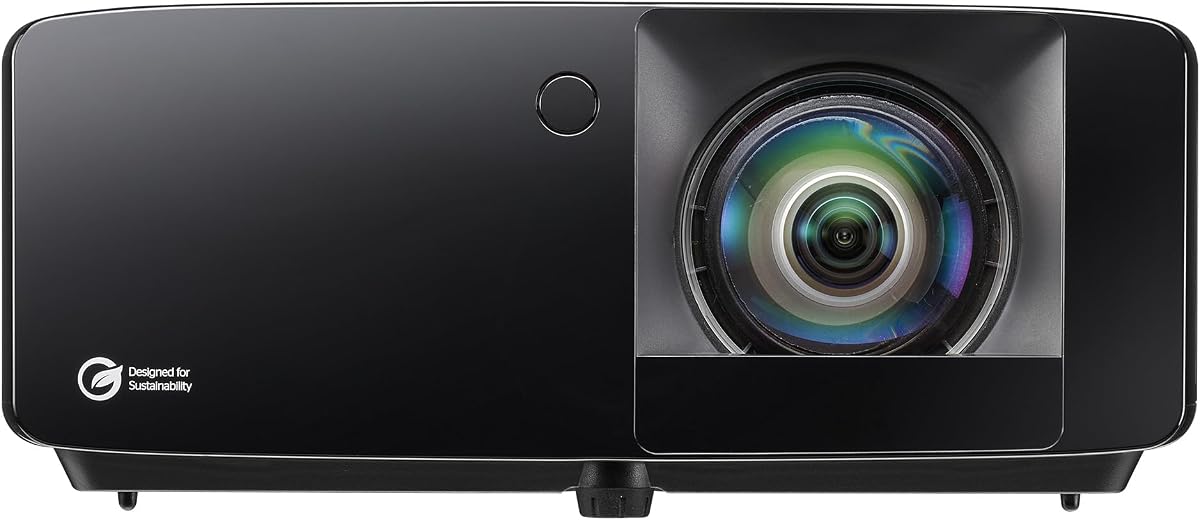
The Optoma HD146X offers an excellent entry point into home projection with its Full HD resolution and vibrant color output. It is designed to bring movies and games to life without breaking the bank. Users appreciate its ease of setup and reliable performance for everyday entertainment needs.
We may earn a commission when you buy through this link, at no additional cost to you.
Its standout feature is the Game Display Mode which reduces input lag for smoother gameplay. The color engine produces rich and saturated visuals that look great on larger screens. This makes it a solid choice for living rooms or multi-purpose spaces where cost is a primary factor.
However, the lamp may require replacement sooner than laser models and brightness can struggle in bright rooms. If you plan to use it in a well-lit space during the day you might notice some loss in contrast. But for evening use it provides a satisfying cinematic atmosphere.
Buyers looking for a budget-friendly option that still delivers decent quality will find this projector appealing. It is perfect for students, casual gamers, or anyone setting up a first home theater. The balance of price and performance makes it a reliable starter device.
Gaming mode optimizes response times making fast-paced action games more playable on a big screen.
The color engine enhances saturation to create lively images that engage viewers effectively.
We may earn a commission when you buy through this link, at no additional cost to you.
The Optoma GT3900UHD is a powerhouse designed for users who demand high brightness and short throw capabilities. It projects stunning 4K images even in rooms with significant ambient light. Its specialized features for golf simulation make it unique among consumer projectors available today.
We may earn a commission when you buy through this link, at no additional cost to you.
With 4000 lumens it ensures visibility during day gaming or sports viewing without needing a fully dark room. The short throw lens allows for large images from close distances which is essential for simulators and small spaces. The laser source guarantees years of maintenance-free operation.
Despite its strengths the physical size can be substantial and might require careful mounting or placement planning. The price reflects its premium features and may be out of reach for budget-conscious buyers. However, the functionality it offers justifies the investment for serious enthusiasts.
This unit is ideal for golf simulators, large living rooms, or commercial displays needing high impact visuals. If you need a projector that handles bright environments and specific tasks like gaming or sports, this model excels. It combines power with versatility for demanding setups.
Optimized for golf simulators to help maximize space and keep the device out of the swing zone.
High brightness allows for clear viewing even when lights are on or sunlight enters the room.
We may earn a commission when you buy through this link, at no additional cost to you.
The Optoma GT2300HDR combines short throw convenience with high brightness for versatile entertainment options. It is designed to create large images in smaller rooms while maintaining clarity and responsiveness. The inclusion of golf simulation readiness adds a unique utility for active users.
We may earn a commission when you buy through this link, at no additional cost to you.
Its 3600 lumens output ensures the picture remains visible in mixed lighting conditions. Low input lag supports responsive gaming making it suitable for fast-paced titles on consoles or PC. The short throw lens means you can place it closer to the screen without obstruction.
The main limitation is that it is Full HD rather than 4K which may not satisfy viewers seeking ultra detail. While it lacks integrated streaming apps, its core performance focuses on image quality and flexibility. This trade-off is acceptable for those prioritizing specific use cases like simulation.
Ideal for home gyms or media rooms where space is limited, this projector delivers reliable performance. It balances affordability with advanced features like laser light and gaming optimization. If you need a bright short throw model for mixed media use, this is a strong candidate.
The short throw ratio allows for a big image even in compact rooms or hallways.
Low input lag ensures that your movements register instantly for competitive gaming.
We may earn a commission when you buy through this link, at no additional cost to you.
The Optoma GT2400HDR pushes brightness limits with 4200 ISO lumens for vivid projection in any light. It is built to be tough with IP6X dust protection suitable for demanding environments. The short throw design ensures flexibility in placement while maintaining image quality.
We may earn a commission when you buy through this link, at no additional cost to you.
High brightness is crucial for visibility in rooms where you cannot fully control ambient light. It performs well for gaming with low lag and supports golf simulation for added versatility. The laser source provides long-term reliability reducing maintenance needs over time.
The fan noise can be a concern in quiet viewing settings but it is less of an issue during sports. While it lacks 4K resolution, the brightness compensates for clarity in bright settings. This makes it a practical choice for busy households or commercial spaces.
Choose this model if you need maximum visibility and durability in a short throw package. It fits well in spaces where light control is difficult or where the projector needs to be robust. It is a tool for reliability and high impact visuals.
IP6X dust resistance helps protect internal components from debris in active environments.
4200 lumens ensure that the image stays bright and clear even during the day.
We may earn a commission when you buy through this link, at no additional cost to you.
The Optoma ZK551 is engineered for professional and educational environments requiring extreme brightness and sharpness. With 5100 lumens and 4K UHD, it delivers crisp visuals even in well-lit conference rooms. Wireless screen sharing enhances collaboration and ease of use for presenters.
We may earn a commission when you buy through this link, at no additional cost to you.
Its IP6X dust resistance ensures longevity in demanding spaces with dust or debris. The 1.6x zoom offers flexible installation options allowing you to adapt to various room layouts. Maintenance-free laser operation reduces downtime for critical business or classroom schedules.
While highly capable, it is geared more towards commercial use than casual home entertainment. The setup may be more complex for average users due to its feature set. However, for offices or schools, its reliability and brightness are unmatched.
This projector is best for businesses or schools needing a reliable tool for daily presentations. It ensures your message is seen clearly by large audiences without technical interruptions. If you need a robust display for meetings, this model is an ideal fit.
Miracast allows you to share screens from devices quickly without cables.
360 and portrait projection support allow for creative mounting in various environments.
We may earn a commission when you buy through this link, at no additional cost to you.
The Optoma GT2000HDR is an ultra-compact solution for small rooms that still delivers strong performance. Its short throw lens allows for big images from a very short distance. The eco-friendly design and laser light make it an efficient choice for home users.
We may earn a commission when you buy through this link, at no additional cost to you.
With 3500 lumens, it provides sufficient brightness for typical living spaces. Full HD resolution ensures clear images for movies and sports without pixelation. The compact size makes it easy to move or store when not in use.
An external power supply is included which adds to the setup footprint slightly. While not 4K, the image quality remains sharp and vibrant for most content. It is a practical choice for those with space constraints or budget limits.
Buyers looking for a small footprint projector for apartments or dorms will find this appealing. It balances portability with enough power for a good night of entertainment. If space is a premium, this model offers a smart solution.
Eco-friendly features help reduce power consumption and environmental impact.
Ultra-compact build fits easily on shelves or small surfaces.
We may earn a commission when you buy through this link, at no additional cost to you.
The Optoma UHD38x is specifically tuned for gamers who want 4K resolution and ultra-low input lag. It supports 240Hz refresh rates and delivers fast response times for competitive play. The high brightness ensures visibility in various lighting conditions during long gaming sessions.
We may earn a commission when you buy through this link, at no additional cost to you.
Its True 4K resolution provides sharp graphics and detail that enhance immersive gameplay. Enhanced gaming mode optimizes settings for performance without compromising image quality. This makes it a strong contender for PC and console enthusiasts seeking the best reaction speeds.
The focus on gaming speed might lead to slightly less color accuracy compared to dedicated cinema models. However, for dynamic content like sports and games, the performance is exceptional. It is a specialized tool that delivers where it matters most.
Choose this projector if gaming is your primary goal and you need top-tier response times. It is also a solid choice for sports fans who appreciate brightness and refresh rate. For a big screen gaming setup, it offers excellent value.
High refresh rates ensure smooth motion and reduced blur during fast action.
Lowest input lag on 4K projectors keeps gameplay responsive and accurate.
We may earn a commission when you buy through this link, at no additional cost to you.
The Optoma UHZ58LV brings dual laser technology to a portable 4K unit for vibrant imaging. It supports HDR10+ for enhanced contrast and color depth in supported content. The brightness allows for clear viewing even when ambient light is present in your room.
We may earn a commission when you buy through this link, at no additional cost to you.
Its portable design makes it easy to move between rooms or take to different locations. Dual laser ensures better color accuracy and longer lifespan than traditional lamps. This combination of quality and mobility is unique in the current market.
The premium features come with a higher price point that may not suit every budget. While compact, it still requires power and space for setup. However, the flexibility it offers justifies the cost for those who value mobility.
Ideal for users who want 4K quality on the go, this projector is versatile and capable. It suits travelers, renters, or families with multiple entertainment spots. If portability and performance are both priorities, consider this model.
Dual laser ensures wider color volume and longer device life.
Designed to be carried easily for viewing in different spaces.
We may earn a commission when you buy through this link, at no additional cost to you.
The Optoma HD30LV is a bright portable projector that offers excellent value for casual viewers. With 4500 lumens it can handle rooms with windows open or lights on. It supports 4K signals even though the native resolution is Full HD making it versatile for modern sources.
We may earn a commission when you buy through this link, at no additional cost to you.
Its lightweight design makes it easy to carry for parties or outdoor movie nights. HDR compatibility adds a layer of contrast that enhances dark scenes and details. This flexibility makes it a great secondary projector for various scenarios.
Being Full HD native means text might not be as sharp as on 4K models. The lamp will eventually need replacing but overall maintenance remains manageable. It balances brightness and portability better than many rivals in this class.
Choose this if you need a bright and movable device for flexible viewing. It works well for sports, gaming, or casual film nights in any room. For those who move their setup often, it is a practical pick.
Lightweight and compact design fits into a standard bag for travel.
4500 lumens ensure visibility even when the room is not fully dark.
We may earn a commission when you buy through this link, at no additional cost to you.
Selecting the right Optoma Projector involves evaluating several key factors to ensure it meets your specific viewing needs and room conditions. This guide outlines the most important aspects to consider before making a purchase decision.
Resolution determines the clarity and detail of your projected image. Optoma offers models ranging from Full HD (1080p) to True 4K UHD. Higher resolutions are essential for detailed content like movies and text, providing sharper visuals on larger screens.
For movie lovers and gamers, True 4K resolution is recommended to fully enjoy modern high definition content. If budget is a constraint, Full HD remains a solid option for general entertainment.
Brightness measured in lumens is critical for visibility in different lighting conditions. Projectors with higher lumens can handle ambient light better, making them suitable for living rooms or spaces with windows. Darker rooms allow for lower brightness models to perform effectively.
Always check the ISO lumens rating to ensure accuracy. Aim for at least 3000 lumens if you plan to watch during the day or in mixed lighting environments.
Throw distance dictates how far the projector must be placed from the screen to create a certain image size. Short throw projectors are ideal for small rooms, allowing large images from short distances. Regular throw models require more space for similar image sizes.
Measure your room space carefully. If you have limited space or want to avoid shadows during use, a short throw model is often the better choice for flexibility.
The light source affects both image quality and maintenance needs. Laser light sources offer long lifespans and consistent brightness over time, unlike traditional lamps that fade and require replacement. They are generally more energy efficient and reliable.
For long term use, laser models provide better value due to reduced maintenance. Traditional lamps are less expensive upfront but will need replacement after thousands of hours of use.
Gamers should look for features like low input lag and high refresh rates to ensure smooth and responsive gameplay. Input lag is the delay between your controller action and what appears on screen. High refresh rates help reduce motion blur in fast-paced games.
Models with dedicated gaming modes or specific lag specs are best for competitive gaming. Check for support for higher refresh rates like 240Hz if you use high-end consoles or PC gaming.
High Dynamic Range (HDR) support enhances contrast and color depth in images. It allows for better detail in dark and bright areas of the screen, making visuals more realistic. Optoma models often support HDR10 or HLG standards.
Look for HDR support if you stream modern content that utilizes these formats. It significantly improves the viewing experience for films and sports on supported content sources.
Ensure the projector has enough ports for your devices, such as HDMI and USB. Wireless features like Miracast can add convenience for screen sharing without cables. Also check for audio outputs if you plan to connect external speakers.
Having versatile connectivity ensures your projector works with current and future devices. A minimum of HDMI ports is necessary for most setups.
Some models include features like IP6X dust resistance to protect internal components. This is especially important for commercial use or dusty environments. Dust protection can extend the life of the projector and reduce cleaning needs.
Consider dust protection if your projector will be in a high-traffic or potentially dusty area. It helps maintain consistent performance and reliability over the years.
Position the projector on a stable surface and ensure it is aligned properly with your screen. Use the focus and zoom rings to adjust the image size and clarity. Most Optoma models have keystone correction to fix angled images automatically.
Regularly clean the lens with a soft cloth to remove dust and smudges. Avoid touching the lens surface with bare fingers to prevent oil residue. Keep the vents clear of obstruction to prevent overheating during long use sessions.
Turn off the projector properly using the remote or menu to let the fan cool down. Never unplug it immediately after turning it off as this can damage the lamp or laser. Store it in a dry and cool place when not in use.
Laser projectors use a solid-state light source that offers longer life, better color, and instant on/off capability. Lamp projectors use traditional bulbs that require periodic replacement and may fade over time. Lasers are generally more reliable for frequent daily use.
Yes, many Optoma models are designed with low input lag and high refresh rates for gaming. Check for specific gaming modes and supported input lag specs to ensure optimal performance with your console. Models like the UHD38x are tailored for gaming needs.
Enable the Game Mode or Low Input Lag setting in the projector menu. This adjusts internal processing to prioritize speed over image enhancement features. It is the most effective way to improve responsiveness for fast-paced games.
Determine the throw distance in your room to calculate the max image size. Most projectors offer a zoom range to adjust size within a specific distance. Use the projector's throw ratio calculator online to find the ideal screen size for your setup.
Most models focus on core projection performance rather than built-in operating systems. You will likely need an external streaming device like Fire Stick or Roku to access apps. This ensures compatibility with all major streaming platforms without extra cost.
Fan noise varies by model and brightness setting. Eco modes usually reduce noise by lowering brightness slightly. In general, modern Optoma projectors are designed to be quiet enough for home theater use but might be noticeable in very quiet rooms.
Yes, portable models with high brightness can work well outdoors at night. Ensure you have a stable power source and protect the unit from moisture. Using a blackout sheet can improve contrast on makeshift outdoor screens effectively.
Warranty terms vary by model and region but typically cover defects in workmanship. Laser and lamp units may have different coverage periods for their light sources. Always register your product after purchase to ensure valid warranty service and support.
Our top picks include the UHZ36 for overall quality, the HD146X for budget needs, and the GT3900UHD for premium short throw use. Each model offers distinct advantages depending on your priorities like brightness, resolution, or portability.
Prioritize resolution and brightness based on your room size and lighting. If you game frequently, input lag and refresh rates are critical. For business use, look for durability and wireless sharing features.
Prices and availability change regularly so always verify current listings on the product page. Take time to compare these features to ensure you get the best value for your specific home or office setup today.