
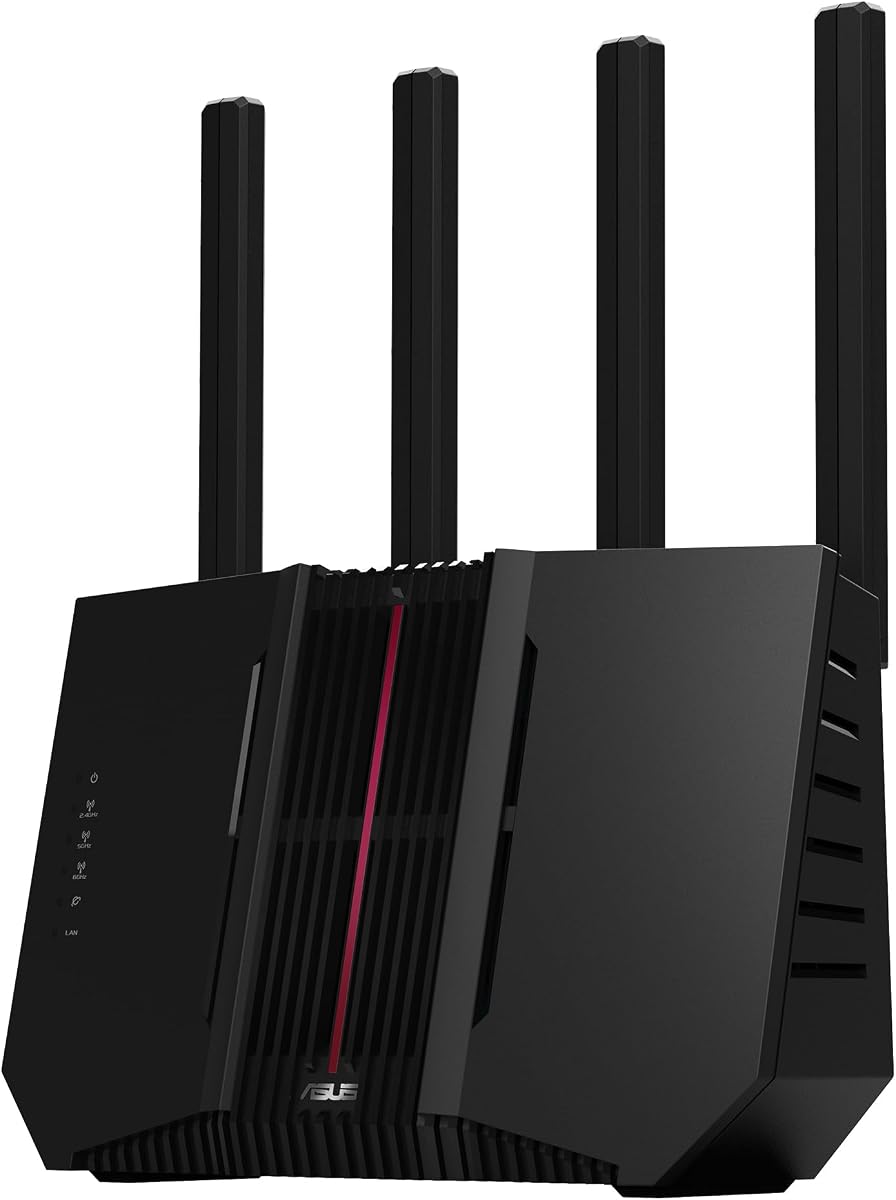
ASUS RT-AX1800S Dual Band WiFi 6 Router
4.3Editor score
Subscription-free network security included
Built-in parental control features
WiFi 6 technology support
This guide compares the top parental control WiFi routers for home networks, featuring detailed specs, safety features, and performance insights to help you
Finding a reliable parental control WiFi router is essential for modern families seeking to manage screen time and ensure online safety. These devices offer robust filtering options and scheduling tools to protect children from inappropriate content without constant manual supervision.
We evaluated ten leading routers based on their security features, ease of use, and network performance. Each model was analyzed for its ability to handle multiple devices while maintaining strong parental controls and reliable connectivity across your home environment.
Each pick highlights unique strengths such as mesh coverage, advanced encryption, or user-friendly apps. Note that availability and technical specs may vary by region. Always verify current features before purchasing to ensure they meet your specific household needs.
4.3Editor score

4.5Editor score
3.9Editor score
The following table provides a side-by-side comparison of the top ten routers selected for their parental control capabilities and overall network performance. Use this overview to quickly identify key specifications and features that matter most to your family.





The TP-Link Deco S4 stands out as a top choice for families prioritizing whole-home coverage and reliable parental controls. With a rating of 4.5 stars, this system ensures strong signal across large spaces. Its mesh technology eliminates dead zones effectively.
We may earn a commission when you buy through this link, at no additional cost to you.
Its standout quality lies in its robust parental control features. You can limit online time and block inappropriate websites using unique profiles for each member. The Deco app makes setup and management incredibly straightforward without technical expertise.
A trade-off is that it uses AC1900 speeds instead of newer WiFi 6 standards. However, for most home uses, the performance remains stable and fast. The ease of use often outweighs the lack of cutting-edge speed for average families.
This product is ideal for households needing extensive coverage and easy management. If you value simplicity and reliable control over your children's online access, this system is a strong recommendation for your home network needs.
Deco mesh technology creates a unified network ensuring seamless roaming as you move through your home without drops.
The Deco app available on Android and iOS devices lets you control guest WiFi and check network status quickly.
We may earn a commission when you buy through this link, at no additional cost to you.
The ASUS RT-AX1800S offers excellent value for families seeking a modern WiFi 6 router with integrated parental controls. It holds a solid 4.3 rating and delivers efficient connectivity for multiple devices. Its security features are particularly notable.
We may earn a commission when you buy through this link, at no additional cost to you.
Key strengths include commercial-grade security powered by Trend Micro without extra subscriptions. The built-in parental controls allow you to protect your home network effectively. Five Gigabit ports ensure fast wired connections for gaming or streaming devices.
A potential trade-off is that advanced controls might require additional setup. However, the core features are robust enough for most needs. The ability to expand with AiMesh routers adds long-term value to your network setup.
Buy this if you want reliable performance without ongoing fees. It is perfect for budget-conscious users who do not want to compromise on security or network speed for their home environment.
AiProtection Classic keeps your network safe using powerful trend Micro technology without requiring any recurring payments.
Supporting MU-MIMO and OFDMA allows the router to communicate with multiple devices simultaneously for better throughput.
We may earn a commission when you buy through this link, at no additional cost to you.
The ASUS RT-AX3000S brings high-speed connectivity with specific tools for managing access times. It rates 4.2 stars and supports total speeds around 3000 Mbps for smooth streaming. Its scheduling features are highly useful for parents.
We may earn a commission when you buy through this link, at no additional cost to you.
The key strength is parental control scheduling which helps establish clear rules for internet use. Instant Guard VPN provides secure connections when away from home. The router also supports adding other AiMesh devices for broader coverage.
While powerful, the setup process may feel complex for beginners. Yet the performance and features justify the effort. It handles heavy loads well ensuring consistent speeds even during peak usage times.
Ideal for tech-savvy families needing precise control over online access. This router delivers robust performance and valuable tools for managing digital habits at home.
You can set specific times for devices to access the internet helping to enforce healthy screen time habits.
This feature provides a one-click secure VPN connection to protect your data when using public networks.
We may earn a commission when you buy through this link, at no additional cost to you.
The TP-Link Archer AXE75 is a high-performance router leveraging the 6 GHz band for near-zero latency. Rated 4.3 stars, it offers blazing speeds for gaming and streaming. The HomeShield suite provides extensive security and parental tools.
We may earn a commission when you buy through this link, at no additional cost to you.
Standout qualities include the unique housing design aiding heat dissipation and the robust CPU. Basic parental controls are free with the HomeShield service. VPN support and EasyMesh compatibility add versatility to network management.
One trade-off is that you need compatible devices to fully utilize the 6 GHz band. However, the router still performs well on older bands. The reliability and speed make it a top choice for demanding environments.
This router suits households with many high-speed devices needing minimal lag. If you want future-proof tech with strong parental controls, this model delivers exceptional value for your home network.
The 6 GHz band brings more bandwidth and near-zero latency enabling more responsive gaming and video chatting.
HomeShield includes network security and parental controls with features like Quality of Service and Weekly reports.
We may earn a commission when you buy through this link, at no additional cost to you.
The GL.iNet Flint 2 is a powerhouse for users wanting deep control over their network. It holds a 4.5 rating and offers ultra-low latency speeds up to 6 Gbps. Its support for AdGuard Home adds advanced content filtering.
We may earn a commission when you buy through this link, at no additional cost to you.
Its key strengths lie in the rapid VPN speeds and high storage for plugins. You can take full control of your online experience by blocking ads and tracking easily. The 2.5G ports ensure fast wired connections for high demand devices.
A trade-off is the initial firmware update and setup complexity. However, this allows for a tailored security experience. The device supports over a hundred connected devices effectively ensuring stability.
Buy this if you want maximum flexibility and open-source features. It is ideal for tech-savvy families needing powerful tools to manage internet traffic and protect children online.
Enabling a DNS server for blocking unwanted tracking and filtering ads provides a clutter-free browsing environment.
Wireguard and OpenVPN speeds up to 900Mbps and 880Mbps ensure secure connections without slowing down your network.
We may earn a commission when you buy through this link, at no additional cost to you.
The TP-Link Archer AX23 delivers balanced performance with reliable speeds and coverage. It rates 4.4 stars and features WiFi 6 tech for efficient bandwidth use. The HomeShield service adds essential security and control tools.
We may earn a commission when you buy through this link, at no additional cost to you.
Key strengths include OFDMA technology cutting latency by allowing multiple clients to share bands. The improved cooling design prevents throttling ensuring top speeds. Alexa compatibility adds a smart layer to network management.
A trade-off is that advanced parental features might be limited compared to dedicated systems. However, the basic controls cover most daily needs. The setup process is straightforward and supported by the Tether app.
This router is suitable for households seeking reliable connectivity and basic safety features. It handles gaming and streaming well without requiring excessive technical setup for everyday use.
OFDMA makes Wi-Fi stronger by allowing multiple clients to share one band at the same time reducing latency.
Control your router via voice commands using Amazon Alexa to make your life smarter and easier.
We may earn a commission when you buy through this link, at no additional cost to you.
The TP-Link Deco S4 system offers extensive coverage with its three-unit mesh configuration. It holds a 4.5 rating and covers homes up to 5500 sq feet effectively. Its mesh technology ensures seamless roaming across all rooms.
We may earn a commission when you buy through this link, at no additional cost to you.
The standout feature is its robust parental controls allowing unique profiles for each member. The setup app is incredibly easy to use on Android or iOS devices. Each unit has Ethernet ports supporting wired backhaul for better speeds.
While not the fastest WiFi 6 router the coverage and ease of use are unmatched. It eliminates dead zones efficiently. The unified network name ensures devices switch between units without interruption or drop.
Ideal for large homes needing complete coverage and simple management. This system ensures safety and stability for all family members regardless of where they are in the house.
Deco units work together to form a unified network with a single network name for seamless roaming.
Each Deco S4 has two Gigabit Ethernet ports supporting wired backhaul for better speeds.
We may earn a commission when you buy through this link, at no additional cost to you.
The TP-Link Archer A54 is an accessible router for smaller homes needing basic protection. It rates 4.3 stars and provides stable wireless connections with dual-band technology. Its support for WPA3 enhances network security effectively.
We may earn a commission when you buy through this link, at no additional cost to you.
Key strengths include the ease of network management via the Tether app. You can keep firmware updated easily to maintain performance. AP Mode allows flexibility in transforming wired connections into wireless networks.
A trade-off is the slower speeds compared to modern WiFi 6 routers. However, for basic browsing and light streaming it suffices. The price and simplicity make it a solid choice for entry-level setups.
Buy this if you need a straightforward router for a small home. It delivers reliable performance and basic safety tools without requiring advanced technical knowledge or heavy investment.
The latest Wi-Fi security protocol WPA3 brings new capabilities to improve cybersecurity in personal networks.
Easy network management at your fingertips with the TP-Link Tether app keeps your WiFi performing at its best.
We may earn a commission when you buy through this link, at no additional cost to you.
The ASUS RT-BE82U is a next-generation router offering ultrafast speeds up to 6500 Mbps. Rated 4.2 stars it uses WiFi 7 technology for enhanced efficiency and throughput. Its AiProtection Pro ensures robust network security.
We may earn a commission when you buy through this link, at no additional cost to you.
Key strengths include Multi-link Operation linking multiple bands for stable connections. The five 2.5GbE ports optimize wired internet connectivity for maximum performance. Hassle-free AiMesh extendable network supports whole home seamless roaming.
A trade-off is that full benefits require compatible devices. Yet the performance is exceptional even for current tech. The commercial-grade security design offers peace of mind for families concerned about online safety.
Ideal for early adopters needing top-tier speed and security. This router future-proofs your home network while delivering powerful parental and safety tools for modern families.
Link to multiple bands at the same time to ensure stable internet connections and efficient data transfers.
AiMesh extendable routers enable whole home seamless roaming with rich advanced features.
We may earn a commission when you buy through this link, at no additional cost to you.
The ASUS RT-BE9700 offers beyond-fast speeds up to 9700 Mbps with Tri-Band technology. Rated 3.9 stars it represents the pinnacle of wireless performance for heavy users. Subscription-free protection ensures robust security without extra fees.
We may earn a commission when you buy through this link, at no additional cost to you.
Key strengths include Multi-link Operation and 320MHz channels in the 6 GHz band. Comprehensive VPN features include advanced site-to-site and Instant Guard mobile app support. The versatile WAN options support always-on internet via USB ports.
A trade-off is the complexity of setup and higher price point. However, the sheer performance and security options justify the investment. It handles massive data loads efficiently ensuring minimal latency for demanding tasks.
This router suits power users and large households needing top-tier capabilities. If you want the best performance and security features available, this model provides a comprehensive solution for your network.
320MHz channels in the 6 GHz band and 4096-QAM significantly increase network capacity and throughput.
Establish always-on internet through AI WAN detection and a convenient USB port ready for 4G LTE and 5G Mobile tethering.
We may earn a commission when you buy through this link, at no additional cost to you.
Selecting the right router requires balancing performance with safety features. Understanding key factors helps you find a device that meets your family's needs.
Security is the foundation of any parental control system. Look for routers with built-in threat protection like WPA3 encryption and anti-phishing tools. Advanced models offer commercial-grade security powered by trusted vendors ensuring your network is safe from external attacks.
Prioritize routers that offer robust security protocols to keep your data private and secure.
Effective parental controls allow you to manage access and content easily. Look for features like time limits, content filtering, and device profiles. The best systems provide intuitive apps so parents can manage rules without technical struggle.
Ensure the router allows for granular control over different devices in your home.
Modern families have many devices connected simultaneously. Choosing a router with WiFi 6 or WiFi 7 ensures efficient data handling. Higher speeds prevent buffering during streaming and keep gaming latency low.
Select a standard that matches your internet plan to avoid bottlenecks.
If you have a large home, coverage is critical. Mesh systems provide seamless coverage across multiple floors. Single units may struggle with dead zones in larger spaces. Consider the square footage your device needs to cover effectively.
Mesh systems often provide the best solution for eliminating dead zones.
A complex setup can discourage consistent use of safety features. Look for routers with mobile apps that guide you through configuration. Simple interfaces ensure you can implement controls quickly and easily.
Choose a system with a user-friendly interface for hassle-free management.
Some routers include built-in VPNs for secure remote access. This adds a layer of privacy when using public networks. For families traveling or needing secure connections, this feature is a valuable bonus.
Check if the router supports VPN client and server features for flexibility.
As your home grows, your network needs change. Models supporting mesh expansion or EasyMesh ensure you can add units later. This future-proofs your investment and allows for tailored coverage.
Select a system that allows for easy network expansion if needed.
After setting up your router, create individual profiles for each family member. This allows you to assign specific time limits and content filters based on age. The mobile app usually lets you manage these profiles effortlessly.
Regularly update your router's firmware to ensure security patches are applied. Check the app or manufacturer website for new updates at least once a month. This keeps your network safe from new threats.
Position your router in a central location for optimal signal strength. Avoid placing it near thick walls or electronics that cause interference. Proper placement ensures all devices stay connected consistently.
Parental control routers monitor and filter traffic going through your network. They allow you to set time limits block specific sites or create schedules for internet access. These controls are managed via a mobile app or web interface.
Not always. Many routers like ASUS offer subscription-free security. Some models offer basic free controls with premium features behind a paywall. Check product details to see what is included with the base model.
Yes, these routers control any device connected to your WiFi network. This includes phones tablets and gaming consoles. However, mobile apps are usually required for remote management outside your home network.
A traditional router broadcasts a single signal from one point. A mesh system uses multiple units to create a seamless network throughout your home. Mesh is better for larger homes needing consistent coverage.
They are highly effective when used correctly. By managing traffic at the network level they prevent access to harmful content. However, they should be paired with open communication with children about safe internet use.
Most routers work with existing modems. You connect your modem to the router via an Ethernet cable. Ensure your modem is compatible with your internet service provider for optimal performance.
Check your internet connection and modem status. Ensure the router is powered on and in a central location. Rebooting the router and modem often resolves temporary connectivity issues quickly.
The TP-Link Deco S4, ASUS RT-AX1800S, and ASUS RT-BE9700 stand out as top picks for their unique strengths. Each offers reliable safety features tailored to different household needs and budgets. Choosing the right one ensures peace of mind for parents.
Prioritize ease of use and robust security when making your decision. Ensure the router supports your internet speed and coverage requirements. A well-chosen device protects your family while maintaining smooth connectivity.
Prices and availability change frequently so always check current offers before buying. Compare features against your specific needs to get the best value. Investing in a quality router secures your home network for the future.