
Creative Sound Blaster AE-X
4.4Editor score
ESS ES9039Q2M DAC
130 dB SNR performance
350mW headphone amp
This guide compares the top PC sound cards for audio recording, evaluating performance, connectivity, and features to help creators choose the right hardware.
Finding the right PC sound card for audio recording is crucial for creators who demand high fidelity and low latency. Whether you are podcasting, streaming, or producing music, the internal audio hardware often falls short of professional needs. External interfaces or dedicated internal cards provide the clarity and control required to capture every nuance of your voice or instrument accurately.
We have rigorously evaluated ten top-rated sound cards and audio interfaces available on the market today. Our analysis focuses on critical aspects such as sample rates, input types, noise reduction capabilities, and overall build quality. Each product was selected based on user feedback, technical specifications, and real-world performance in recording scenarios to ensure you get a reliable device.
Each pick in this list highlights specific strengths tailored to different recording environments and budgets. From compact USB adapters to high-end PCIe cards, you will find options that suit your specific workflow and technical requirements. Please note that product prices and availability can change frequently, so check the current listings before making your final purchasing decision.
4.4Editor score

4.6Editor score

4.3Editor score
This side-by-side comparison outlines the key specifications and unique selling points of each of the ten selected sound cards and audio interfaces to help you make an informed decision.


The Creative Sound Blaster Audigy Fx Pro is a high-resolution PCIe sound card designed for enthusiasts who need superior audio clarity. With a rating of 4.2 stars, it stands out for its ability to deliver 32-bit/384 kHz playback and up to 120 dB signal-to-noise ratio. This hardware ensures that your recordings remain free from background noise and distortion.
We may earn a commission when you buy through this link, at no additional cost to you.
Its standout quality lies in the discrete 7.1-channel analog output which allows for immersive multi-channel audio experiences. The all-new Creative Nexus app provides AutoEq customization, letting you simulate headphone frequency responses for a tailored experience. Connectivity is versatile, supporting SPDIF output, headset outputs, and multiple line-in sources for flexible recording setups.
While the performance is robust, the card does require an open PCIe slot which might not be available in compact mini-ITX builds. However, the inclusion of a half-height bracket helps mitigate this issue for smaller cases. Users should also ensure they download the latest drivers to unlock all features effectively.
This card is ideal for users building a custom PC for audio recording who want internal high-fidelity sound without the clutter of external boxes. If you need reliable multi-channel support and high sample rates for professional playback and monitoring, this is a strong recommendation worth considering.
The card delivers 32-bit/384 kHz playback ensuring your recordings retain every detail without digital artifacts.
Connects to SPDIF, headsets, and line-in sources allowing flexible integration with existing audio gear.
We may earn a commission when you buy through this link, at no additional cost to you.
The PUPGSIS Gaming Audio Mixer serves as a comprehensive audio hub for live streaming and podcasting. With a 4.4-star rating, it offers a 1/4 TRS dynamic microphone input along with built-in reverb and noise reduction technology. This makes it an attractive option for streamers who need to manage multiple audio inputs directly at the hardware level.
We may earn a commission when you buy through this link, at no additional cost to you.
Its key strengths include effective noise cancellation that filters out background hum and fan noise, ensuring viewers hear only your voice. The four programmable sound effect buttons and voice changer allow for creative engagement without software latency. You can also adjust reverb in real time to fine-tune the ambience of your vocals instantly.
One limitation is that it does not support USB microphones or dynamic mics without specific cabling which adds complexity. Additionally, Bluetooth is input only so wired monitoring is still required for zero-latency listening. These trade-offs are acceptable if you prioritize hardware control over simple plug-and-play USB mic setups.
Streamers and content creators who want to enhance their audio with effects and noise reduction without relying on complex software will find this mixer very useful. It is perfect for those who need a physical interface to manage live audio feeds and sound effects seamlessly.
Filters out background hum and fan noise to ensure your voice remains clear for your audience.
Adjust reverb and trigger sound effects on the fly to engage viewers without software delays.
We may earn a commission when you buy through this link, at no additional cost to you.
The Optimal Shop 6 Channel External Sound Card is a budget-friendly USB option for users needing basic audio expansion. It supports 5.1 surround sound and optical S/PDIF output for digital audio. While its rating is lower at 3.7 stars, it offers a straightforward way to add audio inputs and outputs without opening your PC case.
We may earn a commission when you buy through this link, at no additional cost to you.
It functions as a USB audio controller capable of recording and playing back digital and analog audio. The device supports various sampling rates including 48KHz for digital recording. It is compatible with Windows 10 down to XP making it a viable option for older systems that need audio restoration.
Users must be aware that full 5.1 channel output requires specific source files and player settings like PowerDVD passthrough. Without these conditions, the output may default to stereo channels. This complexity might be a hurdle for casual users but acceptable for tech-savvy individuals.
This adapter is best for users who need a simple USB audio solution for legacy systems or basic recording tasks. If you need 5.1 surround sound and have the right software setup this external card provides an accessible entry point.
Supports recording and playback of digital and analog audio via USB interface for flexible connectivity.
Works with Windows versions from XP to Windows 10 ensuring broad usability across different setups.
We may earn a commission when you buy through this link, at no additional cost to you.
This pocket-sized audio interface is designed for live streaming on smartphones and laptops with Type-C or Lightning ports. With a 4.1-star rating it offers 24bit/48KHz recording capabilities ideal for capturing instruments directly. Its low latency processing ensures audio stays synchronized with video making it perfect for mobile creators.
We may earn a commission when you buy through this link, at no additional cost to you.
The device supports electric guitar and bass inputs via a 1/4 inch jack and includes a 3.5mm headphone output for monitoring. Volume buttons and indicator lights provide easy feedback on signal levels preventing distortion. The back clip design allows it to be stored in a pocket or clipped to a device for portability.
It does not include edit or mix functions which means it serves strictly as an interface rather than a mixer. This limitation is acceptable for beginners who just need to plug in and record high fidelity audio without extra processing. It is simple and effective for on-the-go sessions.
Musicians and streamers who need to record instruments on their phones or tablets will appreciate this compact solution. It is a great choice for anyone looking for a reliable plug-and-play interface that fits in a pocket.
Captures 24bit/48KHz audio directly to your device ensuring professional sound quality on the go.
Synchronizes audio with video in real time so your stream looks and sounds natural without delay.
We may earn a commission when you buy through this link, at no additional cost to you.
The SABRENT USB External Stereo Sound Card Adapter is a simple solution for restoring audio functionality to laptops or desktops. With a 4.3-star rating it connects via USB and provides separate 3.5mm headphone and microphone jacks. It is bus-powered and requires no external power source or software installation.
We may earn a commission when you buy through this link, at no additional cost to you.
Its main strength is universal compatibility working with Windows Mac and Linux systems as a standard USB audio device. The green jack handles stereo output while the pink jack manages mono microphone input. This makes it ideal for basic calls or listening without complex driver requirements.
It does not support surround sound or passive speakers which limits its use to stereo setups. For users needing advanced audio features this adapter is too basic. However for those who simply need a functional audio port it is an effective and reliable fix.
This adapter is perfect for users who need a quick fix for broken headphone jacks or need basic audio for calls. It is highly recommended for its simplicity and broad system compatibility at a very affordable price.
Works seamlessly with Windows Mac and Linux without needing any drivers or software installation.
Instantly adds headphone and mic ports to devices with broken jacks or missing audio options.
We may earn a commission when you buy through this link, at no additional cost to you.
This Biaze USB Audio Adapter is designed to replace faulty sound cards or audio ports with high fidelity output. With a 4.6-star rating it features a built-in DAC chip that delivers 16bit/48kHz audio quality. It supports dual functions allowing both listening and speaking via the USB port.
We may earn a commission when you buy through this link, at no additional cost to you.
It supports CTIA standards and works with Android earphones as well as various PC and gaming console systems. The durable ABS material ensures it can withstand daily transport. This adapter is particularly useful for gamers or students who need reliable audio for meetings or streaming.
While it does not have advanced features like noise cancellation it excels at providing a solid audio connection. Some users might need to adjust settings manually if sound is not detected immediately. For a quick fix on broken ports it offers excellent value.
Anyone needing to restore audio on a laptop or desktop with a damaged port will find this adapter highly effective. It is a robust choice for daily tasks and gaming on both PC and consoles.
Features a built-in DAC chip for rich and immersive audio quality up to 16bit/48kHz.
Compatible with Windows Mac and consoles like PS5 and PS4 ensuring wide usability.
We may earn a commission when you buy through this link, at no additional cost to you.
The Creative Sound Blaster AE-X is a reference-grade Hi-Res PCIe sound card designed for audiophiles and professionals. With a 4.4-star rating it features the ESS ES9039Q2M DAC supporting up to 130 dB SNR. This ensures exceptional clarity and detail far beyond typical onboard audio solutions.
We may earn a commission when you buy through this link, at no additional cost to you.
Its built-in high-performance headphone amplifier delivers up to 350mW at 32Ω making it suitable for studio-grade headphones. The card supports DSD256 and ASIO 2.3 for low-latency playback ideal for music production. Additionally the Creative Nexus app offers a 10-band parametric EQ for precise sound tuning.
The main trade-off is that it requires an available PCIe slot and is more expensive than external USB options. However the level of fidelity and customization it provides is unmatched in this category. The coaxial and optical connections allow for seamless integration with other audio setups.
Serious audio creators who demand the highest quality sound and need advanced control over their audio environment should consider this card. It is a premium investment that rewards detailed listening and professional recording tasks.
Powered by the ESS ES9039Q2M DAC with up to 130 dB SNR for exceptional audio detail.
Supports ASIO 2.3 and DSD256 ensuring smooth playback for music and gaming workflows.
We may earn a commission when you buy through this link, at no additional cost to you.
The Focusrite Scarlett Solo 3rd Gen is a popular USB-C audio interface designed for musicians and podcasters. With a 4.6-star rating it offers high-performance mic pre-amps that add clarity with a switchable Air mode. The unit supports high-headroom instrument inputs allowing you to capture guitars and vocals cleanly.
We may earn a commission when you buy through this link, at no additional cost to you.
Its high-performance converters enable recording at up to 24-bit/192kHz ensuring your tracks retain all sonic quality. The Gain Halos indicator prevents clipping by showing when levels are too high. It includes Pro Tools Intro and other software making it a complete starting package for creators.
While it costs more than simple USB adapters the build quality and audio fidelity are significantly superior. The only minor drawback is that it requires a proper connection to function and does not offer basic stereo output without software. For serious audio tasks this is a worthwhile investment.
Beginners and professionals alike will benefit from the professional audio quality and included software suite. If you want to produce music or podcasts with high fidelity this interface is highly recommended.
High-performance mic pre-amps with switchable Air mode for extra clarity in acoustic recordings.
Supports up to 24-bit/192kHz recording to retain every nuance of your sound.
We may earn a commission when you buy through this link, at no additional cost to you.
The UGREEN USB Sound Card Adapter is a compact solution for upgrading audio quality on laptops or desktops. With a 4.4-star rating it features a built-in DAC chip delivering 16bit/48kHz audio. It connects via USB and offers 3.5mm headphone and mic inputs for versatile use.
We may earn a commission when you buy through this link, at no additional cost to you.
It supports a wide range of operating systems including Windows Linux Mac and even PS5. The durable ABS material ensures it can travel easily in a pocket. This makes it a reliable choice for daily tasks or gaming sessions.
It is not compatible with PS3 which limits its use on older consoles. Additionally it offers basic audio features without advanced mixing. For users needing a simple reliable adapter however it performs very well.
Anyone needing a portable and reliable audio adapter for multiple devices will find this UGREEN option excellent. It is a great value for upgrading sound quality on the go.
Features a high-resolution DAC chip for stunning audio quality on laptops and desktops.
Works with Windows Linux Mac and PS5 ensuring seamless integration across setups.
We may earn a commission when you buy through this link, at no additional cost to you.
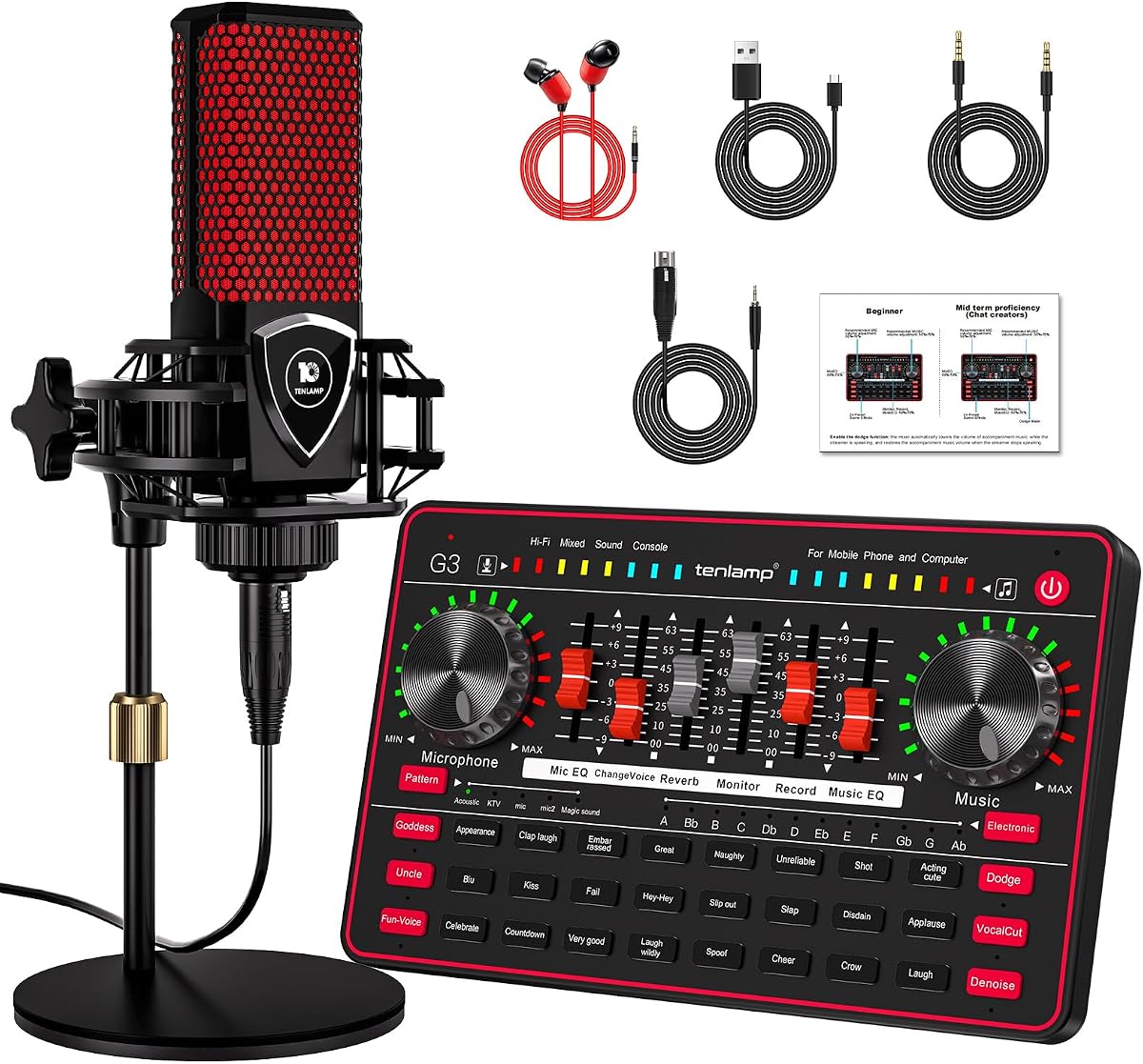
The TENLAMP G3 Creator Audio Mixer Bundle offers a complete solution for podcasters and streamers starting out. It includes a 3.5mm condenser microphone and a soundboard with 24 built-in effects. With a 4.1-star rating it provides clear sound with built-in noise reduction technology.
We may earn a commission when you buy through this link, at no additional cost to you.
You can adjust bass treble and reverb directly and even use a voice changer for creative streams. The mixer runs on a built-in battery making it portable for outdoor recordings. This bundle removes the need for separate purchases ensuring you have everything needed to begin.
The mic quality is basic compared to professional XLR setups but perfect for beginners. If you require high-end sound you may eventually want to upgrade. For starting a podcast or stream on a budget this bundle is convenient.
Creators who want an all-in-one kit to start recording immediately will appreciate this value bundle. It simplifies the setup process and provides fun features to engage your audience.
Includes a microphone and soundboard in one package for easy setup and recording.
Offers 24 built-in effects and voice changer options to make your streams engaging.
We may earn a commission when you buy through this link, at no additional cost to you.
Selecting the right sound card or audio interface requires understanding key technical specifications and workflow needs.
Higher sample rates and bit depths like 32-bit/384 kHz provide more detail and headroom in recordings. Look for cards that support at least 24-bit/192kHz if you plan to do professional music production. This ensures your audio retains quality during editing and mixing processes.
Always check if your software supports these high-resolution formats before purchasing expensive hardware.
You need to match the inputs to your gear whether it is XLR for mics or 1/4 inch for instruments. Consider whether you need stereo or surround output if you plan to mix in multi-channel formats. Some cards offer optical or coaxial connections which can improve digital signal integrity.
Ensure the card has enough ports for your current needs and future expansion plans.
Plug and Play devices save time but dedicated drivers offer better performance for recording. Check if the manufacturer supports your specific operating system including Linux or older versions of Windows. Compatibility with ASIO drivers is essential for low-latency performance in audio editing software.
Choose a card with active driver support to avoid glitches and compatibility issues later.
Some mixers and cards include built-in effects like reverb noise reduction or voice changers. These features are great for live streaming or podcasting where immediate processing is needed. However for studio recording you may prefer raw signals without onboard processing to keep editing flexible.
Decide if you need hardware effects or prefer to apply them digitally in your DAW.
For desktop recording a durable internal PCIe card offers stability and performance. If you travel or record on location a portable USB adapter or interface is more practical. Look for metal housings and high-quality jacks to ensure longevity and reliable connections.
Prioritize a build that matches your recording environment whether stationary or mobile.
A higher SNR ensures that your recordings are clear and free from background hiss or hum. Aim for an SNR of at least 100 dB for professional-quality vocals and instruments. Poor SNR can ruin a recording regardless of how good the microphone you use is.
Always check the SNR rating in product specs to guarantee clean audio capture.
Sound cards range from inexpensive adapters to high-end interfaces so set a realistic budget. While cheaper options work for basic tasks they often lack features needed for professional recording. A good warranty can protect your investment against hardware failures which are common in electronics.
Balance your budget with the features you actually need to get the best value.
Start by connecting the device to a high-speed USB port or PCIe slot depending on the type of sound card. Install any necessary drivers immediately to ensure the operating system recognizes the hardware correctly. Verify the audio levels in your system settings before starting your recording session to avoid clipping.
Keep your equipment clean by dusting the ports regularly and avoiding exposure to moisture or extreme heat. If you use external interfaces place them on a flat stable surface to prevent accidental falls or cable strain. Always use quality cables to maintain signal integrity and reduce noise interference.
Update your drivers regularly to benefit from performance improvements and bug fixes. When not in use disconnect portable adapters to reduce wear on the USB ports. This simple habit can extend the lifespan of your audio gear significantly.
External interfaces often provide better noise isolation and flexibility since they are away from PC electrical interference. However internal PCIe cards can offer higher throughput and integrated DACs depending on the model. Choose based on whether you need portability or maximum performance.
Most USB adapters are plug-and-play and work without extra software on modern operating systems. However dedicated audio interfaces usually require drivers to unlock advanced features like low latency and multi-channel support. Check the product description to confirm driver requirements before purchasing.
You can use an XLR mic if the sound card has an XLR input with phantom power support. If the card only has a 3.5mm jack you will need an adapter which may introduce noise. Ensure the interface matches your microphone type for best results.
For standard podcasting or streaming 44.1kHz or 48kHz is sufficient and easier to edit. Professional music production often benefits from 96kHz or higher to capture more frequency detail. Your choice depends on your workflow and storage capacity.
Use a high SNR sound card and position your microphone correctly to minimize environmental noise. Hardware noise cancellation on some mixers can also help by filtering out hum before it reaches your software. Combining good room treatment with quality gear yields the best results.
Built-in motherboard audio can work for casual use but often lacks the clarity and input options needed for professional recording. An external sound card or interface adds the fidelity and control required for clean vocal and instrument captures. It is a worthwhile investment for serious creators.
We have reviewed ten excellent options ranging from compact USB adapters to high-end PCIe sound cards and interfaces. The Focusrite Scarlett Solo 3rd Gen stands out for its pre-amps and software bundle making it ideal for creators who want to start recording right away. For pure performance the Creative Sound Blaster AE-X offers reference-grade audio for serious users.
When choosing your device prioritize sample rates and inputs that match your microphone and instrument needs. Ensure your chosen model supports your operating system and provides the necessary drivers for stable performance. A good sound card should simplify your workflow rather than complicate it.
Remember that prices and availability can change so always check the current listings before buying. We hope this guide helps you find the perfect hardware to elevate your recording quality. Happy recording and good luck with your next project.