
POE Combiner Splitter Adapter
4.3Editor score
Run 2 Cameras On 1 Cable
IP68 Weatherproof Rating
Works On All POE Switches
This guide compares the top ten POE Splitters for reliability and speed to help you choose the right Ethernet power adapter for your network setup.
POE Splitters allow you to power non-PoE devices using standard Ethernet cables. They convert power and data from a single cable into separate outputs. This simplifies installations where power outlets are scarce or distant from network devices.
We evaluated ten models based on speed, power output, and build quality. Each product supports IEEE standards for safe operation. Our analysis covers gigabit options, USB-C adapters, and industrial-grade units for various environments.
Each pick highlights key features like voltage range and connector type. Real-world use cases help you match specs to your needs. Prices fluctuate often so verify current deals before purchasing any listed item today.
4.3Editor score

4.6Editor score
4.6Editor score
The following table details specifications for each model to help you compare performance metrics side by side.


This Gigabit PoE Splitter delivers reliable power conversion for non-PoE devices. It features a 4.6 rating and supports IEEE 802.3af/at standards for safety. The adapter converts 48V PoE to a stable 12V 2A DC output ideal for cameras. Users appreciate its ability to handle fast transmission rates without lag.
We may earn a commission when you buy through this link, at no additional cost to you.
The standout feature is its Gigabit speed support up to 1000Mbps. This ensures your network data flows smoothly alongside power delivery. It includes multiple protections like short circuit and overvoltage safeguards. The design allows simple connection to terminal equipment without complex configuration steps.
While effective the unit is limited to a specific 12V output voltage. If your device requires 5V or 24V you will need a different model. Also it lacks modern USB-C connectivity which some newer devices demand. These trade-offs are acceptable for standard surveillance systems using DC jacks.
Buyers should choose this if they need a reliable 12V power source for security cameras. It is perfect for installations where a single Ethernet cable must serve both data and power needs. Ensure your switch supports standard PoE before connecting this adapter for best results.
The unit provides consistent 12V 2A output ensuring your devices stay online during peak usage times without interruption.
Gigabit support means video feeds transmit quickly without buffering even when multiple streams are active simultaneously on the network.
We may earn a commission when you buy through this link, at no additional cost to you.
This combo kit lets you run two cameras on one cable run to the switch. It includes a sender and receiver unit to split power and data efficiently. The model has a 4.3 rating and is noted for reducing material costs. It works on standard POE switches and NVRs including both modes.
We may earn a commission when you buy through this link, at no additional cost to you.
The weatherproof design stands out as a major benefit for outdoor setups. With an IP68 rating the receiver unit can be exposed directly to rain or snow. This makes it ideal for harsh environments where sealing boxes might not be practical. You save time by running only one long cable instead of two.
The kit requires a sender unit at the switch end and a receiver at the cameras. This means you need to install both parts which might add complexity compared to single units. It is also a basic splitter without advanced voltage switching options. Still it delivers solid value for the price.
Look for this kit if you are installing paired cameras in one spot. It simplifies cabling when outlets are far away from the cameras. Verify your switch supports standard POE before connecting to ensure compatibility. The cost savings on cabling materials are significant for large projects.
By running one cable for two cameras you reduce material costs and installation time significantly compared to traditional wiring methods.
The IP68 rating ensures the unit survives direct exposure to weather elements like rain ice and sunlight without needing extra housing.
We may earn a commission when you buy through this link, at no additional cost to you.
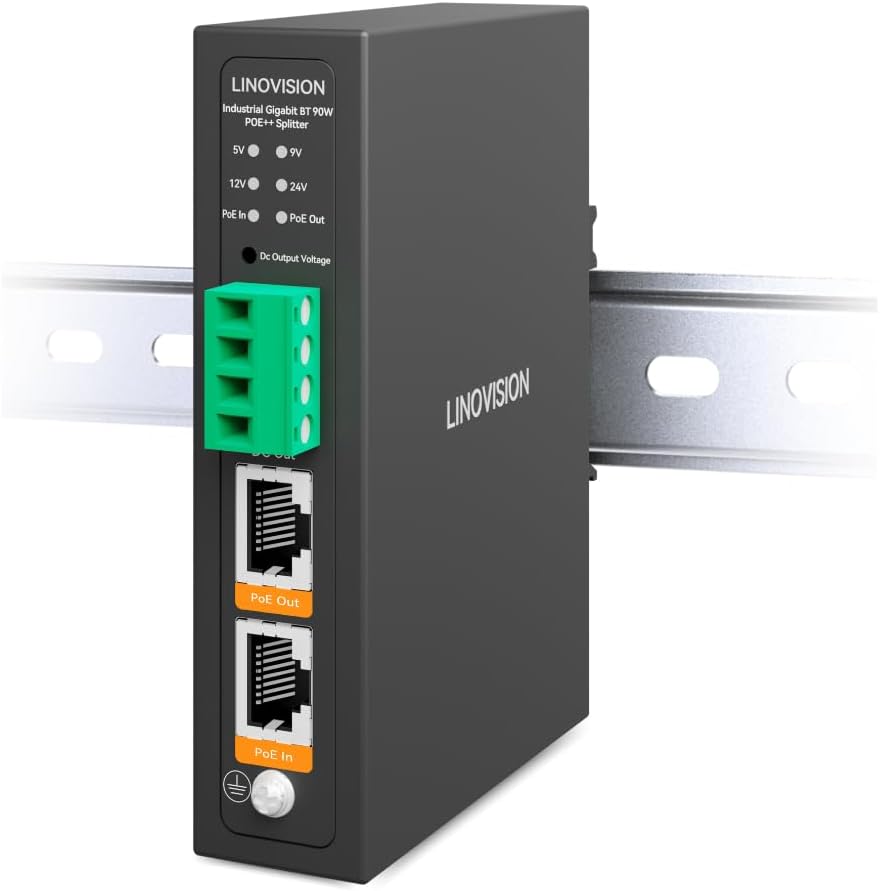
This industrial splitter handles high power loads up to 90W from PoE BT sources. It converts power to DC 5V 9V 12V or 24V via switchable terminal blocks. The model has a 4.6 rating and includes smart LED indicators for output status. It supports PoE output alongside DC for flexible device powering.
We may earn a commission when you buy through this link, at no additional cost to you.
Key strengths include its rugged metal enclosure and wide temperature tolerance. It operates from minus 40 F to 167 F making it perfect for extreme climates. The Din rail mount fits into standard industrial panels easily. You get multiple voltage options to suit different hardware requirements without buying extra units.
It requires a standard IEEE802.3bt switch which may cost more than basic switches. Non standard passive switches can damage the unit or connected devices. The price is higher than simple home models. However the flexibility and robustness justify the cost for professional deployments where reliability is critical.
Investors in this unit if you need high power for PTZ cameras or lighting. It works well for industrial settings where standard wall power is unavailable. Confirm your switch supports BT standards before purchase to avoid compatibility issues. The voltage options allow one box to serve many different device types.
Switchable terminal blocks let you select 5V 9V 12V or 24V DC output to match the exact needs of various connected devices.
The metal case and wide temperature range ensure reliable operation even in harsh environments like outdoor shelters or server rooms.
We may earn a commission when you buy through this link, at no additional cost to you.
This device splits one PoE input into two PoE outputs to power two cameras. It extends the range of Ethernet and PoE signals by up to 330 feet. The model has a 4.2 rating and features a metal casing for heat dissipation. It is compact enough to fit in junction boxes or wall brackets.
We may earn a commission when you buy through this link, at no additional cost to you.
Its primary strength is extending connectivity to remote areas. You can boost signals over regular Cat5E or Cat6 cables effectively. The Gigabit support keeps speeds high for smooth data transmission. It works with standard PoE switches injectors and NVRs for broad compatibility.
The metal casing is good for heat but limits mounting to brackets or small boxes. It does not support DC outputs so you need PoE devices. It is not for extreme weather like the IP68 model. Still it offers reliable stability for indoor or mild outdoor setups.
Use this if you need to reach devices far from your switch. It is great for existing installs where adding more ports is hard. Ensure your switch is standard active PoE before connecting. The extension capability saves you from running new long cables back to the source.
Extend network signals up to 330 feet allowing devices to operate far from the main switch without signal loss.
Supports Gigabit speeds to ensure smooth video streaming and data transfer across the extended network connection.
We may earn a commission when you buy through this link, at no additional cost to you.
This adapter converts PoE to USB-C power for devices like Google WiFi or Raspberry Pi. It outputs up to 5V 3A via Type-C and Gigabit data via RJ45. The model has a 4.3 rating and supports IEEE 802.3af/at standards. It uses a simple plug and play setup without configuration.
We may earn a commission when you buy through this link, at no additional cost to you.
The USB-C port makes it versatile for modern gadgets that lack DC jacks. You get a max output of 15W which suits low power electronics well. Auto detection ensures appropriate power delivery to connected devices. It includes multiple protections to safeguard your equipment from voltage spikes.
It is limited to 5V so devices needing 12V will not work. You must use standard PoE switches as non standard ones might damage it. The DC cable only delivers power while RJ45 carries data. It is not for high power devices but perfect for routers and small boards.
Choose this if your device has a USB-C input and needs remote power. It is ideal for setups where AC power is absent and PoE is available. Check that your switch is IEEE 802.3af compliant for safe operation. The USB-C option adds flexibility for modern connectivity needs.
The USB C port allows you to power modern devices that prefer this connector over traditional DC barrel jacks easily.
Auto detection matches output to your device needs preventing power issues and ensuring stable operation over time.
We may earn a commission when you buy through this link, at no additional cost to you.
This splitter turns PoE into a 5V USB-C supply for devices like Raspberry Pi. It allows non-PoE devices to use existing Ethernet lines for power. The model has a 4.6 rating and requires an IEEE 802.3af compliant switch. It is noted for being a cost-effective way to add PoE support.
We may earn a commission when you buy through this link, at no additional cost to you.
Its main benefit is extending powerlines up to 300 feet from the source. You save on extra wall plugs by using a single Ethernet cable. It works well for Raspberry Pi 4 setups where a HAT is not feasible. The adapter keeps your network clean and simple without extra wires.
It does not support PD or QC fast charging protocols for other devices. The max output is 2.4A which might be low for power hungry gear. The split Ethernet cable does not carry power so you need separate connections. It is strictly for standard active PoE sources.
Buy this if you have a Pi 4 and want to avoid local AC power. It helps extend your network reach without complex wiring. Ensure your switch is active PoE to avoid overvoltage risks. It is a smart solution for small tech projects needing remote power.
Extend powerlines up to 300 feet to where no AC outlets are nearby for flexible device placement anywhere.
Add PoE support to existing 5V USB-C devices without needing expensive switches or new power infrastructure.
We may earn a commission when you buy through this link, at no additional cost to you.
This repeater extends PoE and data to two end devices up to 100 meters. It supports auto-sensing recognition for IEEE 802.3af/at standards. The model has a 4.4 rating and allows up to three extenders to cascade. It uses RJ45 cables for network and power transmission.
We may earn a commission when you buy through this link, at no additional cost to you.
It offers better network experience by reducing latency and transmission loss. The Gigabit transmission ensures smooth data flow for cameras or phones. Each unit comes with a one year warranty and lifetime technical support. You can extend ranges by chaining multiple units together easily.
The cascade limit might restrict very large setups beyond 300 meters total. It only supports 48V devices which excludes some high voltage units. It is a simple solution without advanced features. Still it provides reliable extension for most standard networks effectively.
Use this if you need to power devices far from your main switch. It is great for IP phones or APs that need remote power. Verify your devices are 48V compatible before connecting. The cascading feature allows flexible network expansion without new cables.
Extend power and data to end devices up to 100 meters for devices located far from the main network switch.
Supports deployment of multiple extenders to reach even further distances across large facilities.
We may earn a commission when you buy through this link, at no additional cost to you.
This unit splits 90W PoE BT input into DC outputs and a PoE output. It supports 5V 9V 12V or 24V via terminal blocks. The model has a 4.6 rating and includes LED indicators for output status. It prevents damage to non-PoE devices via active PoE detection.
We may earn a commission when you buy through this link, at no additional cost to you.
It provides shared power to PoE and non-PoE devices simultaneously. This suits outdoor cameras with extra features or video servers. The short circuit protection and thermal cut add safety layers. It is built for harsh environments with wide temperature tolerance.
Non-standard BT switches might not work correctly with this unit. Passive PoE versions can damage it so check compatibility carefully. The price reflects industrial capabilities. It is best where you need high power for multiple types of devices.
Choose this for complex setups needing high wattage and multiple voltages. Ensure you have a standard IEEE802.3bt switch to use it safely. Verify your devices need the supported voltages before installing. It is a robust solution for demanding professional environments.
Active PoE detection prevents damage to standard devices that might be connected unexpectedly to the output.
Switchable DC outputs let you supply different voltages to various devices from a single box.
We may earn a commission when you buy through this link, at no additional cost to you.
This kit allows two cameras to run on one cable using sender and receiver units. It reduces cabling costs by avoiding double runs to the switch. The model has a 4.1 rating and features weatherproof RJ45 connectors on the receiver. Setup is simple plug and play without tools.
We may earn a commission when you buy through this link, at no additional cost to you.
The waterproof receiver allows exposure to rain and snow directly. You can install cameras on corners using only one long cable run. It works on standard POE network switches for easy compatibility. This is useful for new installations or adding cameras later.
It only supports standard POE which limits it to active switches. Advanced features like power switching are missing. It is basic compared to industrial options. Still it is effective for straightforward camera setups needing minimal wiring.
Look for this kit if you need to add a camera nearby. It simplifies installation when outlets are far away. Verify your switch is standard POE before use. The cost savings on materials make it a great choice for simple projects.
Add cameras to existing locations without running new cables from the switch to save time and effort.
Waterproof connectors allow the receiver to survive direct rain exposure without extra waterproof housing.
We may earn a commission when you buy through this link, at no additional cost to you.
This splitter converts IEEE802.3BT PoE to 12V 3A DC power. It supports up to 2.5Gbps internet speed for fast data transmission. The model has a 4.1 rating and includes isolation circuit protection. It auto detects power from power sourcing equipment automatically.
We may earn a commission when you buy through this link, at no additional cost to you.
The 36W output suits devices that need more power than standard. It delivers power via DC cable and data via RJ45 port. The 2.5G speed ensures no delay for high bandwidth devices. This is ideal for IP cameras needing higher data rates.
You need an IEEE802.3BT PSE power source for 36W output. Using 802.3at switches limits power to 30W. It uses a standard 5.5mm plug which might not fit all devices. Still it offers good power for high-speed networks effectively.
Use this if you need faster speeds than 1G for cameras. Ensure your power source is IEEE802.3BT compatible for best results. Verify your devices need 12V 3A specifically before installing. It supports next generation network setups well.
Support up to 2.5Gbps internet speed enabling devices to run at full speed without delay.
Get 36W power output for devices that require more energy than standard options provide.
We may earn a commission when you buy through this link, at no additional cost to you.
Selecting the right PoE splitter requires checking power needs and device compatibility.
Most splitters offer specific voltages like 5V or 12V. You must match the output to your device's input requirements to avoid damage. Check the label on your hardware before buying.
Verify the DC voltage matches your device exactly before connecting the splitter.
Splitters should support IEEE 802.3af or at standards for safe operation. Passive POE can damage devices if not compatible. Ensure your switch supports the standard the splitter needs.
Always choose models that follow IEEE standards to ensure safety and compatibility.
Gigabit splitters support up to 1000Mbps for smooth video feeds. Newer 2.5G models offer faster data rates for high bandwidth needs. Match the speed to your camera or router requirements.
Ensure the splitter supports Gigabit or faster speeds for smooth data transfer.
Connectors may be DC barrel jacks or USB-C types. USB-C is common for modern routers and single boards. DC jacks are standard for older security cameras. Select the correct plug shape for your gear.
Check the connector type to ensure it fits your device's power input port.
Outdoor units need weatherproof ratings like IP65 or IP68. This ensures they survive rain or heat without failure. Indoor models may not need such heavy protection. Check where you will place the unit.
Choose weatherproof units for outdoor use to protect against rain exposure.
The power source must match the splitter input voltage. Most require 48V PoE from switches or injectors. Mismatched sources may lead to insufficient power. Verify your switch output specs.
Ensure your switch provides the correct PoE input voltage for the splitter.
Compact units fit in junction boxes while industrial ones use Din rails. Proper mounting keeps connections secure in hard to reach places. Look for flexible mounting brackets if needed.
Select a model with mounting options that fit your installation space.
Some vendors offer lifetime technical support or one year warranties. This helps resolve issues quickly if the device fails. Check support policies before finalizing the purchase.
Opt for models with warranties or support to protect your investment.
Connect the Ethernet cable from your PoE switch to the splitter input port. Ensure the connection is secure to avoid signal loss. Verify the switch is active PoE before powering on.
Route the DC cable to your device and check polarity if applicable. Match the voltage and current specs to your device needs. Avoid running cables near high heat sources to prevent melting.
Inspect connections periodically for wear or damage especially outdoors. Clean dust from ports regularly to keep signals strong. Replace cables if they show signs of fraying or cracking.
Most splitters require IEEE 802.3af or at standards and may not work safely with passive switches. Passive power can damage your devices due to incorrect voltage levels. Always check your splitter manual before using with passive sources.
Yes they split power and data from one cable into separate outputs. The Ethernet port carries data while the DC port supplies power. Both lines continue to work simultaneously for full functionality.
Mismatched voltage can cause hardware damage or failure of the connected device. Always match the splitter output to the device input requirements exactly. Incorrect power levels lead to overheating or short circuits.
Some models include IP68 or IP65 weatherproof ratings for outdoor use. Others are designed for indoor environments only. Check the rating on the product page if you plan outdoor installation.
Standard models support Gigabit speeds up to 1000Mbps. Specialized units support 2.5Gbps for faster data needs. Verify the speed spec if you require higher throughput rates.
Ethernet cables typically run up to 100 meters without loss. Splitters may extend this with repeaters or boosters. Check extension capabilities in product specs for longer runs.
Basic splitters usually split power to one device. Some units offer multiple ports to split power to two devices. Choose a splitter model with multiple outputs if needed.
No splitters draw power from the PoE switch or injector instead. This eliminates the need for a separate local power supply for the device.
We reviewed ten options ranging from simple splitters to industrial grade units. The Gigabit PoE Splitter 12V 2A offers great value for most cameras. The industrial models suit high power needs and harsh environments.
Prioritize standard compliance and voltage matching for safe operation. Check your switch capabilities before buying any adapter unit. Ensure your devices fit the output requirements to avoid issues.
Prices and stock vary often so confirm details before ordering online. Verify current deals to get the best value for your setup. Always check return policies before finalizing your purchase decision.