
NOYAFA NF-488
4.5Editor score
Multifunctional Ethernet testing
Backlit LCD screen display
RJ45 continuity check included
This guide compares the top Inline POE Testers for 2026, evaluating features like voltage detection, OLED displays, and battery-free operation to help you
Finding the right Inline POE Tester is essential for network technicians who need to verify power delivery without disrupting service. These tools help identify voltage, current, and power issues quickly. A good tester supports multiple standards like 802.3af/at/bt and passive PoE. It should be compact, easy to read, and reliable in various environments.
We compared ten top-rated models based on their testing modes, display quality, and ease of use. Each product offers unique features such as OLED screens, battery-free operation, or advanced continuity testing. Our analysis focuses on real-world usability for installers and engineers. We looked at ratings, specifications, and user feedback to ensure accuracy.
Each pick below highlights specific strengths like budget-friendly options or premium OLED displays. We explain what makes each device stand out in professional settings. Keep in mind that prices and availability can change over time. Always check the latest offers before purchasing to ensure you get the best value for your needs.
4.5Editor score

4.1Editor score

4.1Editor score
The following table provides a side-by-side comparison of all ten Inline POE Testers reviewed in this guide. It highlights key specifications and features to help you quickly identify which model fits your specific networking needs and budget constraints.


The TRENDnet TC-NTP1 is a robust tool designed for network professionals who need reliable PoE verification. With a 4.1 rating, it stands out for its compliance with NDAA standards, making it suitable for government projects. Its battery-free operation ensures you can test anywhere without worrying about charging.
We may earn a commission when you buy through this link, at no additional cost to you.
This device supports three distinct testing modes: T-mode for PSE devices, N-mode for passive PoE, and I-mode for inline testing. The step button allows you to cycle through voltage, amperage, and wattage easily. It handles IEEE 802.3af/at/bt standards up to 100W, covering most modern installations.
While the display is functional, it lacks the high contrast of OLED screens found in premium models. However, the compact design and lightweight build make it easy to carry in a toolkit. The manufacturer protection and English-speaking support add value for long-term use.
Choose this tester if you need a dependable, compliant tool for diverse environments. It is ideal for installers working on government contracts or those who prefer a simple, battery-free solution. The real-time troubleshooting features help minimize downtime significantly.
The NDAA compliant status ensures this tester meets strict requirements for U.S. and Canadian government customers.
You can diagnose PoE issues on-the-go without needing additional devices or complex setups.
We may earn a commission when you buy through this link, at no additional cost to you.
The PoE-T100 is a premium choice for those who prioritize visual clarity and advanced diagnostics. Its OLED display provides instant, high-contrast readings of voltage, current, and power on a single page. The self-powered operation means it draws energy directly from the PoE line, eliminating battery needs.
We may earn a commission when you buy through this link, at no additional cost to you.
It supports PD, Inline, and DC modes to handle various scenarios. Whether testing a switch port or a DC supply, it identifies standard and non-standard PoE accurately. This versatility reduces downtime during installation or troubleshooting tasks significantly.
Although the price is higher than budget models, the OLED screen justifies the cost for frequent users. It offers detailed data that helps prevent misconfigurations. Some users might find the learning curve slightly steeper due to the feature set.
This tool is perfect for network engineers needing precise data in low-light conditions. The OLED screen ensures readability in dark server rooms. Invest in this if clarity and comprehensive mode support are your top priorities.
The bright OLED screen allows for instant identification of power levels even in dimly lit environments.
By drawing power from the PoE line, you never need to carry spare batteries for testing.
We may earn a commission when you buy through this link, at no additional cost to you.
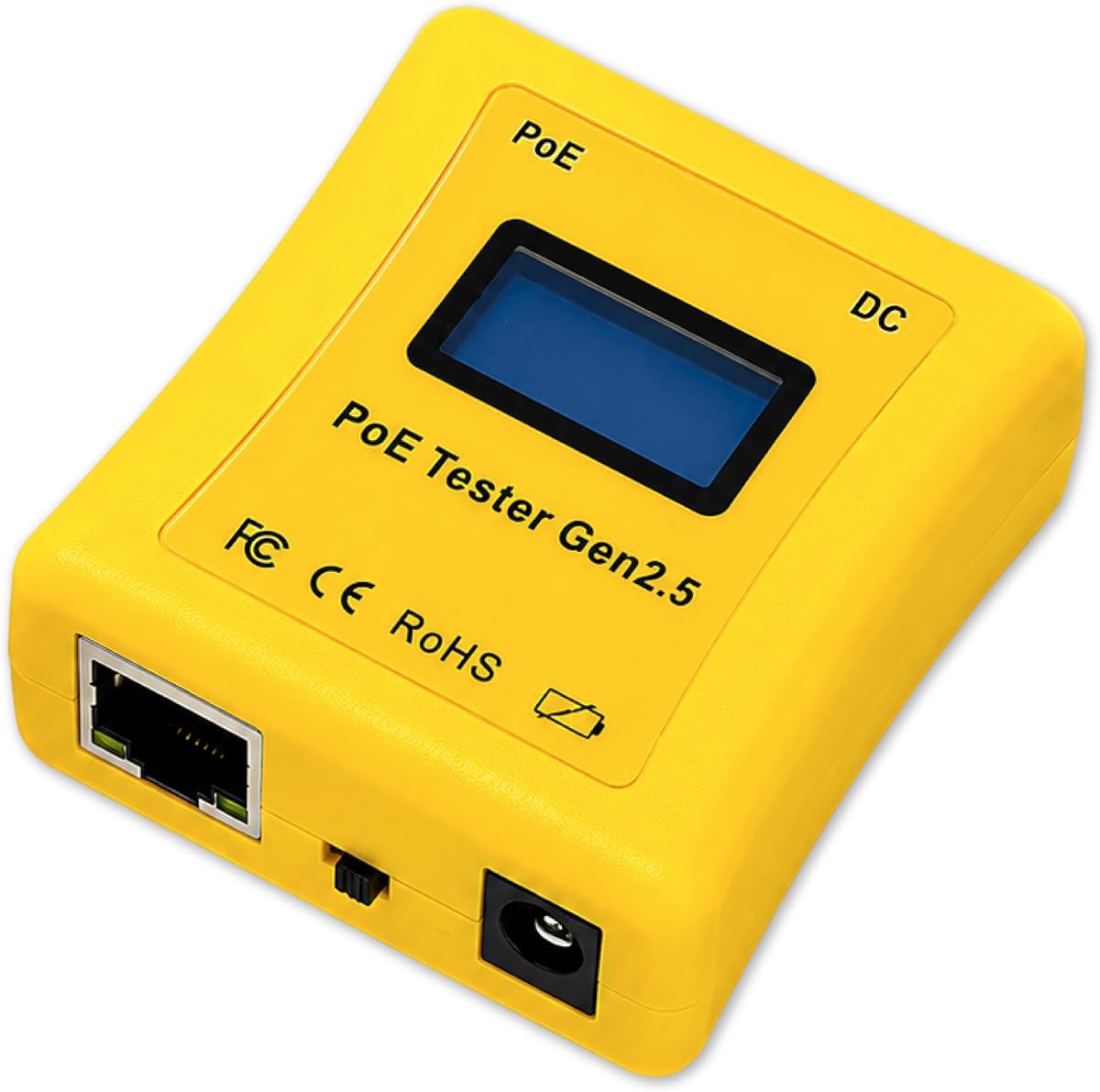
The PoE Texas Gen2.5 focuses on portability and infinite usage through battery-free operation. Its ergonomic curved body is 25% smaller than previous versions, making it comfortable to hold during extended fieldwork. The LCD screen cycles through voltage, current, and power readings automatically.
We may earn a commission when you buy through this link, at no additional cost to you.
This device can activate ports on managed switches without a powered device attached. It detects power loss in the cable and measures DC supplies accurately. The compact design allows it to fit easily into a pocket or small pouch for quick access.
While the LCD is functional, it does not offer the crispness of OLED screens. However, the reliability and ergonomic design compensate for this. The automatic cycling feature ensures you get all data without manual button presses.
Choose this if you need a lightweight tool for frequent pocket carry. The infinite usage capability is a major plus for technicians who work long hours. Its ability to test Mode A and B adds value for advanced setups.
The curved body design reduces hand fatigue during repeated testing tasks in the field.
Drawing power from the PoE line means you never need to charge or replace batteries.
We may earn a commission when you buy through this link, at no additional cost to you.
The NOYAFA NF-488 offers excellent value with its multifunctional capabilities. At a budget-friendly price, it includes network continuity checks and POE detection in one package. The backlit LCD screen ensures visibility in dark spaces, while the anti-slip casing improves grip.
We may earn a commission when you buy through this link, at no additional cost to you.
It identifies standard and non-standard POE information including voltage and polarity. The remote wiring function tests for open or short circuits effectively. This makes it a versatile tool for low-voltage system installations like security cameras.
While it lacks advanced DC power measurement modes, it covers most basic needs efficiently. The design is simple enough for beginners but robust enough for professionals. The clear interface makes results easy to read at a glance.
For those needing a cost-effective solution, this is the top pick. It balances performance and price well. Ideal for contractors who need a reliable tester without breaking the budget.
The device combines POE testing with basic continuity checks, offering two tools in one.
The backlit LCD screen allows for clear reading in dark server rooms or basements.
We may earn a commission when you buy through this link, at no additional cost to you.
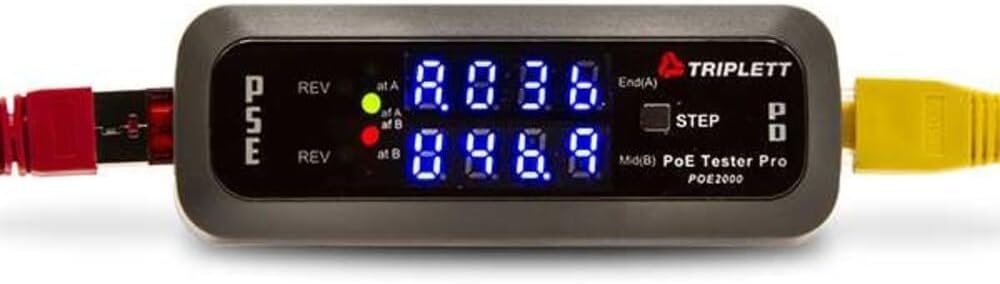
The Triplett POE2000 uses dual 7-digit LEDs to indicate power source and polarity clearly. This LED approach is beneficial for quick checks without needing to read a small screen. It distinguishes between End Span and Mid Span power sources effectively.
We may earn a commission when you buy through this link, at no additional cost to you.
It detects standard and non-standard passive PoE. The display alternates between voltage, current, and power when inline, with a step button for specific data selection. This feature helps in targeted troubleshooting of power levels.
The lower rating suggests some users prefer modern digital displays. However, the LED system is reliable and easy to understand quickly. It is a straightforward tool for basic power detection needs.
Choose this if you prefer visual LEDs over screens. It is suitable for quick on-site verification where readability is key. The polarity indication is a critical safety feature for any installer.
The LED system provides immediate feedback on power source types without complex menus.
Accurately identifying End or Mid Span helps in planning network power distribution efficiently.
We may earn a commission when you buy through this link, at no additional cost to you.
The Triplett POE3000 is designed for speed and accuracy in installation workflows. Visual indicator LEDs highlight IEEE standards and polarity, making it simple to verify connections. It offers inline power level monitoring with a step button for focused data reading.
We may earn a commission when you buy through this link, at no additional cost to you.
It detects PSE-type/class and power source details accurately. The device distinguishes between standard and non-standard passive PoE. This versatility ensures compatibility with a wide range of network setups without confusion.
While specific ratings are not yet available, the design focuses on reducing troubleshooting time. The simplicity makes it ideal for professionals who value quick checks over deep data analysis. It fits well into fast-paced deployment schedules.
This model is best for users who prioritize speed and visual feedback. The inline monitoring feature helps verify power delivery in real-time. It is a strong candidate for those already familiar with the Triplett brand.
Clear LEDs indicate IEEE standards instantly, speeding up the verification process for new installs.
Real-time monitoring allows you to see exactly how much power is being delivered to the device.
We may earn a commission when you buy through this link, at no additional cost to you.
The Jonard Tools POE-1 offers a comprehensive solution for both PoE and cable continuity testing. The complete kit includes a remote, adapters, and batteries, ensuring you are ready out of the box. It measures resistance and verifies continuity for Cat5 to Cat6a cables.
We may earn a commission when you buy through this link, at no additional cost to you.
Battery-free operation is available for PoE testing, but it also supports AA batteries for unpowered cables. This dual approach ensures flexibility in different environments. The lightweight design and belt clip make it easy to carry during long workdays.
As a newer product, user ratings are still evolving. However, the inclusion of essential accessories adds immediate value. The ability to measure resistance separately from power adds a layer of diagnostic depth for troubleshooting complex network faults.
This tool is great for professionals who need a full set of tools in one purchase. The belt clip and compact design ensure convenience. Choose this if you want a complete testing package without buying separate cable testers.
Receiving a full kit with adapters and remote saves time and extra costs for additional accessories.
The lightweight design with a belt clip ensures the tool stays accessible without weighing you down.
We may earn a commission when you buy through this link, at no additional cost to you.
This IEEE compliant tester stands out for its cable length measurement capabilities ranging from 5 to 300 meters. It features a rechargeable battery that supports extended testing sessions without needing AA replacements. The port flash detection helps locate active ports in large racks.
We may earn a commission when you buy through this link, at no additional cost to you.
It verifies continuity for up to 600 meters, identifying shorts and opens effectively. The load validation feature ensures connected devices receive stable power. Customizable auto-shutoff modes help preserve battery life when the device is not in use.
The high rating reflects its reliability and advanced features. While it relies on a rechargeable battery, the included charge port ensures you stay prepared. The combination of length measurement and PoE testing makes it a powerful tool for network verification.
Choose this if you need to verify cable runs alongside power delivery. The port flash feature is excellent for finding active connections quickly. It is a strong choice for installers working with extensive structured cabling systems.
Measure cable runs accurately to ensure compliance with industry standards before finalizing the installation.
Locate active ports easily in crowded server racks without the need for a separate network tool.
We may earn a commission when you buy through this link, at no additional cost to you.
This inline DVM and Network POE Tester offers a dedicated panel for measurements. It supports both CAT5 and CAT6 cables, ensuring compatibility with legacy and modern networks. The power panel design allows for precise voltage and current readings.
We may earn a commission when you buy through this link, at no additional cost to you.
It functions as a network PoE tester to verify system integrity. The inline capability means you can monitor power while the network is active. This setup is useful for fixed installations or panels where permanent monitoring is required.
Detailed specifications are not fully available, which may limit comparison with newer devices. However, the focus on DVM functions provides a stable way to monitor voltage levels. It is a specialized tool for specific panel-based setups.
Choose this if you need a panel-mounted solution for ongoing monitoring. The DVM integration is key for detailed electrical analysis. It fits well into environments where fixed testing points are preferred over handheld devices.
The dedicated DVM panel allows for stable and repeatable measurements in fixed network environments.
Verify system integrity by monitoring power levels while the network remains fully active.
We may earn a commission when you buy through this link, at no additional cost to you.
The NF-488 Network tester combines cable verification with PoE capabilities. It offers a loop-back test to diagnose problems in the network loop. An LED lamp is included for visibility in dark areas, adding convenience to the package.
We may earn a commission when you buy through this link, at no additional cost to you.
It checks for current, voltage, and power consumption of DC devices with a range up to 180W. The detection of short circuits helps find root causes quickly. Customer service is highlighted with a lifetime friendly promise for support.
While similar to other NOYAFA models, this version emphasizes loop-back testing. The LED lamp is a practical addition for field work. The high rating suggests good performance for general maintenance tasks.
This model is ideal for IT support teams needing basic diagnostics. The loop-back feature is useful for complex troubleshooting scenarios. It is a practical choice for those valuing support and included accessories.
Loop-back testing helps confirm whether a problem exists within the network loop itself.
The built-in LED lamp aids visibility when testing cables in dark corners or conduits.
We may earn a commission when you buy through this link, at no additional cost to you.
Selecting the right Inline POE Tester requires understanding your specific network requirements and testing needs.
Consider whether the tester supports all required modes such as PSE, PD, and Inline. Different tasks may require different testing scenarios like passive PoE detection or DC power measurement. Ensure the device can handle the specific types of power sourcing equipment you encounter.
Choose a model with versatile modes to avoid buying multiple tools.
The display should be clear and readable in various lighting conditions. OLED screens offer better contrast, while backlit LCDs provide solid visibility. A step button to lock specific readouts helps in real-time monitoring scenarios.
Look for displays that show all necessary data on one page.
Verify that the tester supports 802.3af/at/bt standards and 4PPoE. Government projects may require NDAA compliance. This ensures the device meets safety and security standards for public infrastructure.
Always check compliance lists for specific project requirements.
Battery-free operation is highly desirable for reducing maintenance and increasing uptime. Some devices use AA batteries for unpowered cables. Self-powered options draw energy from the PoE line directly.
Prioritize battery-free tools for convenience and cost efficiency.
Compact and lightweight designs are essential for field work. Look for ergonomic shapes and belt clips that make carrying easier. Smaller units fit in pockets and reduce fatigue during long shifts.
Select a model that balances size with screen visibility.
Manufacturers offering protection periods add value to your purchase. Anti-slip casings and rugged designs withstand daily abuse. A strong warranty indicates confidence in build quality.
Check warranty terms to ensure long-term support.
Some testers include cable continuity checks, length measurement, or loop-back tests. These features reduce the need for separate tools. However, ensure they do not compromise the primary PoE testing accuracy.
Decide which secondary features are truly necessary for your workflow.
Compare prices against features to find the best value. Budget models may lack advanced displays, while premium ones offer better data. Invest in features that solve your specific pain points.
Balance cost with the frequency of use in daily tasks.
To use the tester, connect one end to the PoE switch or injector and the other to the powered device or directly to the cable. Ensure the connection is secure to prevent intermittent readings. Most devices start testing automatically upon power detection.
Use the step button to cycle through voltage, current, and power readings. If your device has a lock feature, press the button to freeze the display on the desired metric. This helps in recording data or comparing values over time.
For care, store the device in a dry, dust-free environment. Avoid dropping it or exposing it to extreme temperatures. Regularly clean the ports with compressed air to maintain contact quality and extend the tool's lifespan.
An Inline POE Tester is used to verify that Power over Ethernet is being delivered correctly. It measures voltage, current, and power to ensure devices like cameras and phones get enough electricity. It also helps troubleshoot connection issues without needing a powered device.
Most modern testers operate without batteries by drawing power from the PoE line. However, some models may require AA batteries for testing unpowered cables. Always check the specific device specifications to confirm its power requirements before buying.
Some advanced models include cable length measurement features ranging from 5 to 300 meters. These tools use resistance or signal analysis to estimate cable distance. It is useful for verifying compliance with network standards during installation.
NDAA compliance refers to meeting the requirements of the National Defense Authorization Act. This certification ensures the device is safe for use in government projects. It is often required for public infrastructure contracts in the U.S. and Canada.
To test passive PoE, set the tester to a mode that supports non-standard voltage ranges. Most devices allow you to detect voltages from 12V to 60V. Ensure the tester differentiates between active and passive standards to avoid damage.
Yes, most Inline POE Testers are designed to safely interact with managed switches. They simulate a powered device or pass through power without disrupting data. Always check the device ratings to ensure compatibility with your switch model.
In conclusion, the TRENDnet TC-NTP1 and PoE-T100 stand out for their compliance and display quality respectively. The NOYAFA NF-488 remains a strong budget choice with essential features. Each device serves different needs from government projects to simple home office setups.
Prioritize features like display clarity, mode support, and portability based on your specific tasks. If you work in low light, an OLED screen might be worth the extra cost. For frequent travel, a lightweight and battery-free design is crucial.
Prices and availability are subject to change, so always verify current offers before purchasing. Check the latest product descriptions to ensure the features you need are still included. A careful comparison will help you find the best value for your investment.